LangSmith pytest 플러그인을 사용하면 Python 개발자가 dataset과 평가를 pytest test case로 정의할 수 있습니다. 표준 평가 플로우와 비교했을 때, 다음과 같은 경우에 유용합니다:
- 각 example이 서로 다른 평가 로직을 필요로 하는 경우
- 이진 기대값을 assert하고, 이러한 assertion을 LangSmith에서 추적하면서 동시에 로컬(예: CI 파이프라인)에서 assertion error를 발생시키고 싶은 경우
- pytest와 유사한 터미널 출력을 원하는 경우
- 이미 pytest를 사용하여 앱을 테스트하고 있으며 LangSmith 추적을 추가하고 싶은 경우
pytest 통합은 베타 버전이며 향후 릴리스에서 변경될 수 있습니다.
Installation
이 기능을 사용하려면 Python SDK 버전 langsmith>=0.3.4가 필요합니다.
rich 터미널 출력 및 테스트 캐싱과 같은 추가 기능을 사용하려면 다음과 같이 설치하세요:
pip install -U "langsmith[pytest]"
테스트 정의 및 실행
pytest 통합을 사용하면 dataset과 evaluator를 test case로 정의할 수 있습니다.
LangSmith에서 테스트를 추적하려면 @pytest.mark.langsmith decorator를 추가하세요. 모든 decorator가 적용된 test case는 dataset example과 동기화됩니다. 테스트 스위트를 실행하면 dataset이 업데이트되고 각 test case에 대한 결과가 포함된 새로운 experiment가 생성됩니다.
###################### my_app/main.py ######################
import openai
from langsmith import traceable, wrappers

oai_client = wrappers.wrap_openai(openai.OpenAI())

@traceable
def generate_sql(user_query: str) -> str:
    result = oai_client.chat.completions.create(
        model="gpt-4o-mini",
        messages=[
            {"role": "system", "content": "Convert the user query to a SQL query."},
            {"role": "user", "content": user_query},
        ],
    )
    return result.choices[0].message.content

###################### tests/test_my_app.py ######################
import pytest
from langsmith import testing as t

def is_valid_sql(query: str) -> bool:
    """Return True if the query is valid SQL."""
    return True  # Dummy implementation

@pytest.mark.langsmith  # <-- Mark as a LangSmith test case
def test_sql_generation_select_all() -> None:
    user_query = "Get all users from the customers table"
    t.log_inputs({"user_query": user_query})  # <-- Log example inputs, optional
    expected = "SELECT * FROM customers;"
    t.log_reference_outputs({"sql": expected})  # <-- Log example reference outputs, optional

    sql = generate_sql(user_query)
    t.log_outputs({"sql": sql})  # <-- Log run outputs, optional

    t.log_feedback(key="valid_sql", score=is_valid_sql(sql))  # <-- Log feedback, optional
    assert sql == expected  # <-- Test pass/fail status automatically logged to LangSmith under 'pass' feedback key
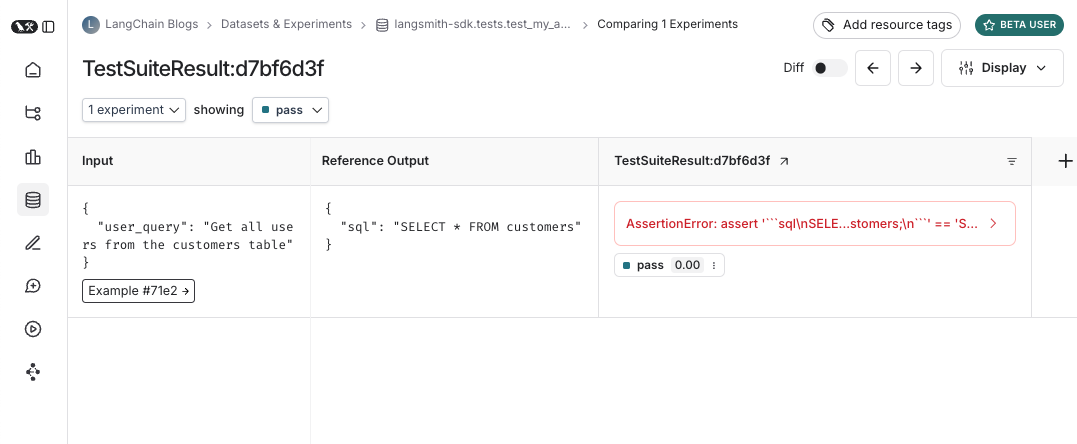
pass boolean feedback key가 생성됩니다. 또한 로깅한 모든 input, output 및 reference(예상) output을 추적합니다.
평소처럼 pytest를 사용하여 테스트를 실행하세요:
대부분의 경우 test suite 이름을 설정하는 것을 권장합니다:
LANGSMITH_TEST_SUITE='SQL app tests' pytest tests/
- 각 테스트 파일에 대한 dataset을 생성합니다. 이 테스트 파일에 대한 dataset이 이미 존재하는 경우 업데이트됩니다
- 생성/업데이트된 각 dataset에 experiment를 생성합니다
- 각 test case에 대한 experiment row를 생성하며, 로깅한 input, output, reference output 및 feedback을 포함합니다
- 각 test case에 대한
pass feedback key 아래에 통과/실패율을 수집합니다
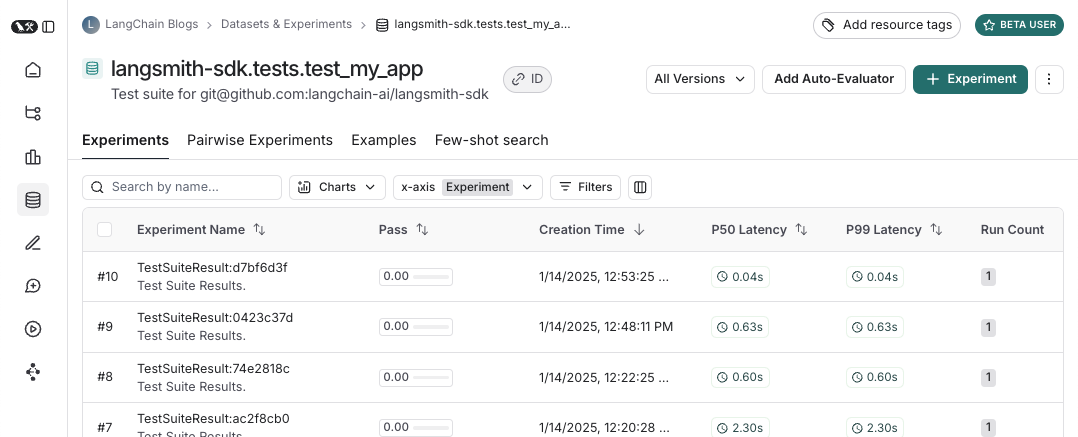
다음은 test suite dataset의 모습입니다:
 그리고 해당 test suite에 대한 experiment의 모습입니다:
 테스트를 실행할 때마다 dataset example과 동기화하고 run으로 추적합니다. example input과 reference output, 그리고 run output을 추적하는 몇 가지 방법이 있습니다. 가장 간단한 방법은
 log_inputs, log_outputs, log_reference_outputs 메서드를 사용하는 것입니다. 테스트 중 언제든지 이를 실행하여 해당 테스트의 example과 run을 업데이트할 수 있습니다:
import pytest
from langsmith import testing as t

@pytest.mark.langsmith
def test_foo() -> None:
    t.log_inputs({"a": 1, "b": 2})
    t.log_reference_outputs({"foo": "bar"})
    t.log_outputs({"foo": "baz"})
    assert True
{"a": 1, "b": 2}, reference output이 {"foo": "bar"}인 example이 생성/업데이트되고 output이 {"foo": "baz"}인 run이 추적됩니다.
참고: log_inputs, log_outputs 또는 log_reference_outputs를 두 번 실행하면 이전 값이 덮어쓰여집니다.
example input과 reference output을 정의하는 또 다른 방법은 pytest fixture/parametrization을 사용하는 것입니다. 기본적으로 테스트 함수의 모든 인수는 해당 example의 input으로 로깅됩니다. 특정 인수가 reference output을 나타내는 경우 @pytest.mark.langsmith(output_keys=["name_of_ref_output_arg"])를 사용하여 그렇게 로깅되도록 지정할 수 있습니다:
import pytest

@pytest.fixture
def c() -> int:
    return 5

@pytest.fixture
def d() -> int:
    return 6

@pytest.mark.langsmith(output_keys=["d"])
def test_cd(c: int, d: int) -> None:
    result = 2 * c
    t.log_outputs({"d": result})  # Log run outputs
    assert result == d
{"c": 5}, reference output이 {"d": 6}, run output이 {"d": 10}인 example이 생성/동기화됩니다.
feedback 로깅
기본적으로 LangSmith는 각 test case에 대한 pass feedback key 아래에 통과/실패율을 수집합니다. log_feedback을 사용하여 추가 feedback을 추가할 수 있습니다.
import openai
import pytest
from langsmith import wrappers
from langsmith import testing as t

oai_client = wrappers.wrap_openai(openai.OpenAI())

@pytest.mark.langsmith
def test_offtopic_input() -> None:
    user_query = "whats up"
    t.log_inputs({"user_query": user_query})

    sql = generate_sql(user_query)
    t.log_outputs({"sql": sql})

    expected = "Sorry that is not a valid query."
    t.log_reference_outputs({"sql": expected})

    # Use this context manager to trace any steps used for generating evaluation
    # feedback separately from the main application logic
    with t.trace_feedback():
        instructions = (
            "Return 1 if the ACTUAL and EXPECTED answers are semantically equivalent, "
            "otherwise return 0. Return only 0 or 1 and nothing else."
        )

        grade = oai_client.chat.completions.create(
            model="gpt-4o-mini",
            messages=[
                {"role": "system", "content": instructions},
                {"role": "user", "content": f"ACTUAL: {sql}\nEXPECTED: {expected}"},
            ],
        )
        score = float(grade.choices[0].message.content)
        t.log_feedback(key="correct", score=score)

    assert score
trace_feedback() context manager의 사용에 주목하세요. 이렇게 하면 LLM-as-judge 호출이 나머지 test case와 별도로 추적됩니다. 메인 test case run에 표시되는 대신 correct feedback key의 trace에 표시됩니다.
참고: feedback trace와 연결된 log_feedback 호출이 trace_feedback context 내에서 발생하는지 확인하세요. 이렇게 하면 feedback을 trace와 연결할 수 있으며, UI에서 feedback을 볼 때 클릭하여 이를 생성한 trace를 볼 수 있습니다.
중간 호출 추적
LangSmith는 test case 실행 과정에서 발생하는 모든 추적 가능한 중간 호출을 자동으로 추적합니다.
테스트를 test suite로 그룹화
기본적으로 주어진 파일 내의 모든 테스트는 해당 dataset이 있는 단일 “test suite”로 그룹화됩니다. 테스트가 속한 test suite를 구성하려면 케이스별 그룹화를 위해 @pytest.mark.langsmith에 test_suite_name 매개변수를 전달하거나, LANGSMITH_TEST_SUITE 환경 변수를 설정하여 실행의 모든 테스트를 단일 test suite로 그룹화할 수 있습니다:
LANGSMITH_TEST_SUITE="SQL app tests" pytest tests/
LANGSMITH_TEST_SUITE를 설정하는 것을 권장합니다.
experiment 이름 지정
LANGSMITH_EXPERIMENT 환경 변수를 사용하여 experiment의 이름을 지정할 수 있습니다:
LANGSMITH_TEST_SUITE="SQL app tests" LANGSMITH_EXPERIMENT="baseline" pytest tests/
langsmith[pytest]로 설치하고 환경 변수를 설정하세요: LANGSMITH_TEST_CACHE=/my/cache/path:
pip install -U "langsmith[pytest]"
LANGSMITH_TEST_CACHE=tests/cassettes pytest tests/my_llm_tests
tests/cassettes에 캐시되고 후속 실행 시 거기에서 로드됩니다. 이를 repository에 체크인하면 CI에서도 캐시를 사용할 수 있습니다.
langsmith>=0.4.10에서는 다음과 같이 개별 URL 또는 hostname에 대한 요청에 대해 선택적으로 캐싱을 활성화할 수 있습니다:
@pytest.mark.langsmith(cached_hosts=["api.openai.com", "https://api.anthropic.com"])
def my_test():
    ...
pytest 기능
@pytest.mark.langsmith는 방해가 되지 않도록 설계되었으며 익숙한 pytest 기능과 잘 작동합니다.
pytest.mark.parametrize로 매개변수화
이전처럼 parametrize decorator를 사용할 수 있습니다. 이렇게 하면 테스트의 각 매개변수화된 인스턴스에 대해 새로운 test case가 생성됩니다.
@pytest.mark.langsmith(output_keys=["expected_sql"])
@pytest.mark.parametrize(
    "user_query, expected_sql",
    [
        ("Get all users from the customers table", "SELECT * FROM customers"),
        ("Get all users from the orders table", "SELECT * FROM orders"),
    ],
)
def test_sql_generation_parametrized(user_query, expected_sql):
    sql = generate_sql(user_query)
    assert sql == expected_sql
evaluate()를 사용하는 것을 고려하세요. 이는 평가를 병렬화하고 개별 experiment와 해당 dataset을 더 쉽게 제어할 수 있게 합니다.
pytest-xdist로 병렬화
평소처럼 pytest-xdist를 사용하여 테스트 실행을 병렬화할 수 있습니다:
pip install -U pytest-xdist
pytest -n auto tests
pytest-asyncio로 비동기 테스트
@pytest.mark.langsmith는 동기 또는 비동기 테스트와 함께 작동하므로 이전과 똑같이 비동기 테스트를 실행할 수 있습니다.
pytest-watch로 watch 모드
watch 모드를 사용하여 테스트를 빠르게 반복하세요. 불필요한 LLM 호출을 피하기 위해 테스트 캐싱(아래 참조)을 활성화한 상태에서만 사용하는 것을 강력히 권장합니다:
pip install pytest-watch
LANGSMITH_TEST_CACHE=tests/cassettes ptw tests/my_llm_tests
Rich 출력
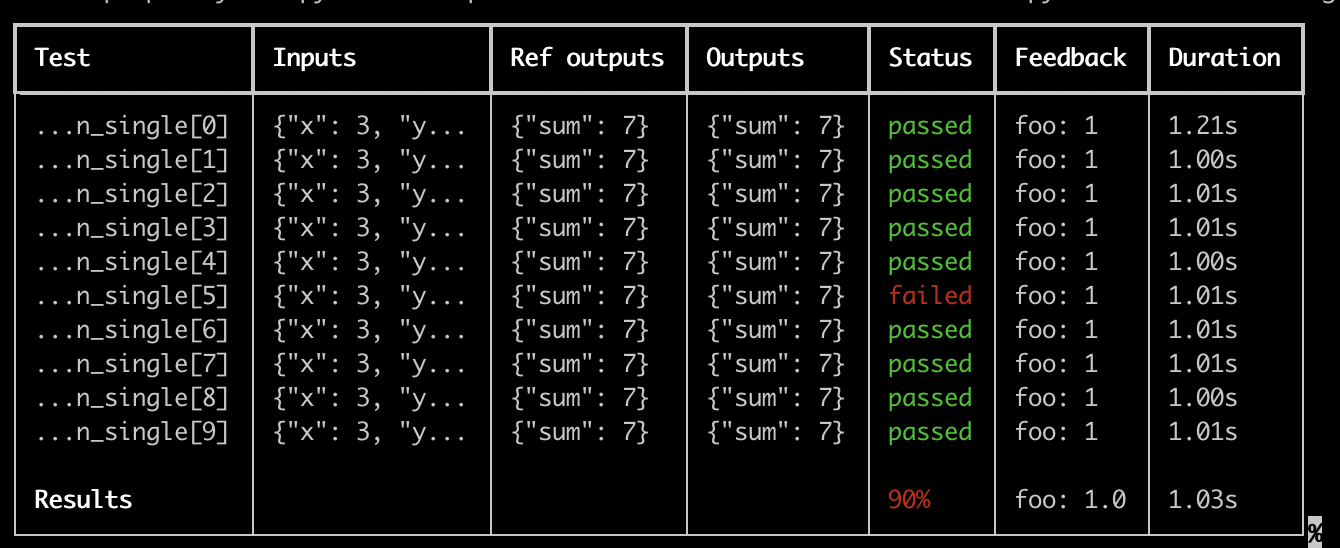
테스트 실행의 LangSmith 결과를 풍부하게 표시하려면 --langsmith-output을 지정할 수 있습니다:
pytest --langsmith-output tests
langsmith<=0.3.3에서 --output=langsmith였지만 다른 pytest 플러그인과의 충돌을 피하기 위해 업데이트되었습니다.
결과가 LangSmith에 업로드되는 동안 실시간으로 업데이트되는 test suite당 멋진 테이블을 얻을 수 있습니다:
 이 기능을 사용하기 위한 몇 가지 중요한 참고 사항:
pip install -U "langsmith[pytest]"를 설치했는지 확인하세요- Rich 출력은 현재
pytest-xdist와 함께 작동하지 않습니다
참고: 사용자 정의 출력은 모든 표준 pytest 출력을 제거합니다. 예상치 못한 동작을 디버깅하려는 경우 전체 오류 trace를 얻기 위해 일반 pytest 출력을 표시하는 것이 더 나은 경우가 많습니다.
Dry-run 모드
결과를 LangSmith에 동기화하지 않고 테스트를 실행하려면 환경에서 LANGSMITH_TEST_TRACKING=false를 설정할 수 있습니다.
LANGSMITH_TEST_TRACKING=false pytest tests/
Expectation
LangSmith는 LLM 출력에 대한 기대값을 정의하는 데 도움이 되는 expect 유틸리티를 제공합니다. 예를 들어:
from langsmith import expect

@pytest.mark.langsmith
def test_sql_generation_select_all():
    user_query = "Get all users from the customers table"
    sql = generate_sql(user_query)
    expect(sql).to_contain("customers")
assert하여 테스트 실패를 트리거할 수 있습니다.
expect는 “fuzzy match” 메서드도 제공합니다. 예를 들어:
@pytest.mark.langsmith(output_keys=["expectation"])
@pytest.mark.parametrize(
    "query, expectation",
    [
       ("what's the capital of France?", "Paris"),
    ],
)
def test_embedding_similarity(query, expectation):
    prediction = my_chatbot(query)
    expect.embedding_distance(
        # This step logs the distance as feedback for this run
        prediction=prediction, expectation=expectation
        # Adding a matcher (in this case, 'to_be_*"), logs 'expectation' feedback
    ).to_be_less_than(0.5) # Optional predicate to assert against

    expect.edit_distance(
        # This computes the normalized Damerau-Levenshtein distance between the two strings
        prediction=prediction, expectation=expectation
        # If no predicate is provided below, 'assert' isn't called, but the score is still logged
    )
- 예측과 기대값 사이의
embedding_distance
- 이진
expectation 점수 (cosine distance가 0.5 미만이면 1, 그렇지 않으면 0)
- 예측과 기대값 사이의
edit_distance
- 전체 테스트 통과/실패 점수 (이진)
expect 유틸리티는 Jest의 expect API를 모델로 하며, LLM을 더 쉽게 평가할 수 있도록 즉시 사용 가능한 기능을 제공합니다.
Legacy
@test / @unit decorator
test case를 표시하는 레거시 방법은 @test 또는 @unit decorator를 사용하는 것입니다:
from langsmith import test

@test
def test_foo() -> None:
    pass

