일부 사용자는 LangSmith 외부에서 데이터셋을 관리하고 실험을 실행하는 것을 선호하지만, LangSmith UI를 사용하여 결과를 보고 싶어합니다. 이는 엔드포인트를 통해 지원됩니다. 이 가이드는 Python의 requests 라이브러리를 예시로 사용하여 REST API를 통해 평가를 업로드하는 방법을 보여줍니다. 그러나 동일한 원칙이 모든 언어에 적용됩니다.

Request body schema

실험을 업로드하려면 실험 및 데이터셋에 대한 관련 상위 수준 정보와 함께 실험 내 예제 및 실행에 대한 개별 데이터를 지정해야 합니다. results의 각 객체는 실험의 “행”을 나타냅니다 - 단일 데이터셋 예제와 관련 실행입니다. dataset_iddataset_name은 외부 시스템의 데이터셋 식별자를 참조하며 외부 실험을 단일 데이터셋으로 그룹화하는 데 사용됩니다. 이들은 LangSmith의 기존 데이터셋을 참조해서는 안 됩니다(해당 데이터셋이 이 엔드포인트를 통해 생성된 경우가 아니라면). 다음 schema를 사용하여 /datasets/upload-experiment 엔드포인트에 실험을 업로드할 수 있습니다:
{
  "experiment_name": "string (required)",
  "experiment_description": "string (optional)",
  "experiment_start_time": "datetime (required)",
  "experiment_end_time": "datetime (required)",
  "dataset_id": "uuid (optional - an external dataset id, used to group experiments together)",
  "dataset_name": "string (optional - must provide either dataset_id or dataset_name)",
  "dataset_description": "string (optional)",
  "experiment_metadata": { // Object (any shape - optional)
    "key": "value"
  },
  "summary_experiment_scores": [ // List of summary feedback objects (optional)
    {
      "key": "string (required)",
      "score": "number (optional)",
      "value": "string (optional)",
      "comment": "string (optional)",
      "feedback_source": { // Object (optional)
        "type": "string (required)"
      },
      "feedback_config": { // Object (optional)
        "type": "string enum: continuous, categorical, or freeform",
        "min": "number (optional)",
        "max": "number (optional)",
        "categories": [ // List of feedback category objects (optional)
          {
            "value": "number (required)",
            "label": "string (optional)"
          }
        ]
      },
      "created_at": "datetime (optional - defaults to now)",
      "modified_at": "datetime (optional - defaults to now)",
      "correction": "Object or string (optional)"
    }
  ],
  "results": [ // List of experiment row objects (required)
    {
      "row_id": "uuid (required)",
      "inputs": { // Object (required - any shape). This will
        "key": "val" // be the input to both the run and the dataset example.
      },
      "expected_outputs": { // Object (optional - any shape).
        "key": "val" // These will be the outputs of the dataset examples.
      },
      "actual_outputs": { // Object (optional - any shape).
        "key": "val" // These will be the outputs of the runs.
      },
      "evaluation_scores": [ // List of feedback objects for the run (optional)
        {
          "key": "string (required)",
          "score": "number (optional)",
          "value": "string (optional)",
          "comment": "string (optional)",
          "feedback_source": { // Object (optional)
            "type": "string (required)"
          },
          "feedback_config": { // Object (optional)
            "type": "string enum: continuous, categorical, or freeform",
            "min": "number (optional)",
            "max": "number (optional)",
            "categories": [ // List of feedback category objects (optional)
              {
                "value": "number (required)",
                "label": "string (optional)"
              }
            ]
          },
          "created_at": "datetime (optional - defaults to now)",
          "modified_at": "datetime (optional - defaults to now)",
          "correction": "Object or string (optional)"
        }
      ],
      "start_time": "datetime (required)", // The start/end times for the runs will be used to
      "end_time": "datetime (required)", // calculate latency. They must all fall between the
      "run_name": "string (optional)", // start and end times for the experiment.
      "error": "string (optional)",
      "run_metadata": { // Object (any shape - optional)
        "key": "value"
      }
    }
  ]
}
응답 JSON은 experimentdataset 키를 가진 dict이며, 각각은 생성된 실험 및 데이터셋에 대한 관련 정보를 포함하는 객체입니다.

고려사항

여러 호출 간에 동일한 dataset_id 또는 dataset_name을 제공하여 동일한 데이터셋에 여러 실험을 업로드할 수 있습니다. 실험은 단일 데이터셋 아래에 함께 그룹화되며, 비교 뷰를 사용하여 실험 간 결과를 비교할 수 있습니다. 개별 행의 시작 및 종료 시간이 모두 실험의 시작 및 종료 시간 사이에 있는지 확인하세요. dataset_id 또는 dataset_name 중 하나를 반드시 제공해야 합니다. ID만 제공하고 데이터셋이 아직 존재하지 않는 경우 이름을 생성해 드리며, 이름만 제공하는 경우도 마찬가지입니다. 이 엔드포인트를 통해 생성되지 않은 데이터셋에는 실험을 업로드할 수 없습니다. 실험 업로드는 외부에서 관리되는 데이터셋에만 지원됩니다.

예제 요청

다음은 /datasets/upload-experiment에 대한 간단한 호출 예제입니다. 이는 설명을 위해 가장 중요한 필드만 사용하는 기본 예제입니다.
import os
import requests

body = {
    "experiment_name": "My external experiment",
    "experiment_description": "An experiment uploaded to LangSmith",
    "dataset_name": "my-external-dataset",
    "summary_experiment_scores": [
        {
            "key": "summary_accuracy",
            "score": 0.9,
            "comment": "Great job!"
        }
    ],
    "results": [
        {
            "row_id": "<<uuid>>",
            "inputs": {
                "input": "Hello, what is the weather in San Francisco today?"
            },
            "expected_outputs": {
                "output": "Sorry, I am unable to provide information about the current weather."
            },
            "actual_outputs": {
                "output": "The weather is partly cloudy with a high of 65."
            },
            "evaluation_scores": [
                {
                    "key": "hallucination",
                    "score": 1,
                    "comment": "The chatbot made up the weather instead of identifying that "
                               "they don't have enough info to answer the question. This is "
                               "a hallucination."
                }
            ],
            "start_time": "2024-08-03T00:12:39",
            "end_time": "2024-08-03T00:12:41",
            "run_name": "Chatbot"
        },
        {
            "row_id": "<<uuid>>",
            "inputs": {
                "input": "Hello, what is the square root of 49?"
            },
            "expected_outputs": {
                "output": "The square root of 49 is 7."
            },
            "actual_outputs": {
                "output": "7."
            },
            "evaluation_scores": [
                {
                    "key": "hallucination",
                    "score": 0,
                    "comment": "The chatbot correctly identified the answer. This is not a "
                               "hallucination."
                }
            ],
            "start_time": "2024-08-03T00:12:40",
            "end_time": "2024-08-03T00:12:42",
            "run_name": "Chatbot"
        }
    ],
    "experiment_start_time": "2024-08-03T00:12:38",
    "experiment_end_time": "2024-08-03T00:12:43"
}

resp = requests.post(
    "https://api.smith.langchain.com/api/v1/datasets/upload-experiment", # Update appropriately for self-hosted installations or the EU region
    json=body,
    headers={"x-api-key": os.environ["LANGSMITH_API_KEY"]}
)

print(resp.json())
다음은 수신된 응답입니다:
{
  "dataset": {
    "name": "my-external-dataset",
    "description": null,
    "created_at": "2024-08-03T00:36:23.289730+00:00",
    "data_type": "kv",
    "inputs_schema_definition": null,
    "outputs_schema_definition": null,
    "externally_managed": true,
    "id": "<<uuid>>",
    "tenant_id": "<<uuid>>",
    "example_count": 0,
    "session_count": 0,
    "modified_at": "2024-08-03T00:36:23.289730+00:00",
    "last_session_start_time": null
  },
  "experiment": {
    "start_time": "2024-08-03T00:12:38",
    "end_time": "2024-08-03T00:12:43+00:00",
    "extra": null,
    "name": "My external experiment",
    "description": "An experiment uploaded to LangSmith",
    "default_dataset_id": null,
    "reference_dataset_id": "<<uuid>>",
    "trace_tier": "longlived",
    "id": "<<uuid>>",
    "run_count": null,
    "latency_p50": null,
    "latency_p99": null,
    "first_token_p50": null,
    "first_token_p99": null,
    "total_tokens": null,
    "prompt_tokens": null,
    "completion_tokens": null,
    "total_cost": null,
    "prompt_cost": null,
    "completion_cost": null,
    "tenant_id": "<<uuid>>",
    "last_run_start_time": null,
    "last_run_start_time_live": null,
    "feedback_stats": null,
    "session_feedback_stats": null,
    "run_facets": null,
    "error_rate": null,
    "streaming_rate": null,
    "test_run_number": 1
  }
}
실험 결과의 latency 및 feedback 통계가 null인 이유는 실행이 아직 지속되지 않았기 때문이며, 이는 몇 초가 걸릴 수 있습니다. experiment id를 저장하고 몇 초 후에 다시 쿼리하면 모든 통계를 볼 수 있습니다(다만 tokens/cost는 여전히 null일 것입니다. request body에서 이 정보를 요청하지 않기 때문입니다).

UI에서 실험 보기

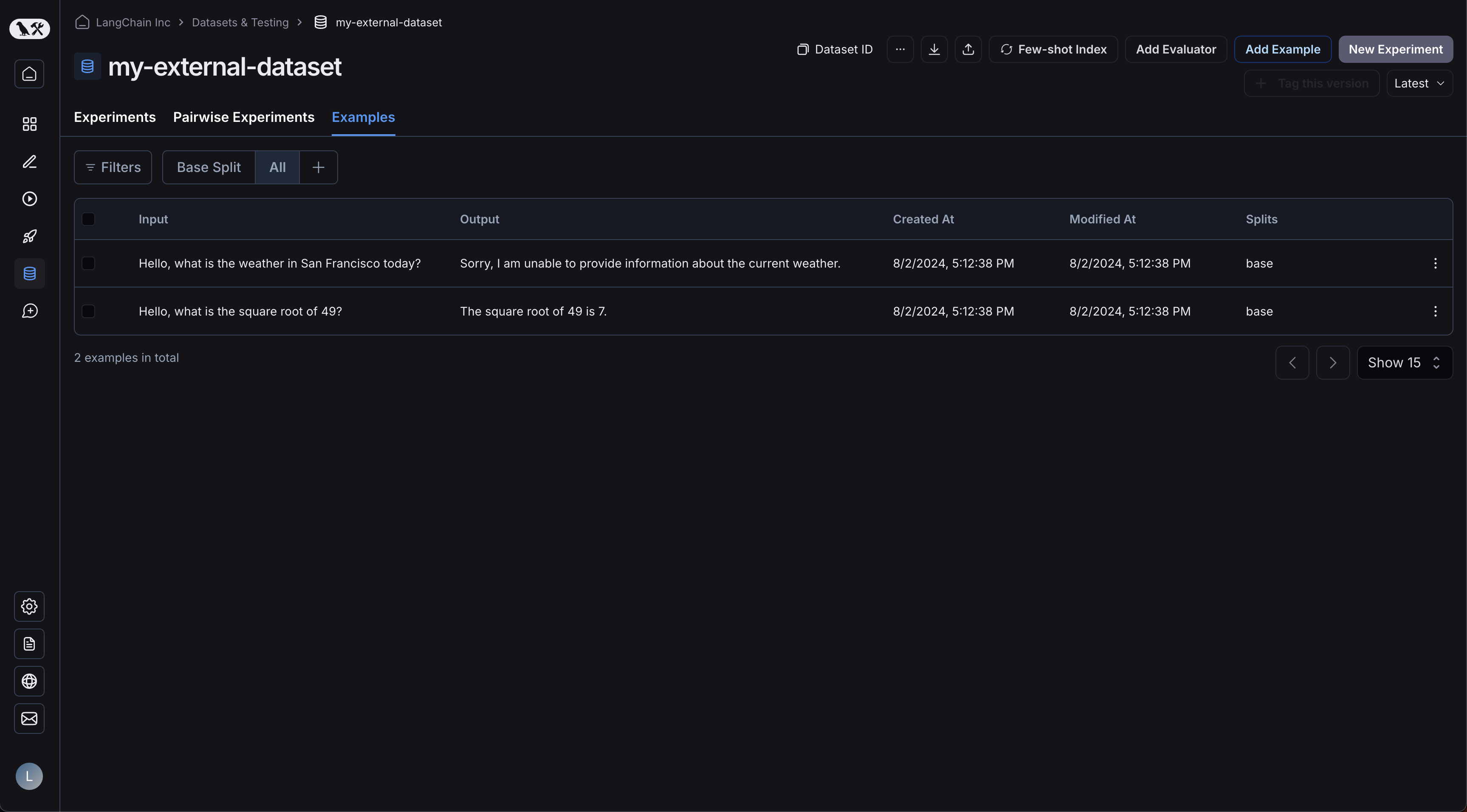
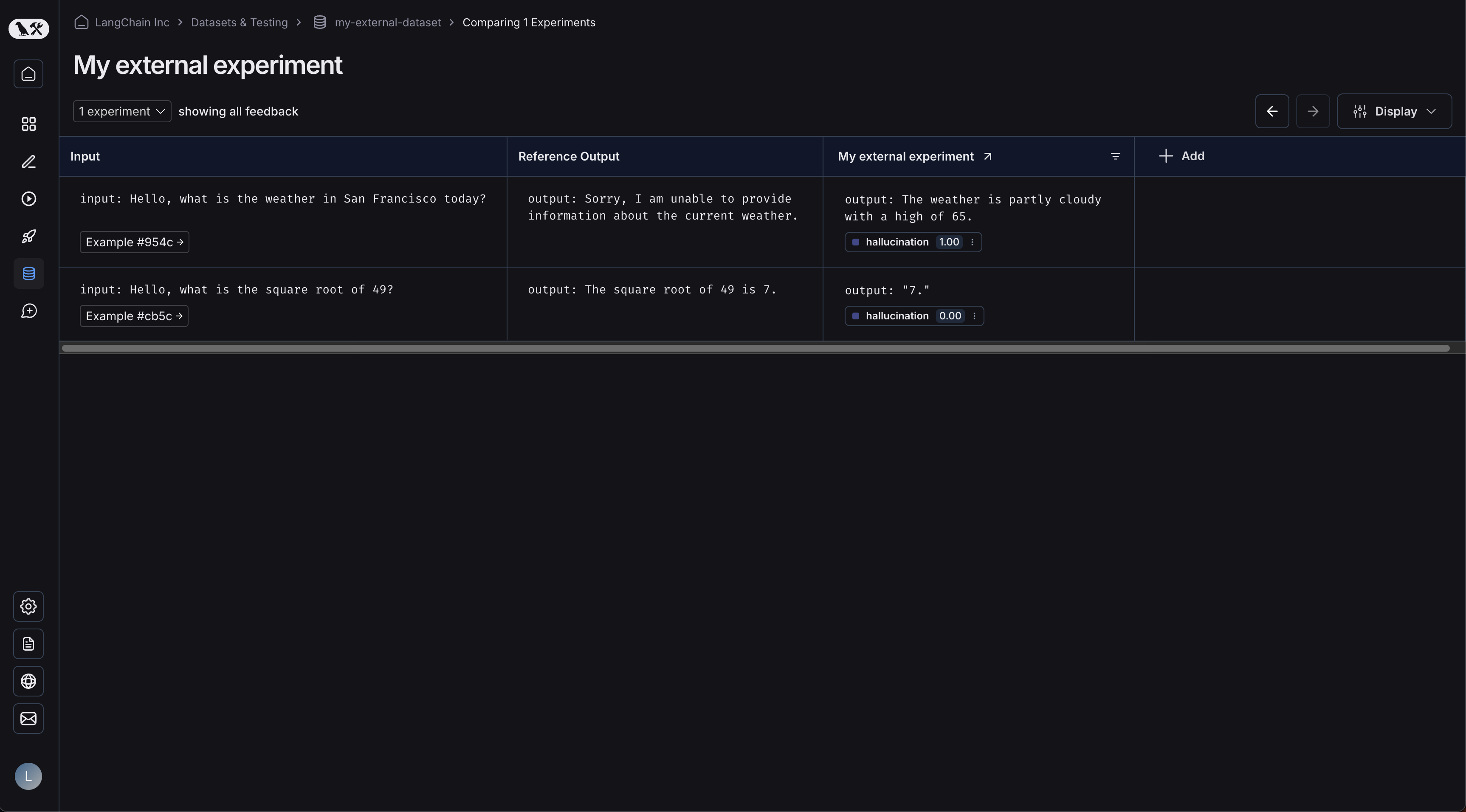
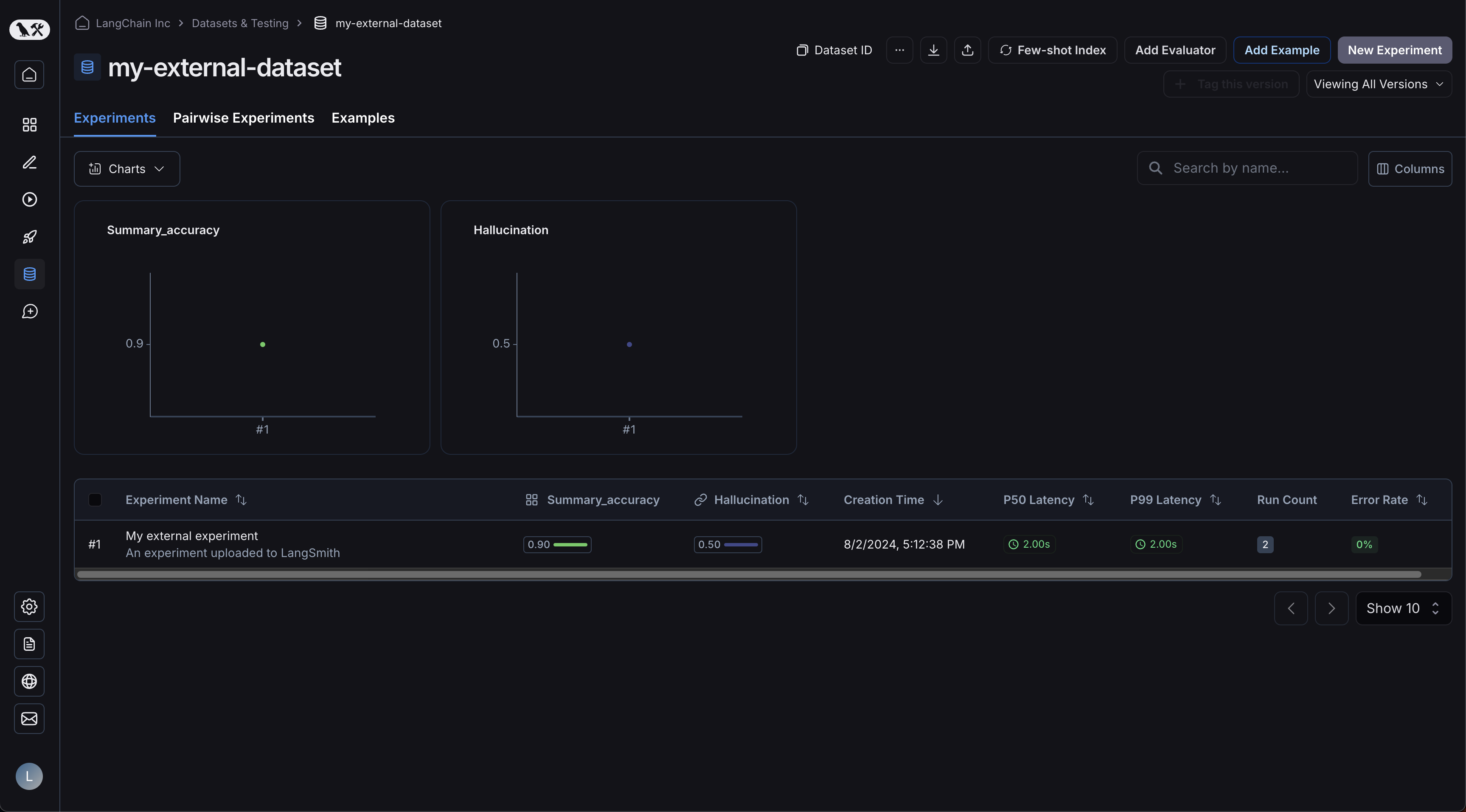
이제 UI에 로그인하고 새로 생성된 데이터셋을 클릭하세요! 단일 실험이 표시됩니다: Uploaded experiments table 예제가 업로드되었습니다: Uploaded examples 실험을 클릭하면 비교 뷰로 이동합니다: Uploaded experiment comparison view 데이터셋에 더 많은 실험을 업로드하면 결과를 비교하고 비교 뷰에서 회귀를 쉽게 식별할 수 있습니다.
Connect these docs programmatically to Claude, VSCode, and more via MCP for real-time answers.
I