이 가이드에서는 커스텀 모델이나 커스텀 입력/출력 포맷을 사용할 때 LangSmith에 LLM 호출을 어떻게 로그하는지 다룹니다. LangSmith의 LLM 트레이스 처리 기능을 최대한 활용하려면, 지정된 포맷 중 하나로 LLM 트레이스를 기록해야 합니다.LangSmith는 LLM 트레이스에 대해 다음과 같은 이점을 제공합니다:
메시지 리스트의 풍부하고 구조화된 렌더링
LLM 호출별, 트레이스별, 그리고 시간에 따른 토큰 및 비용 추적
추천된 포맷으로 LLM 트레이스를 기록하지 않더라도 데이터를 LangSmith에 로그할 수 있지만, 예상한 방식으로 처리되거나 렌더링되지 않을 수 있습니다.LangChain OSS를 사용하여 언어 모델을 호출하거나 LangSmith 래퍼(OpenAI, Anthropic)를 사용하는 경우, 이러한 접근 방식은 올바른 포맷으로 트레이스를 자동으로 기록합니다.
이 페이지의 예제들은 모델 실행을 로그하기 위해 traceable 데코레이터/래퍼를 사용합니다(파이썬 및 JS/TS에서 권장되는 방식). 하지만 동일한 아이디어는 RunTree나 API를 직접 사용할 때도 적용됩니다.
커스텀 모델이나 커스텀 입력/출력 포맷을 추적할 때는 LangChain 포맷, OpenAI completions 포맷, 또는 Anthropic messages 포맷 중 하나를 따라야 합니다. 자세한 내용은 OpenAI Chat Completions 또는 Anthropic Messages 문서를 참고하세요. LangChain 포맷은 다음과 같습니다:
inputs = { "messages": [ { "role": "user", "content": [ { "type": "text", "text": "Hi, can you tell me the capital of France?" } ] } ]}outputs = { "messages": [ { "role": "assistant", "content": [ { "type": "text", "text": "The capital of France is Paris." }, { "type": "reasoning", "text": "The user is asking about..." } ] } ]}
커스텀 입력 또는 출력 포맷을 사용하는 경우, @traceable 데코레이터(파이썬) 또는 traceable 함수(TS)의 process_inputs/processInputs 및 process_outputs/processOutputs 함수를 사용하여 LangSmith 호환 포맷으로 변환할 수 있습니다.process_inputs/processInputs와 process_outputs/processOutputs는 특정 트레이스의 입력과 출력을 LangSmith에 로그하기 전에 변환할 수 있는 함수를 받습니다. 이 함수들은 트레이스의 입력과 출력에 접근할 수 있으며, 처리된 데이터를 담은 새로운 딕셔너리를 반환할 수 있습니다.아래는 커스텀 I/O 포맷을 LangSmith 호환 포맷으로 변환하기 위해 process_inputs와 process_outputs를 사용하는 기본 예제입니다:
Show the code
Copy
class OriginalInputs(BaseModel): """Your app's custom request shape"""class OriginalOutputs(BaseModel): """Your app's custom response shape."""class LangSmithInputs(BaseModel): """The input format LangSmith expects."""class LangSmithOutputs(BaseModel): """The output format LangSmith expects."""def process_inputs(inputs: dict) -> dict: """Dict -> OriginalInputs -> LangSmithInputs -> dict"""def process_outputs(output: Any) -> dict: """OriginalOutputs -> LangSmithOutputs -> dict"""@traceable(run_type="llm", process_inputs=process_inputs, process_outputs=process_outputs)def chat_model(inputs: dict) -> dict: """ Your app's model call. Keeps your custom I/O shape. The decorators call process_* to log LangSmith-compatible format. """
커스텀 모델을 사용할 때는 트레이스에서 모델을 식별하고 필터링할 수 있도록 다음과 같은 metadata 필드를 함께 제공하는 것이 좋습니다.
ls_provider: 모델의 제공자, 예시 “openai”, “anthropic” 등
ls_model_name: 모델의 이름, 예시 “gpt-4o-mini”, “claude-3-opus-20240307” 등
Copy
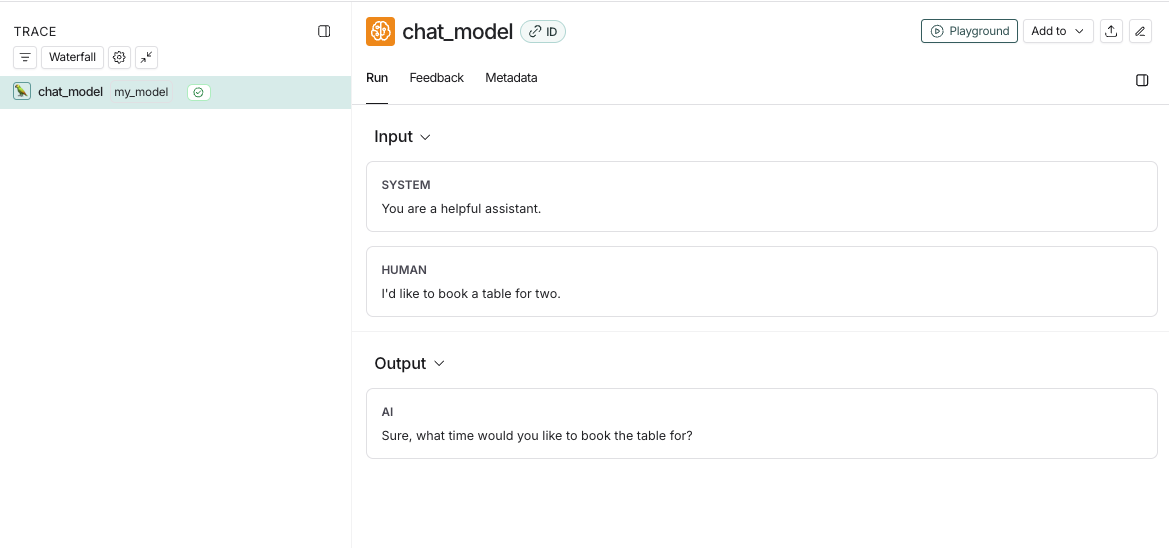
from langsmith import traceableinputs = [ {"role": "system", "content": "You are a helpful assistant."}, {"role": "user", "content": "I'd like to book a table for two."},]output = { "choices": [ { "message": { "role": "assistant", "content": "Sure, what time would you like to book the table for?" } } ]}@traceable( run_type="llm", metadata={"ls_provider": "my_provider", "ls_model_name": "my_model"})def chat_model(messages: list): return outputchat_model(inputs)
이 코드는 다음과 같은 트레이스를 로그합니다:
커스텀 스트리밍 chat_model을 구현하는 경우, 출력값을 비스트리밍 버전과 동일한 포맷으로 “reduce”할 수 있습니다. 이는 현재 파이썬에서만 지원됩니다.
Copy
def _reduce_chunks(chunks: list): all_text = "".join([chunk["choices"][0]["message"]["content"] for chunk in chunks]) return {"choices": [{"message": {"content": all_text, "role": "assistant"}}]}@traceable( run_type="llm", reduce_fn=_reduce_chunks, metadata={"ls_provider": "my_provider", "ls_model_name": "my_model"})def my_streaming_chat_model(messages: list): for chunk in ["Hello, " + messages[1]["content"]]: yield { "choices": [ { "message": { "content": chunk, "role": "assistant", } } ] }list( my_streaming_chat_model( [ {"role": "system", "content": "You are a helpful assistant. Please greet the user."}, {"role": "user", "content": "polly the parrot"}, ], ))
ls_model_name이 extra.metadata에 없으면, 토큰 수 추정에 다음 필드들이 우선순위대로 사용될 수 있습니다:
LangSmith는 토큰 수가 제공되면 모델 가격표를 사용하여 비용을 자동으로 계산합니다. LangSmith가 토큰 기반 비용을 어떻게 계산하는지 알고 싶다면 이 가이드를 참고하세요.많은 모델들이 응답에 토큰 수를 포함합니다. LangSmith에 토큰 수를 제공하는 방법은 두 가지입니다:
추적된 함수 내에서 사용량을 추출하여 run의 metadata에 usage_metadata 필드를 설정합니다.
추적된 함수의 출력값에 usage_metadata 필드를 반환합니다.
두 경우 모두, 전송하는 usage metadata에는 LangSmith가 인식하는 다음 필드 중 일부가 포함되어야 합니다:
아래에 나열된 필드 외에는 설정할 수 없습니다. 모든 필드를 포함할 필요는 없습니다.
Copy
class UsageMetadata(TypedDict, total=False):
    input_tokens: int
    """The number of tokens used for the prompt."""
    output_tokens: int
    """The number of tokens generated as output."""
    total_tokens: int
    """The total number of tokens used."""
    input_token_details: dict[str, float]
    """The details of the input tokens."""
    output_token_details: dict[str, float]
    """The details of the output tokens."""
    input_cost: float
    """The cost of the input tokens."""
    output_cost: float
    """The cost of the output tokens."""
    total_cost: float
    """The total cost of the tokens."""
    input_cost_details: dict[str, float]
    """The cost details of the input tokens."""
    output_cost_details: dict[str, float]
    """The cost details of the output tokens."""
사용량 데이터에 비용 정보도 포함할 수 있습니다. LangSmith의 토큰 기반 비용 공식에 의존하지 않으려는 경우에 유용합니다. 이는 토큰 타입별로 가격이 선형적이지 않은 모델에 적합합니다.
추적된 함수 내에서 사용량 정보를 포함하여 현재 실행의 metadata를 수정할 수 있습니다. 이 방식의 장점은 함수의 런타임 출력값을 변경할 필요가 없다는 점입니다. 예시는 다음과 같습니다:
langsmith>=0.3.43(파이썬) 및 langsmith>=0.3.30(JS/TS)이 필요합니다.
Copy
from langsmith import traceable, get_current_run_treeinputs = [ {"role": "system", "content": "You are a helpful assistant."}, {"role": "user", "content": "I'd like to book a table for two."},]@traceable( run_type="llm", metadata={"ls_provider": "my_provider", "ls_model_name": "my_model"})def chat_model(messages: list): llm_output = { "choices": [ { "message": { "role": "assistant", "content": "Sure, what time would you like to book the table for?" } } ], "usage_metadata": { "input_tokens": 27, "output_tokens": 13, "total_tokens": 40, "input_token_details": {"cache_read": 10}, # If you wanted to specify costs: # "input_cost": 1.1e-6, # "input_cost_details": {"cache_read": 2.3e-7}, # "output_cost": 5.0e-6, }, } run = get_current_run_tree() run.set(usage_metadata=llm_output["usage_metadata"]) return llm_output["choices"][0]["message"]chat_model(inputs)
함수의 응답에 usage_metadata 키를 추가하여 토큰 수와 비용을 수동으로 설정할 수 있습니다.
Copy
from langsmith import traceableinputs = [ {"role": "system", "content": "You are a helpful assistant."}, {"role": "user", "content": "I'd like to book a table for two."},]output = { "choices": [ { "message": { "role": "assistant", "content": "Sure, what time would you like to book the table for?" } } ], "usage_metadata": { "input_tokens": 27, "output_tokens": 13, "total_tokens": 40, "input_token_details": {"cache_read": 10}, # If you wanted to specify costs: # "input_cost": 1.1e-6, # "input_cost_details": {"cache_read": 2.3e-7}, # "output_cost": 5.0e-6, },}@traceable( run_type="llm", metadata={"ls_provider": "my_provider", "ls_model_name": "my_model"})def chat_model(messages: list): return outputchat_model(inputs)
traceable 또는 SDK 래퍼를 사용하는 경우, LangSmith는 스트리밍 LLM 실행에 대해 첫 번째 토큰까지의 시간을 자동으로 기록합니다.
하지만 RunTree API를 직접 사용하는 경우, 첫 번째 토큰까지의 시간을 올바르게 기록하려면 run tree에 new_token 이벤트를 추가해야 합니다.예시는 다음과 같습니다:
Copy
from langsmith.run_trees import RunTreerun_tree = RunTree( name="CustomChatModel", run_type="llm", inputs={ ... })run_tree.post()llm_stream = ...first_token = Nonefor token in llm_stream: if first_token is None: first_token = token run_tree.add_event({ "name": "new_token" })run_tree.end(outputs={ ... })run_tree.patch()