더 이상 실행을 추적하지 않으려면 LANGSMITH_TRACING 환경 변수를 제거할 수 있습니다. 이는 RunTree 객체나 API 사용자에게는 영향을 미치지 않습니다. 이들은 저수준으로 설계되어 추적 토글의 영향을 받지 않기 때문입니다.
LangChain(Python 또는 JS/TS)을 사용하는 경우, 이 섹션을 건너뛰고 LangChain 전용 가이드로 바로 이동할 수 있습니다. @traceable / traceable 사용하기
LangSmith를 사용하면 Python의 @traceable decorator와 TypeScript의 traceable function을 통해 기존 코드를 최소한으로 변경하면서 trace를 쉽게 기록할 수 있습니다.
@traceable 또는 traceable을 사용하는 경우에도 trace가 LangSmith에 기록되려면 LANGSMITH_TRACING 환경 변수가 'true'로 설정되어야 합니다. 이를 통해 코드를 변경하지 않고도 추적을 켜고 끌 수 있습니다.또한 LANGSMITH_API_KEY 환경 변수를 API key로 설정해야 합니다(자세한 내용은 Setup 참조).기본적으로 trace는 default라는 이름의 project에 기록됩니다. 다른 project에 trace를 기록하려면 이 섹션을 참조하세요.@traceable decorator는 LangSmith Python SDK에서 trace를 기록하는 간단한 방법입니다. 모든 function을 @traceable로 decorate하기만 하면 됩니다.
traceable로 동기 function을 래핑할 때(예: 아래 예제의 formatPrompt), trace가 올바르게 기록되도록 호출 시 await 키워드를 사용해야 합니다.
from langsmith import traceable
from openai import Client

openai = Client()

@traceable
def format_prompt(subject):
  return [
      {
          "role": "system",
          "content": "You are a helpful assistant.",
      },
      {
          "role": "user",
          "content": f"What's a good name for a store that sells {subject}?"
      }
  ]

@traceable(run_type="llm")
def invoke_llm(messages):
  return openai.chat.completions.create(
      messages=messages, model="gpt-4o-mini", temperature=0
  )

@traceable
def parse_output(response):
  return response.choices[0].message.content

@traceable
def run_pipeline():
  messages = format_prompt("colorful socks")
  response = invoke_llm(messages)
  return parse_output(response)

run_pipeline()
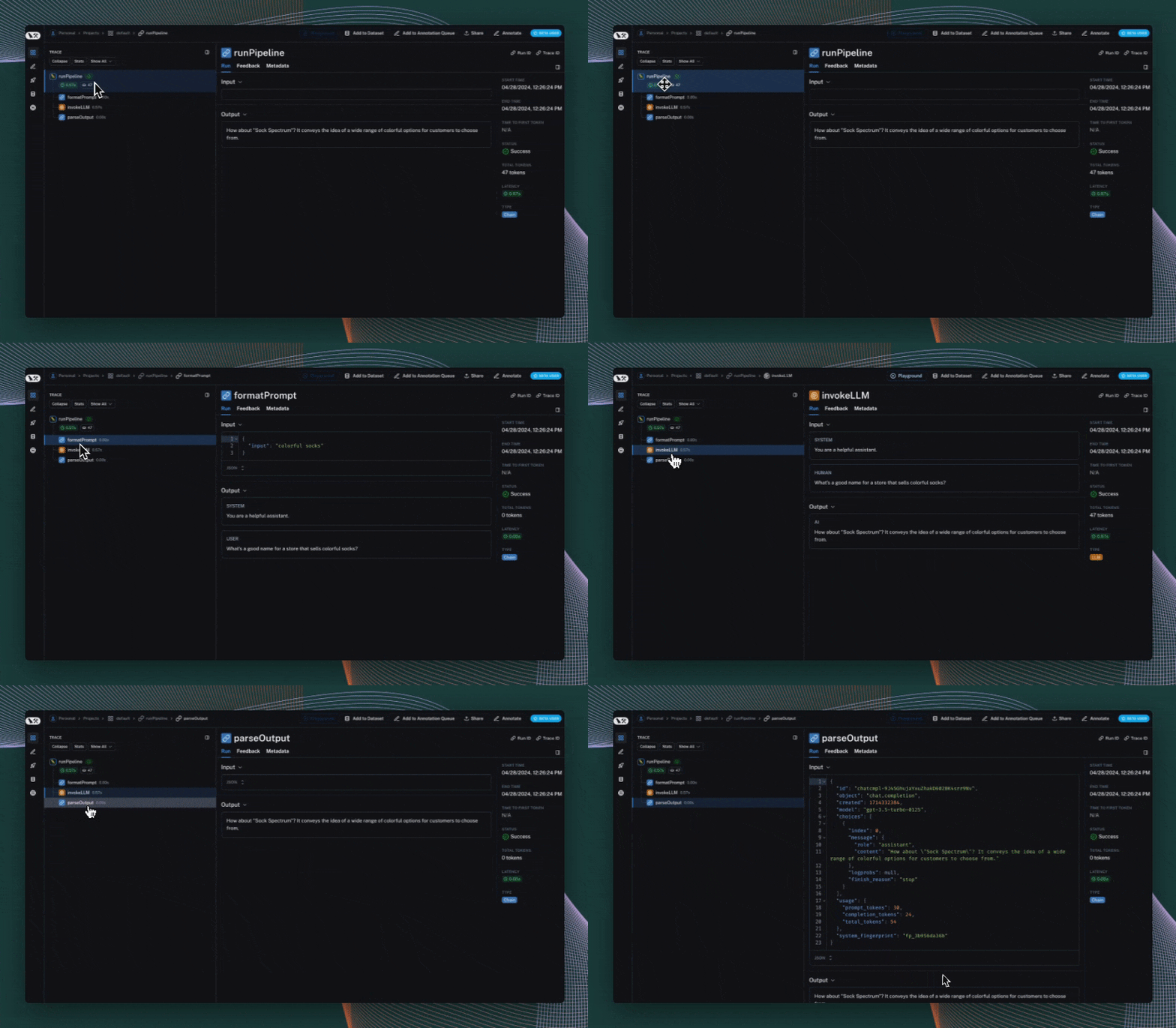
trace context manager 사용하기 (Python 전용)
Python에서는 trace context manager를 사용하여 LangSmith에 trace를 기록할 수 있습니다. 다음과 같은 상황에서 유용합니다:
- 특정 코드 블록에 대한 trace를 기록하고 싶을 때
- trace의 input, output 및 기타 속성을 제어하고 싶을 때
- decorator나 wrapper를 사용하기 어려운 경우
- 위의 경우 중 일부 또는 전부
context manager는 traceable decorator 및 wrap_openai wrapper와 원활하게 통합되므로 동일한 애플리케이션에서 함께 사용할 수 있습니다.
import openai
import langsmith as ls
from langsmith.wrappers import wrap_openai

client = wrap_openai(openai.Client())

@ls.traceable(run_type="tool", name="Retrieve Context")
def my_tool(question: str) -> str:
    return "During this morning's meeting, we solved all world conflict."

def chat_pipeline(question: str):
    context = my_tool(question)
    messages = [
        { "role": "system", "content": "You are a helpful assistant. Please respond to the user's request only based on the given context." },
        { "role": "user", "content": f"Question: {question}\nContext: {context}"}
    ]
    chat_completion = client.chat.completions.create(
        model="gpt-4o-mini", messages=messages
    )
    return chat_completion.choices[0].message.content

app_inputs = {"input": "Can you summarize this morning's meetings?"}

with ls.trace("Chat Pipeline", "chain", project_name="my_test", inputs=app_inputs) as rt:
    output = chat_pipeline("Can you summarize this morning's meetings?")
    rt.end(outputs={"output": output})
RunTree API 사용하기
LangSmith에 trace를 기록하는 또 다른 명시적인 방법은 RunTree API를 사용하는 것입니다. 이 API를 사용하면 추적을 더 세밀하게 제어할 수 있습니다. run과 하위 run을 수동으로 생성하여 trace를 구성할 수 있습니다. 여전히 LANGSMITH_API_KEY를 설정해야 하지만, 이 방법에서는 LANGSMITH_TRACING이 필요하지 않습니다.
이 방법은 trace context를 전파할 때 실수하기 쉬우므로 권장되지 않습니다.
import openai
from langsmith.run_trees import RunTree

# This can be a user input to your app
question = "Can you summarize this morning's meetings?"

# Create a top-level run
pipeline = RunTree(
  name="Chat Pipeline",
  run_type="chain",
  inputs={"question": question}
)
pipeline.post()

# This can be retrieved in a retrieval step
context = "During this morning's meeting, we solved all world conflict."
messages = [
  { "role": "system", "content": "You are a helpful assistant. Please respond to the user's request only based on the given context." },
  { "role": "user", "content": f"Question: {question}\nContext: {context}"}
]

# Create a child run
child_llm_run = pipeline.create_child(
  name="OpenAI Call",
  run_type="llm",
  inputs={"messages": messages},
)
child_llm_run.post()

# Generate a completion
client = openai.Client()
chat_completion = client.chat.completions.create(
  model="gpt-4o-mini", messages=messages
)

# End the runs and log them
child_llm_run.end(outputs=chat_completion)
child_llm_run.patch()
pipeline.end(outputs={"answer": chat_completion.choices[0].message.content})
pipeline.patch()
사용 예제
위의 유틸리티를 확장하여 모든 코드를 편리하게 추적할 수 있습니다. 다음은 몇 가지 확장 예제입니다:
class의 모든 public method 추적하기:
from typing import Any, Callable, Type, TypeVar

T = TypeVar("T")

def traceable_cls(cls: Type[T]) -> Type[T]:
    """Instrument all public methods in a class."""
    def wrap_method(name: str, method: Any) -> Any:
        if callable(method) and not name.startswith("__"):
            return traceable(name=f"{cls.__name__}.{name}")(method)
        return method

    # Handle __dict__ case
    for name in dir(cls):
        if not name.startswith("_"):
            try:
                method = getattr(cls, name)
                setattr(cls, name, wrap_method(name, method))
            except AttributeError:
                # Skip attributes that can't be set (e.g., some descriptors)
                pass

    # Handle __slots__ case
    if hasattr(cls, "__slots__"):
        for slot in cls.__slots__:  # type: ignore[attr-defined]
            if not slot.startswith("__"):
                try:
                    method = getattr(cls, slot)
                    setattr(cls, slot, wrap_method(slot, method))
                except AttributeError:
                    # Skip slots that don't have a value yet
                    pass

    return cls

@traceable_cls
class MyClass:
    def __init__(self, some_val: int):
        self.some_val = some_val

    def combine(self, other_val: int):
        return self.some_val + other_val

# See trace: https://smith.langchain.com/public/882f9ecf-5057-426a-ae98-0edf84fdcaf9/r
MyClass(13).combine(29)
종료 전 모든 trace가 제출되도록 보장하기
LangSmith의 추적은 프로덕션 애플리케이션을 방해하지 않도록 백그라운드 스레드에서 수행됩니다. 즉, 모든 trace가 LangSmith에 성공적으로 게시되기 전에 프로세스가 종료될 수 있습니다. 애플리케이션을 종료하기 전에 모든 trace가 제출되도록 보장하는 몇 가지 옵션이 있습니다.
LangSmith SDK 사용하기
LangSmith SDK를 독립적으로 사용하는 경우, 종료 전에 flush method를 사용할 수 있습니다:
from langsmith import Client

client = Client()

@traceable(client=client)
async def my_traced_func():
  # Your code here...
  pass

try:
  await my_traced_func()
finally:
  await client.flush()
LangChain 사용하기
LangChain을 사용하는 경우, LangChain 추적 가이드를 참조하세요.
비디오 튜토리얼을 선호하는 경우, Introduction to LangSmith Course의 Tracing Basics video를 확인하세요.

