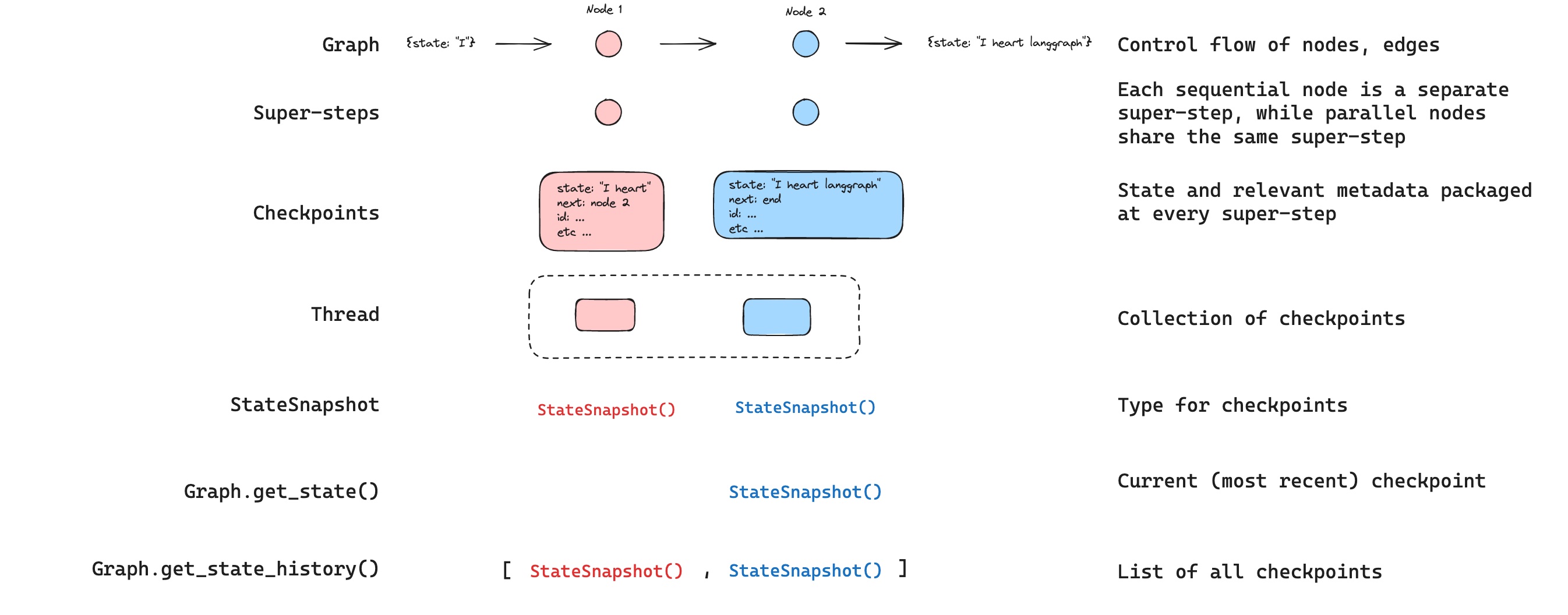
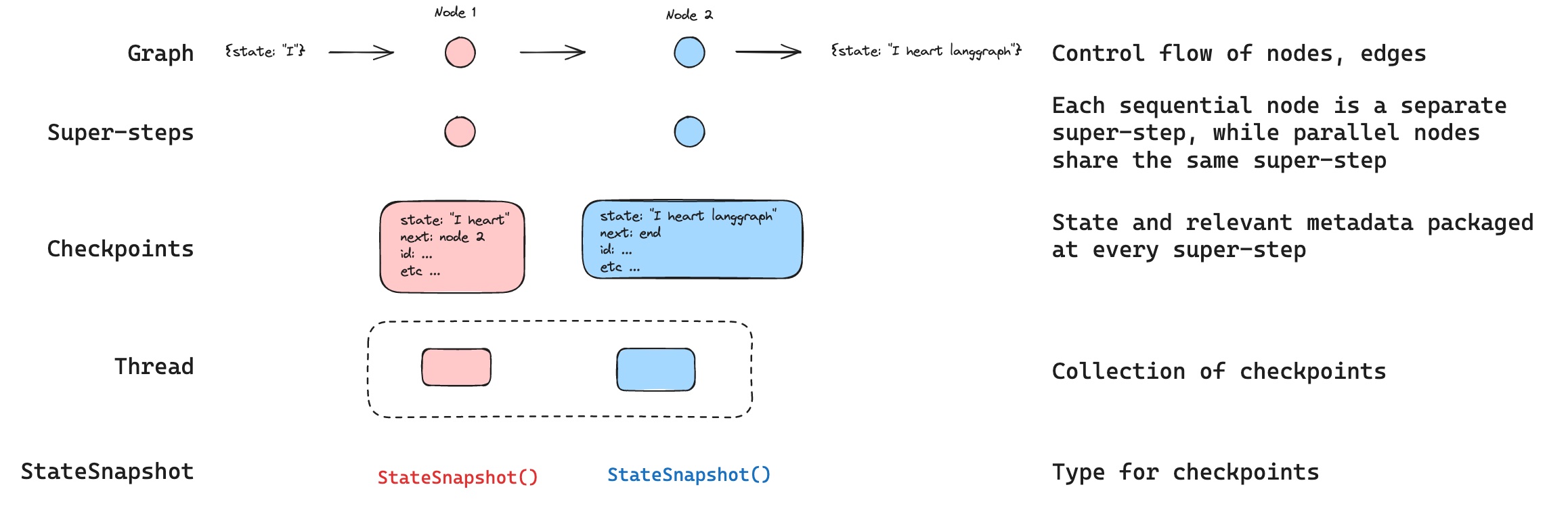
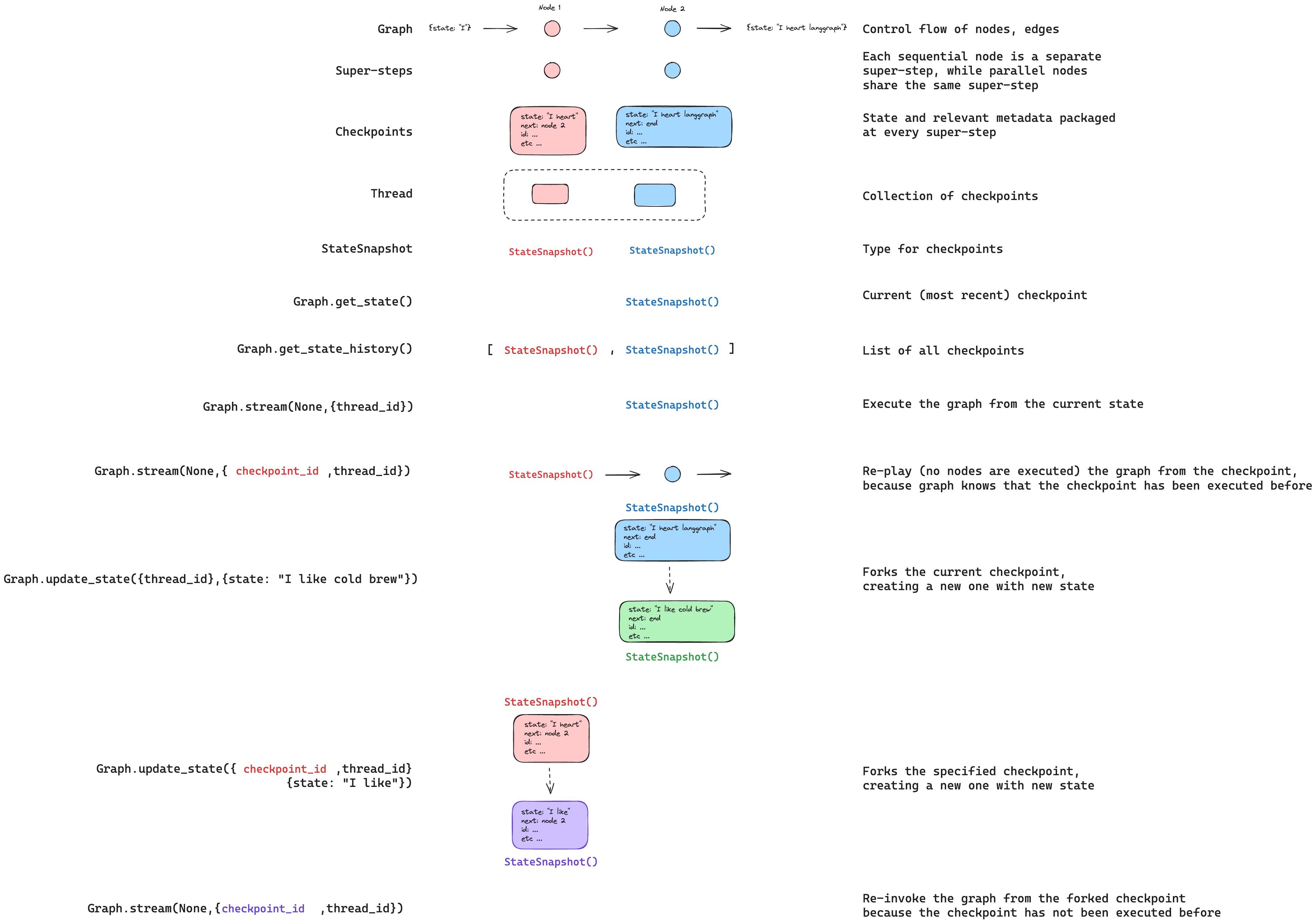
LangGraph는 checkpointer를 통해 구현되는 내장 persistence layer를 가지고 있습니다. checkpointer와 함께 graph를 compile하면, checkpointer는 모든 super-step마다 graph state의 checkpoint를 저장합니다. 이러한 checkpoint들은 thread에 저장되며, graph 실행 후에 접근할 수 있습니다. thread는 실행 후 graph의 state에 대한 접근을 허용하기 때문에, human-in-the-loop, memory, time travel, fault-tolerance를 포함한 여러 강력한 기능들이 모두 가능합니다. 아래에서 이러한 각 개념에 대해 더 자세히 설명하겠습니다. Checkpoints
LangGraph API는 checkpointing을 자동으로 처리합니다 LangGraph API를 사용할 때는 checkpointer를 수동으로 구현하거나 구성할 필요가 없습니다. API가 백그라운드에서 모든 persistence 인프라를 처리합니다.

Threads

thread는 checkpointer에 의해 저장된 각 checkpoint에 할당된 고유 ID 또는 thread identifier입니다. 이것은 run 시퀀스의 누적된 state를 포함합니다. run이 실행되면, assistant의 기본 graph의 state가 thread에 저장됩니다. checkpointer와 함께 graph를 invoke할 때, config의 configurable 부분에 thread_id반드시 지정해야 합니다.
{"configurable": {"thread_id": "1"}}
thread의 현재 및 과거 state를 검색할 수 있습니다. state를 유지하려면 run을 실행하기 전에 thread를 생성해야 합니다. LangSmith API는 thread와 thread state를 생성하고 관리하기 위한 여러 endpoint를 제공합니다. 자세한 내용은 API reference를 참조하세요.

Checkpoints

특정 시점의 thread state를 checkpoint라고 합니다. Checkpoint는 각 super-step에서 저장된 graph state의 스냅샷이며 다음과 같은 주요 속성을 가진 StateSnapshot 객체로 표현됩니다:
  • config: 이 checkpoint와 연관된 Config.
  • metadata: 이 checkpoint와 연관된 Metadata.
  • values: 이 시점의 state channel들의 값.
  • next: graph에서 다음에 실행할 node 이름들의 tuple.
  • tasks: 다음에 실행할 task에 대한 정보를 포함하는 PregelTask 객체들의 tuple. 이전에 step이 시도되었다면 error 정보를 포함합니다. graph가 node 내에서 동적으로 중단된 경우, task는 interrupt와 관련된 추가 데이터를 포함합니다.
Checkpoint는 유지되며 나중에 thread의 state를 복원하는 데 사용할 수 있습니다. 간단한 graph가 다음과 같이 invoke될 때 어떤 checkpoint들이 저장되는지 살펴보겠습니다:
from langgraph.graph import StateGraph, START, END
from langgraph.checkpoint.memory import InMemorySaver
from langchain_core.runnables import RunnableConfig
from typing import Annotated
from typing_extensions import TypedDict
from operator import add

class State(TypedDict):
    foo: str
    bar: Annotated[list[str], add]

def node_a(state: State):
    return {"foo": "a", "bar": ["a"]}

def node_b(state: State):
    return {"foo": "b", "bar": ["b"]}


workflow = StateGraph(State)
workflow.add_node(node_a)
workflow.add_node(node_b)
workflow.add_edge(START, "node_a")
workflow.add_edge("node_a", "node_b")
workflow.add_edge("node_b", END)

checkpointer = InMemorySaver()
graph = workflow.compile(checkpointer=checkpointer)

config: RunnableConfig = {"configurable": {"thread_id": "1"}}
graph.invoke({"foo": ""}, config)
graph를 실행한 후, 정확히 4개의 checkpoint를 볼 수 있습니다:
  • 다음에 실행될 node로 START를 가진 빈 checkpoint
  • 사용자 입력 {'foo': '', 'bar': []}과 다음에 실행될 node로 node_a를 가진 checkpoint
  • node_a의 출력 {'foo': 'a', 'bar': ['a']}과 다음에 실행될 node로 node_b를 가진 checkpoint
  • node_b의 출력 {'foo': 'b', 'bar': ['a', 'b']}과 다음에 실행될 node가 없는 checkpoint
bar channel에 대한 reducer가 있기 때문에 bar channel 값에는 두 node의 출력이 모두 포함됩니다.

Get state

저장된 graph state와 상호작용할 때, thread identifier반드시 지정해야 합니다. graph.get_state(config)를 호출하여 graph의 최신 state를 볼 수 있습니다. 이것은 config에 제공된 thread ID와 연관된 최신 checkpoint에 해당하는 StateSnapshot 객체를 반환하거나, 제공된 경우 thread의 checkpoint ID와 연관된 checkpoint를 반환합니다.
# get the latest state snapshot
config = {"configurable": {"thread_id": "1"}}
graph.get_state(config)

# get a state snapshot for a specific checkpoint_id
config = {"configurable": {"thread_id": "1", "checkpoint_id": "1ef663ba-28fe-6528-8002-5a559208592c"}}
graph.get_state(config)
예제에서 get_state의 출력은 다음과 같습니다:
StateSnapshot(
    values={'foo': 'b', 'bar': ['a', 'b']},
    next=(),
    config={'configurable': {'thread_id': '1', 'checkpoint_ns': '', 'checkpoint_id': '1ef663ba-28fe-6528-8002-5a559208592c'}},
    metadata={'source': 'loop', 'writes': {'node_b': {'foo': 'b', 'bar': ['b']}}, 'step': 2},
    created_at='2024-08-29T19:19:38.821749+00:00',
    parent_config={'configurable': {'thread_id': '1', 'checkpoint_ns': '', 'checkpoint_id': '1ef663ba-28f9-6ec4-8001-31981c2c39f8'}}, tasks=()
)

Get state history

graph.get_state_history(config)를 호출하여 주어진 thread에 대한 graph 실행의 전체 history를 가져올 수 있습니다. 이것은 config에 제공된 thread ID와 연관된 StateSnapshot 객체들의 list를 반환합니다. 중요한 점은, checkpoint들이 시간순으로 정렬되며 가장 최근의 checkpoint / StateSnapshot이 list의 첫 번째에 위치한다는 것입니다.
config = {"configurable": {"thread_id": "1"}}
list(graph.get_state_history(config))
예제에서 get_state_history의 출력은 다음과 같습니다:
[
    StateSnapshot(
        values={'foo': 'b', 'bar': ['a', 'b']},
        next=(),
        config={'configurable': {'thread_id': '1', 'checkpoint_ns': '', 'checkpoint_id': '1ef663ba-28fe-6528-8002-5a559208592c'}},
        metadata={'source': 'loop', 'writes': {'node_b': {'foo': 'b', 'bar': ['b']}}, 'step': 2},
        created_at='2024-08-29T19:19:38.821749+00:00',
        parent_config={'configurable': {'thread_id': '1', 'checkpoint_ns': '', 'checkpoint_id': '1ef663ba-28f9-6ec4-8001-31981c2c39f8'}},
        tasks=(),
    ),
    StateSnapshot(
        values={'foo': 'a', 'bar': ['a']},
        next=('node_b',),
        config={'configurable': {'thread_id': '1', 'checkpoint_ns': '', 'checkpoint_id': '1ef663ba-28f9-6ec4-8001-31981c2c39f8'}},
        metadata={'source': 'loop', 'writes': {'node_a': {'foo': 'a', 'bar': ['a']}}, 'step': 1},
        created_at='2024-08-29T19:19:38.819946+00:00',
        parent_config={'configurable': {'thread_id': '1', 'checkpoint_ns': '', 'checkpoint_id': '1ef663ba-28f4-6b4a-8000-ca575a13d36a'}},
        tasks=(PregelTask(id='6fb7314f-f114-5413-a1f3-d37dfe98ff44', name='node_b', error=None, interrupts=()),),
    ),
    StateSnapshot(
        values={'foo': '', 'bar': []},
        next=('node_a',),
        config={'configurable': {'thread_id': '1', 'checkpoint_ns': '', 'checkpoint_id': '1ef663ba-28f4-6b4a-8000-ca575a13d36a'}},
        metadata={'source': 'loop', 'writes': None, 'step': 0},
        created_at='2024-08-29T19:19:38.817813+00:00',
        parent_config={'configurable': {'thread_id': '1', 'checkpoint_ns': '', 'checkpoint_id': '1ef663ba-28f0-6c66-bfff-6723431e8481'}},
        tasks=(PregelTask(id='f1b14528-5ee5-579c-949b-23ef9bfbed58', name='node_a', error=None, interrupts=()),),
    ),
    StateSnapshot(
        values={'bar': []},
        next=('__start__',),
        config={'configurable': {'thread_id': '1', 'checkpoint_ns': '', 'checkpoint_id': '1ef663ba-28f0-6c66-bfff-6723431e8481'}},
        metadata={'source': 'input', 'writes': {'foo': ''}, 'step': -1},
        created_at='2024-08-29T19:19:38.816205+00:00',
        parent_config=None,
        tasks=(PregelTask(id='6d27aa2e-d72b-5504-a36f-8620e54a76dd', name='__start__', error=None, interrupts=()),),
    )
]
State

Replay

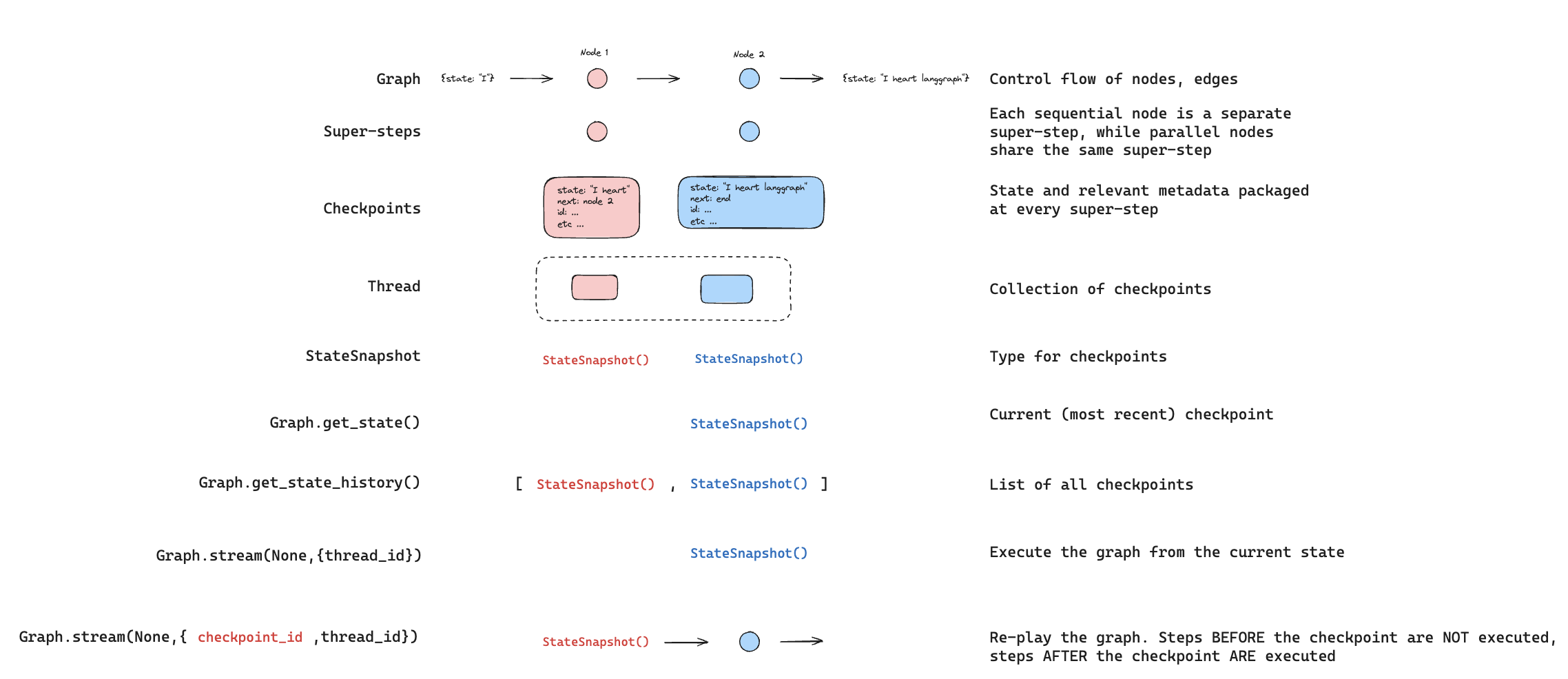
이전 graph 실행을 재생하는 것도 가능합니다. thread_idcheckpoint_id로 graph를 invoke하면, checkpoint_id에 해당하는 checkpoint _이전_에 실행된 step들을 _재생_하고, checkpoint _이후_의 step들만 실행합니다.
  • thread_id는 thread의 ID입니다.
  • checkpoint_id는 thread 내의 특정 checkpoint를 참조하는 식별자입니다.
graph를 invoke할 때 config의 configurable 부분에 이것들을 전달해야 합니다:
config = {"configurable": {"thread_id": "1", "checkpoint_id": "0c62ca34-ac19-445d-bbb0-5b4984975b2a"}}
graph.invoke(None, config=config)
중요한 점은, LangGraph는 특정 step이 이전에 실행되었는지 여부를 알고 있다는 것입니다. 실행되었다면, LangGraph는 단순히 graph의 해당 step을 _재생_하고 step을 다시 실행하지 않지만, 이는 제공된 checkpoint_id _이전_의 step들에만 해당됩니다. checkpoint_id _이후_의 모든 step들은 이전에 실행되었더라도 실행됩니다(즉, 새로운 fork). replay에 대한 자세한 내용은 time-travel 사용 방법 가이드를 참조하세요. Replay
Update state

특정 checkpoint에서 graph를 재생하는 것 외에도, graph state를 _편집_할 수도 있습니다. 이는 update_state를 사용하여 수행합니다. 이 method는 세 가지 다른 인수를 받습니다:

config

config는 업데이트할 thread를 지정하는 thread_id를 포함해야 합니다. thread_id만 전달되면 현재 state를 업데이트(또는 fork)합니다. 선택적으로 checkpoint_id 필드를 포함하면 선택한 checkpoint를 fork합니다.

values

이것들은 state를 업데이트하는 데 사용될 값들입니다. 이 업데이트는 node의 모든 업데이트가 처리되는 것과 정확히 동일하게 처리됩니다. 즉, 이러한 값들은 graph state의 일부 channel에 대해 정의된 경우 reducer function에 전달됩니다. 이는 update_state가 모든 channel의 channel 값을 자동으로 덮어쓰지 않고, reducer가 없는 channel에 대해서만 덮어쓴다는 것을 의미합니다. 예제를 살펴보겠습니다. 다음 schema로 graph의 state를 정의했다고 가정해봅시다(전체 예제는 위 참조):
from typing import Annotated
from typing_extensions import TypedDict
from operator import add

class State(TypedDict):
    foo: int
    bar: Annotated[list[str], add]
이제 graph의 현재 state가 다음과 같다고 가정해봅시다:
{"foo": 1, "bar": ["a"]}
다음과 같이 state를 업데이트하면:
graph.update_state(config, {"foo": 2, "bar": ["b"]})
graph의 새로운 state는 다음과 같습니다:
{"foo": 2, "bar": ["a", "b"]}
foo key(channel)는 완전히 변경됩니다(해당 channel에 대해 지정된 reducer가 없기 때문에 update_state가 덮어씁니다). 그러나 bar key에 대해서는 reducer가 지정되어 있으므로 bar의 state에 "b"를 추가합니다.

as_node

update_state를 호출할 때 선택적으로 지정할 수 있는 마지막 항목은 as_node입니다. 제공하면 업데이트가 node as_node에서 온 것처럼 적용됩니다. as_node가 제공되지 않으면, 모호하지 않은 경우 state를 업데이트한 마지막 node로 설정됩니다. 이것이 중요한 이유는 다음에 실행할 step이 업데이트를 제공한 마지막 node에 따라 달라지기 때문이며, 이를 사용하여 다음에 실행할 node를 제어할 수 있습니다. state forking에 대한 자세한 내용은 time-travel 사용 방법 가이드를 참조하세요. Update
Memory Store

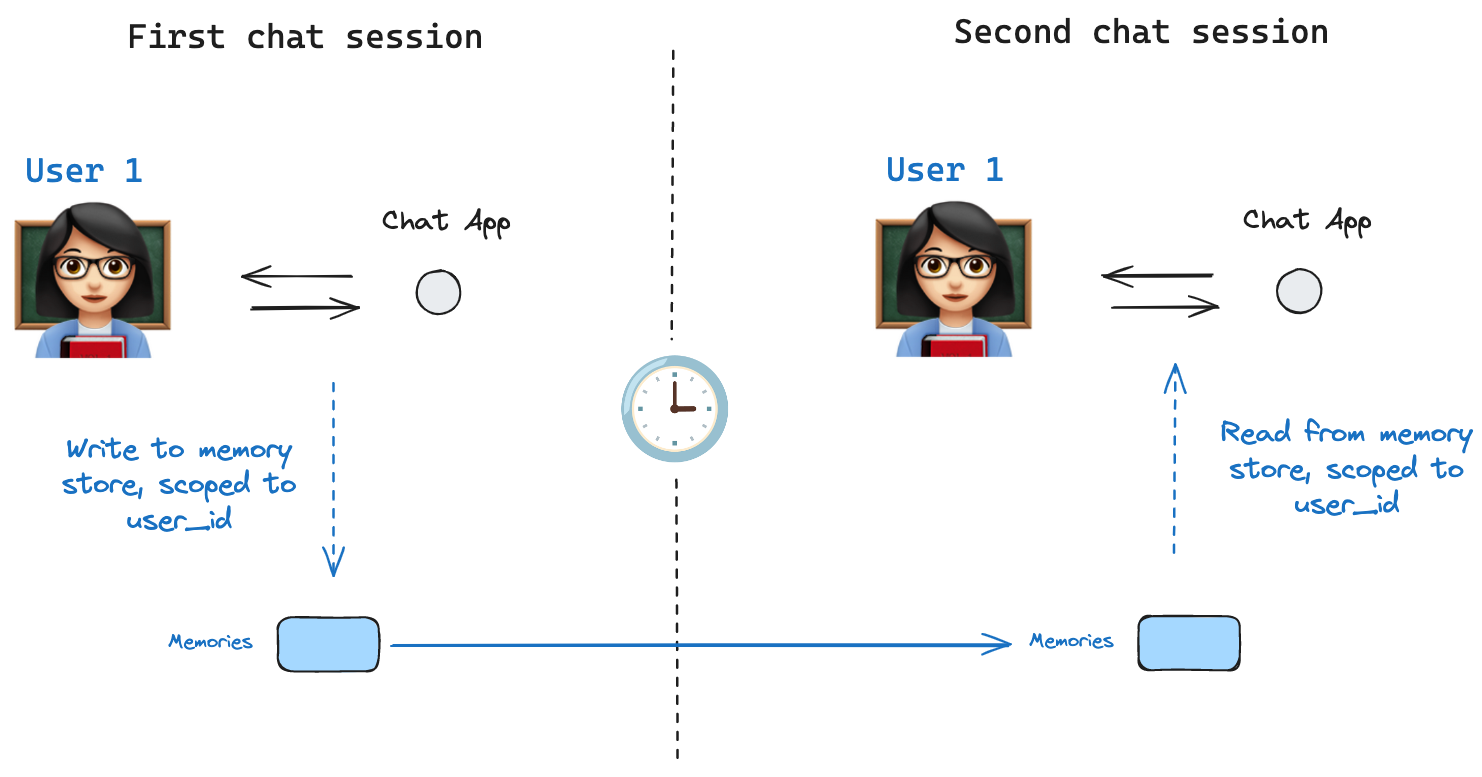
Model of shared state state schema는 graph가 실행될 때 채워지는 key들의 집합을 지정합니다. 위에서 논의한 바와 같이, state는 각 graph step에서 checkpointer에 의해 thread에 기록될 수 있어 state persistence를 가능하게 합니다. 하지만 thread 간에 일부 정보를 유지하려면 어떻게 해야 할까요? 사용자와의 모든 대화(예: thread)에서 사용자에 대한 특정 정보를 유지하려는 chatbot의 경우를 생각해보세요! checkpointer만으로는 thread 간에 정보를 공유할 수 없습니다. 이것이 Store interface의 필요성을 야기합니다. 예를 들어, thread 간에 사용자에 대한 정보를 저장하기 위해 InMemoryStore를 정의할 수 있습니다. 이전과 같이 checkpointer와 함께 graph를 compile하고, 새로운 in_memory_store 변수와 함께 compile합니다.
LangGraph API는 store를 자동으로 처리합니다 LangGraph API를 사용할 때는 store를 수동으로 구현하거나 구성할 필요가 없습니다. API가 백그라운드에서 모든 storage 인프라를 처리합니다.

Basic Usage

먼저, LangGraph를 사용하지 않고 독립적으로 이것을 보여드리겠습니다.
from langgraph.store.memory import InMemoryStore
in_memory_store = InMemoryStore()
Memory는 tuple로 namespace가 지정되며, 이 특정 예제에서는 (<user_id>, "memories")가 됩니다. namespace는 임의의 길이가 될 수 있고 무엇이든 나타낼 수 있으며, 사용자별로 지정될 필요는 없습니다.
user_id = "1"
namespace_for_memory = (user_id, "memories")
store.put method를 사용하여 store의 namespace에 memory를 저장합니다. 이렇게 할 때, 위에서 정의한 대로 namespace와 memory의 key-value 쌍을 지정합니다: key는 단순히 memory의 고유 식별자(memory_id)이고 value(dictionary)는 memory 자체입니다.
memory_id = str(uuid.uuid4())
memory = {"food_preference" : "I like pizza"}
in_memory_store.put(namespace_for_memory, memory_id, memory)
store.search method를 사용하여 namespace의 memory를 읽을 수 있으며, 이는 주어진 사용자에 대한 모든 memory를 list로 반환합니다. 가장 최근의 memory는 list의 마지막에 있습니다.
memories = in_memory_store.search(namespace_for_memory)
memories[-1].dict()
{'value': {'food_preference': 'I like pizza'},
 'key': '07e0caf4-1631-47b7-b15f-65515d4c1843',
 'namespace': ['1', 'memories'],
 'created_at': '2024-10-02T17:22:31.590602+00:00',
 'updated_at': '2024-10-02T17:22:31.590605+00:00'}
각 memory type은 특정 속성을 가진 Python class(Item)입니다. 위와 같이 .dict를 통해 변환하여 dictionary로 접근할 수 있습니다. 가지고 있는 속성은 다음과 같습니다:
  • value: 이 memory의 값(그 자체가 dictionary)
  • key: 이 namespace에서 이 memory의 고유 key
  • namespace: 이 memory type의 namespace인 문자열 list
  • created_at: 이 memory가 생성된 시간의 Timestamp
  • updated_at: 이 memory가 업데이트된 시간의 Timestamp
단순 검색 외에도, store는 semantic search를 지원하여 정확한 일치가 아닌 의미를 기반으로 memory를 찾을 수 있습니다. 이를 활성화하려면 embedding model로 store를 구성하세요:
from langchain.embeddings import init_embeddings

store = InMemoryStore(
    index={
        "embed": init_embeddings("openai:text-embedding-3-small"),  # Embedding provider
        "dims": 1536,                              # Embedding dimensions
        "fields": ["food_preference", "$"]              # Fields to embed
    }
)
이제 검색할 때 자연어 쿼리를 사용하여 관련 memory를 찾을 수 있습니다:
# Find memories about food preferences
# (This can be done after putting memories into the store)
memories = store.search(
    namespace_for_memory,
    query="What does the user like to eat?",
    limit=3  # Return top 3 matches
)
fields parameter를 구성하거나 memory를 저장할 때 index parameter를 지정하여 memory의 어느 부분이 embedding될지 제어할 수 있습니다:
# Store with specific fields to embed
store.put(
    namespace_for_memory,
    str(uuid.uuid4()),
    {
        "food_preference": "I love Italian cuisine",
        "context": "Discussing dinner plans"
    },
    index=["food_preference"]  # Only embed "food_preferences" field
)

# Store without embedding (still retrievable, but not searchable)
store.put(
    namespace_for_memory,
    str(uuid.uuid4()),
    {"system_info": "Last updated: 2024-01-01"},
    index=False
)

Using in LangGraph

이 모든 것이 준비되면 LangGraph에서 in_memory_store를 사용합니다. in_memory_store는 checkpointer와 함께 작동합니다: checkpointer는 위에서 논의한 대로 thread에 state를 저장하고, in_memory_store는 thread 간에 접근할 수 있도록 임의의 정보를 저장할 수 있게 합니다. 다음과 같이 checkpointer와 in_memory_store 모두와 함께 graph를 compile합니다.
from langgraph.checkpoint.memory import InMemorySaver

# We need this because we want to enable threads (conversations)
checkpointer = InMemorySaver()

# ... Define the graph ...

# Compile the graph with the checkpointer and store
graph = graph.compile(checkpointer=checkpointer, store=in_memory_store)
이전과 같이 thread_id로 graph를 invoke하고, 위에서 보여준 것처럼 이 특정 사용자에게 memory를 namespace하는 데 사용할 user_id도 함께 invoke합니다.
# Invoke the graph
user_id = "1"
config = {"configurable": {"thread_id": "1", "user_id": user_id}}

# First let's just say hi to the AI
for update in graph.stream(
    {"messages": [{"role": "user", "content": "hi"}]}, config, stream_mode="updates"
):
    print(update)
node 인수로 store: BaseStoreconfig: RunnableConfig를 전달하여 _모든 node_에서 in_memory_storeuser_id에 접근할 수 있습니다. node에서 semantic search를 사용하여 관련 memory를 찾는 방법은 다음과 같습니다:
def update_memory(state: MessagesState, config: RunnableConfig, *, store: BaseStore):

    # Get the user id from the config
    user_id = config["configurable"]["user_id"]

    # Namespace the memory
    namespace = (user_id, "memories")

    # ... Analyze conversation and create a new memory

    # Create a new memory ID
    memory_id = str(uuid.uuid4())

    # We create a new memory
    store.put(namespace, memory_id, {"memory": memory})

위에서 보여준 것처럼, 모든 node에서 store에 접근하고 store.search method를 사용하여 memory를 가져올 수 있습니다. memory는 dictionary로 변환할 수 있는 객체의 list로 반환됩니다.
memories[-1].dict()
{'value': {'food_preference': 'I like pizza'},
 'key': '07e0caf4-1631-47b7-b15f-65515d4c1843',
 'namespace': ['1', 'memories'],
 'created_at': '2024-10-02T17:22:31.590602+00:00',
 'updated_at': '2024-10-02T17:22:31.590605+00:00'}
memory에 접근하여 model 호출에 사용할 수 있습니다.
def call_model(state: MessagesState, config: RunnableConfig, *, store: BaseStore):
    # Get the user id from the config
    user_id = config["configurable"]["user_id"]

    # Namespace the memory
    namespace = (user_id, "memories")

    # Search based on the most recent message
    memories = store.search(
        namespace,
        query=state["messages"][-1].content,
        limit=3
    )
    info = "\n".join([d.value["memory"] for d in memories])

    # ... Use memories in the model call
새 thread를 생성하더라도 user_id가 동일하면 동일한 memory에 접근할 수 있습니다.
# Invoke the graph
config = {"configurable": {"thread_id": "2", "user_id": "1"}}

# Let's say hi again
for update in graph.stream(
    {"messages": [{"role": "user", "content": "hi, tell me about my memories"}]}, config, stream_mode="updates"
):
    print(update)
LangSmith를 사용할 때, 로컬(예: Studio) 또는 LangSmith로 호스팅하든, base store는 기본적으로 사용 가능하며 graph compilation 중에 지정할 필요가 없습니다. 그러나 semantic search를 활성화하려면 langgraph.json 파일에서 indexing 설정을 구성해야 합니다. 예를 들어:
{
    ...
    "store": {
        "index": {
            "embed": "openai:text-embeddings-3-small",
            "dims": 1536,
            "fields": ["$"]
        }
    }
}
자세한 내용과 구성 옵션은 deployment guide를 참조하세요.

Checkpointer libraries

내부적으로 checkpointing은 BaseCheckpointSaver interface를 준수하는 checkpointer 객체에 의해 구동됩니다. LangGraph는 모두 독립적이고 설치 가능한 library를 통해 구현된 여러 checkpointer 구현을 제공합니다:
  • langgraph-checkpoint: checkpointer saver의 base interface(BaseCheckpointSaver)와 serialization/deserialization interface(SerializerProtocol). 실험을 위한 in-memory checkpointer 구현(InMemorySaver)을 포함합니다. LangGraph는 langgraph-checkpoint를 포함하여 제공됩니다.
  • langgraph-checkpoint-sqlite: SQLite database를 사용하는 LangGraph checkpointer의 구현(SqliteSaver / AsyncSqliteSaver). 실험 및 로컬 workflow에 이상적입니다. 별도로 설치해야 합니다.
  • langgraph-checkpoint-postgres: LangSmith에서 사용되는 Postgres database를 사용하는 고급 checkpointer(PostgresSaver / AsyncPostgresSaver). 프로덕션에서 사용하기에 이상적입니다. 별도로 설치해야 합니다.

Checkpointer interface

각 checkpointer는 BaseCheckpointSaver interface를 준수하며 다음 method들을 구현합니다:
  • .put - checkpoint를 configuration 및 metadata와 함께 저장합니다.
  • .put_writes - checkpoint에 연결된 중간 write를 저장합니다(즉, pending writes).
  • .get_tuple - 주어진 configuration(thread_idcheckpoint_id)에 대한 checkpoint tuple을 가져옵니다. 이는 graph.get_state()에서 StateSnapshot을 채우는 데 사용됩니다.
  • .list - 주어진 configuration 및 filter 기준과 일치하는 checkpoint를 나열합니다. 이는 graph.get_state_history()에서 state history를 채우는 데 사용됩니다.
checkpointer가 비동기 graph 실행과 함께 사용되는 경우(즉, .ainvoke, .astream, .abatch를 통해 graph를 실행), 위 method들의 비동기 버전이 사용됩니다(.aput, .aput_writes, .aget_tuple, .alist).
graph를 비동기적으로 실행하려면 InMemorySaver 또는 Sqlite/Postgres checkpointer의 비동기 버전인 AsyncSqliteSaver / AsyncPostgresSaver checkpointer를 사용할 수 있습니다.

Serializer

checkpointer가 graph state를 저장할 때, state의 channel 값을 serialize해야 합니다. 이는 serializer 객체를 사용하여 수행됩니다. langgraph_checkpoint는 serializer를 구현하기 위한 protocol을 정의하고 LangChain 및 LangGraph primitive, datetime, enum 등을 포함한 다양한 type을 처리하는 기본 구현(JsonPlusSerializer)을 제공합니다.

Serialization with pickle

기본 serializer인 JsonPlusSerializer는 내부적으로 ormsgpack과 JSON을 사용하며, 이는 모든 type의 객체에 적합하지 않습니다. msgpack encoder에서 현재 지원되지 않는 객체(예: Pandas dataframe)에 대해 pickle로 fallback하려면 JsonPlusSerializerpickle_fallback 인수를 사용할 수 있습니다:
from langgraph.checkpoint.memory import InMemorySaver
from langgraph.checkpoint.serde.jsonplus import JsonPlusSerializer

# ... Define the graph ...
graph.compile(
    checkpointer=InMemorySaver(serde=JsonPlusSerializer(pickle_fallback=True))
)

Encryption

Checkpointer는 선택적으로 모든 유지된 state를 암호화할 수 있습니다. 이를 활성화하려면 EncryptedSerializer의 인스턴스를 BaseCheckpointSaver 구현의 serde 인수에 전달하세요. 암호화된 serializer를 생성하는 가장 쉬운 방법은 from_pycryptodome_aes를 통하는 것이며, 이는 LANGGRAPH_AES_KEY 환경 변수에서 AES key를 읽습니다(또는 key 인수를 받습니다):
import sqlite3

from langgraph.checkpoint.serde.encrypted import EncryptedSerializer
from langgraph.checkpoint.sqlite import SqliteSaver

serde = EncryptedSerializer.from_pycryptodome_aes()  # reads LANGGRAPH_AES_KEY
checkpointer = SqliteSaver(sqlite3.connect("checkpoint.db"), serde=serde)
from langgraph.checkpoint.serde.encrypted import EncryptedSerializer
from langgraph.checkpoint.postgres import PostgresSaver

serde = EncryptedSerializer.from_pycryptodome_aes()
checkpointer = PostgresSaver.from_conn_string("postgresql://...", serde=serde)
checkpointer.setup()
LangSmith에서 실행할 때, LANGGRAPH_AES_KEY가 있으면 암호화가 자동으로 활성화되므로 환경 변수만 제공하면 됩니다. CipherProtocol을 구현하고 EncryptedSerializer에 제공하여 다른 암호화 scheme을 사용할 수 있습니다.

Capabilities

Human-in-the-loop

첫째, checkpointer는 인간이 graph step을 검사, 중단 및 승인할 수 있도록 하여 human-in-the-loop workflow를 용이하게 합니다. 인간이 언제든지 graph의 state를 볼 수 있어야 하고, 인간이 state에 업데이트를 한 후 graph가 실행을 재개할 수 있어야 하므로 이러한 workflow에는 checkpointer가 필요합니다. 예제는 how-to guide를 참조하세요.

Memory

둘째, checkpointer는 상호작용 간의 “memory”를 허용합니다. 반복되는 인간 상호작용(대화와 같은)의 경우, 후속 메시지를 해당 thread로 보낼 수 있으며, 이는 이전 메시지의 memory를 유지합니다. checkpointer를 사용하여 대화 memory를 추가하고 관리하는 방법에 대한 정보는 Add memory를 참조하세요.

Time Travel

셋째, checkpointer는 “time travel”을 허용하여 사용자가 이전 graph 실행을 재생하여 특정 graph step을 검토 및/또는 디버그할 수 있게 합니다. 또한 checkpointer는 임의의 checkpoint에서 graph state를 fork하여 대체 경로를 탐색할 수 있게 합니다.

Fault-tolerance

마지막으로, checkpointing은 fault-tolerance와 error recovery도 제공합니다: 주어진 superstep에서 하나 이상의 node가 실패하면 마지막으로 성공한 step에서 graph를 다시 시작할 수 있습니다. 또한 주어진 superstep에서 graph node가 실행 중에 실패하면, LangGraph는 해당 superstep에서 성공적으로 완료된 다른 node들의 pending checkpoint write를 저장하므로, 해당 superstep에서 graph 실행을 재개할 때마다 성공한 node를 다시 실행하지 않습니다.

Pending writes

또한 주어진 superstep에서 graph node가 실행 중에 실패하면, LangGraph는 해당 superstep에서 성공적으로 완료된 다른 node들의 pending checkpoint write를 저장하므로, 해당 superstep에서 graph 실행을 재개할 때마다 성공한 node를 다시 실행하지 않습니다.
Connect these docs programmatically to Claude, VSCode, and more via MCP for real-time answers.
I