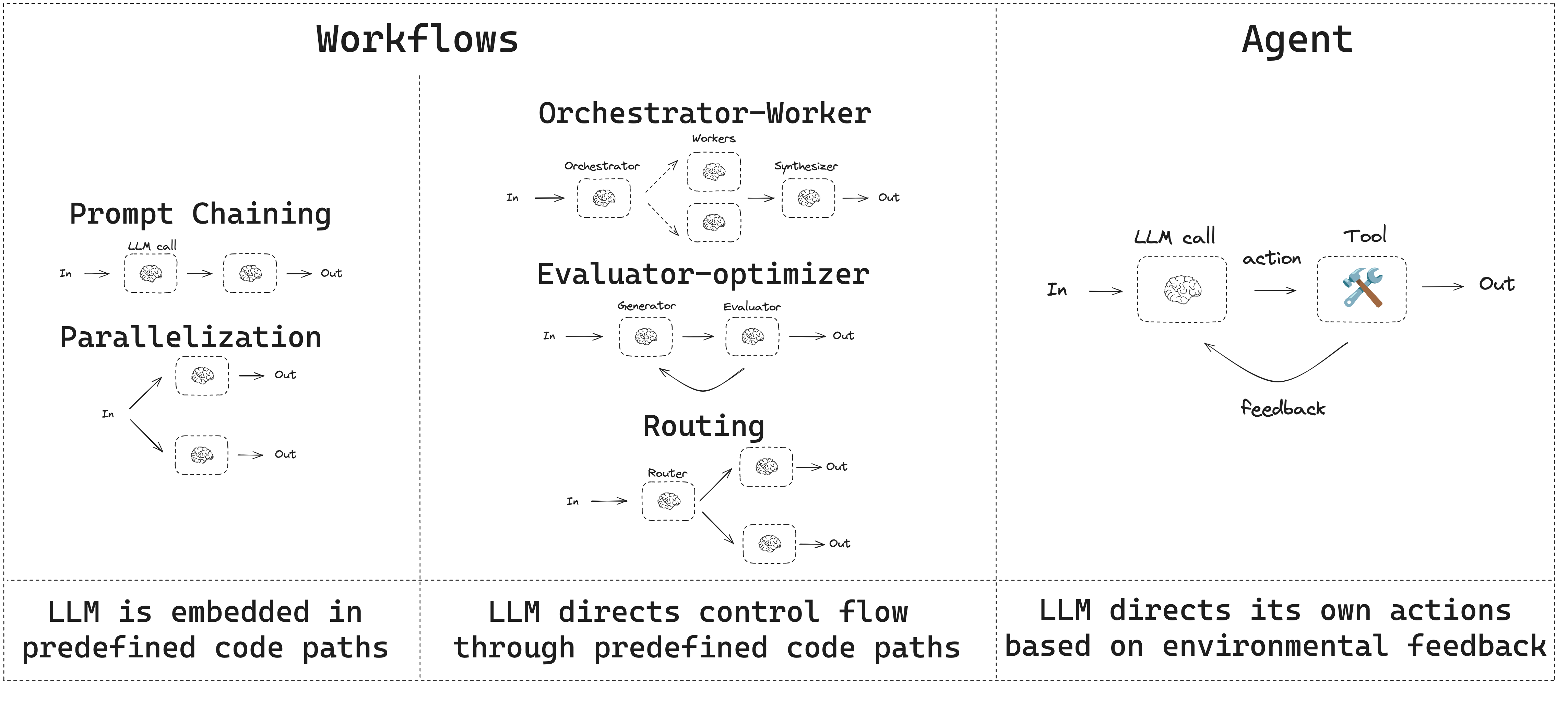
이 가이드는 일반적인 workflow와 agent 패턴을 검토합니다.
  • Workflow는 미리 정의된 코드 경로를 가지며 특정 순서로 작동하도록 설계되었습니다.
  • Agent는 동적이며 자체 프로세스와 도구 사용을 정의합니다.
Agent Workflow LangGraph는 agent와 workflow를 구축할 때 persistence, streaming, 디버깅 지원 및 deployment를 포함한 여러 이점을 제공합니다.

Setup

workflow 또는 agent를 구축하려면 structured output과 tool calling을 지원하는 모든 chat model을 사용할 수 있습니다. 다음 예제는 Anthropic을 사용합니다:
  1. dependency 설치:
pip install langchain_core langchain-anthropic langgraph
  1. LLM 초기화:
import os
import getpass

from langchain_anthropic import ChatAnthropic

def _set_env(var: str):
    if not os.environ.get(var):
        os.environ[var] = getpass.getpass(f"{var}: ")


_set_env("ANTHROPIC_API_KEY")

llm = ChatAnthropic(model="claude-sonnet-4-5")

LLM과 augmentation

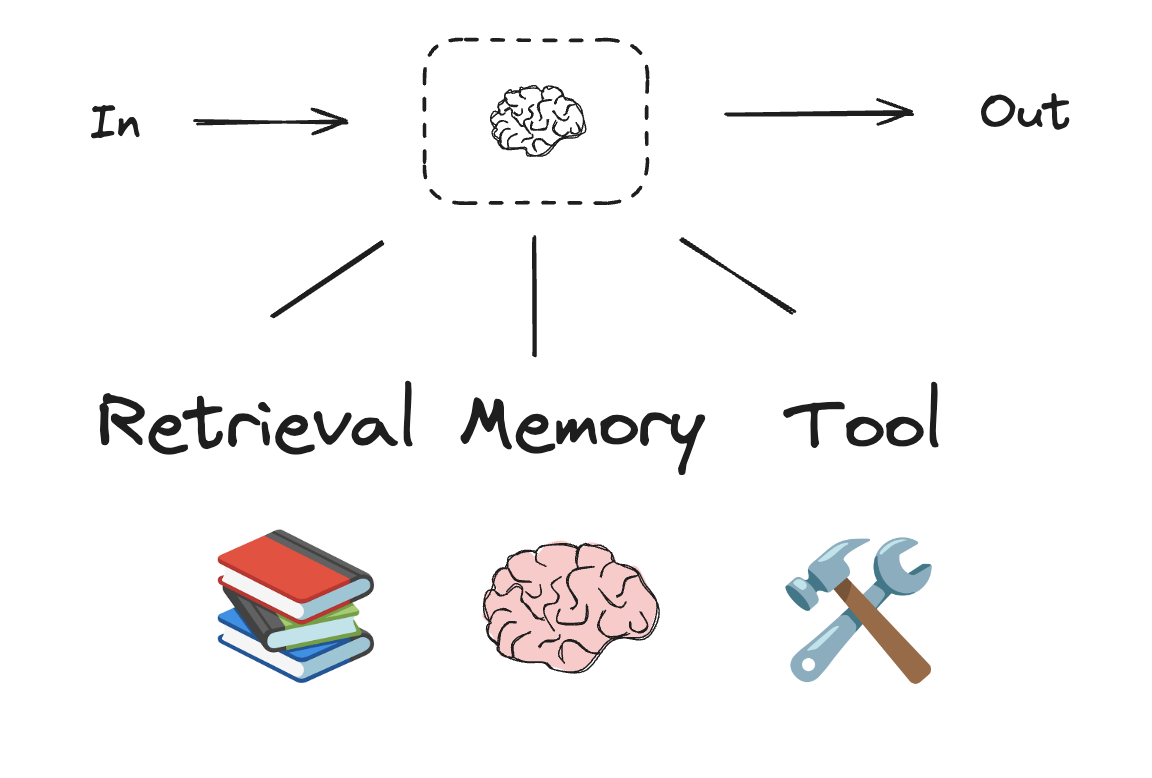
Workflow와 agentic 시스템은 LLM과 이에 추가하는 다양한 augmentation을 기반으로 합니다. Tool calling, structured output, short term memory는 LLM을 필요에 맞게 조정하기 위한 몇 가지 옵션입니다. LLM augmentations
# Schema for structured output
from pydantic import BaseModel, Field


class SearchQuery(BaseModel):
    search_query: str = Field(None, description="Query that is optimized web search.")
    justification: str = Field(
        None, description="Why this query is relevant to the user's request."
    )


# Augment the LLM with schema for structured output
structured_llm = llm.with_structured_output(SearchQuery)

# Invoke the augmented LLM
output = structured_llm.invoke("How does Calcium CT score relate to high cholesterol?")

# Define a tool
def multiply(a: int, b: int) -> int:
    return a * b

# Augment the LLM with tools
llm_with_tools = llm.bind_tools([multiply])

# Invoke the LLM with input that triggers the tool call
msg = llm_with_tools.invoke("What is 2 times 3?")

# Get the tool call
msg.tool_calls

Prompt chaining

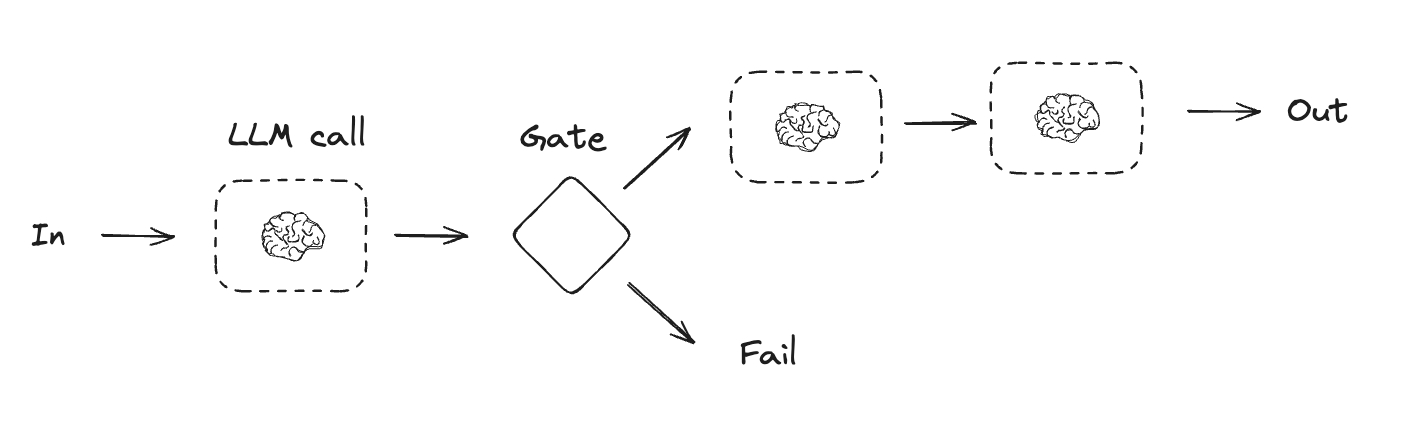
Prompt chaining은 각 LLM 호출이 이전 호출의 출력을 처리하는 방식입니다. 이는 더 작고 검증 가능한 단계로 나눌 수 있는 명확하게 정의된 작업을 수행하는 데 자주 사용됩니다. 몇 가지 예는 다음과 같습니다:
  • 문서를 다른 언어로 번역
  • 생성된 콘텐츠의 일관성 검증
Prompt chaining
from typing_extensions import TypedDict
from langgraph.graph import StateGraph, START, END
from IPython.display import Image, display


# Graph state
class State(TypedDict):
    topic: str
    joke: str
    improved_joke: str
    final_joke: str


# Nodes
def generate_joke(state: State):
    """First LLM call to generate initial joke"""

    msg = llm.invoke(f"Write a short joke about {state['topic']}")
    return {"joke": msg.content}


def check_punchline(state: State):
    """Gate function to check if the joke has a punchline"""

    # Simple check - does the joke contain "?" or "!"
    if "?" in state["joke"] or "!" in state["joke"]:
        return "Pass"
    return "Fail"


def improve_joke(state: State):
    """Second LLM call to improve the joke"""

    msg = llm.invoke(f"Make this joke funnier by adding wordplay: {state['joke']}")
    return {"improved_joke": msg.content}


def polish_joke(state: State):
    """Third LLM call for final polish"""
    msg = llm.invoke(f"Add a surprising twist to this joke: {state['improved_joke']}")
    return {"final_joke": msg.content}


# Build workflow
workflow = StateGraph(State)

# Add nodes
workflow.add_node("generate_joke", generate_joke)
workflow.add_node("improve_joke", improve_joke)
workflow.add_node("polish_joke", polish_joke)

# Add edges to connect nodes
workflow.add_edge(START, "generate_joke")
workflow.add_conditional_edges(
    "generate_joke", check_punchline, {"Fail": "improve_joke", "Pass": END}
)
workflow.add_edge("improve_joke", "polish_joke")
workflow.add_edge("polish_joke", END)

# Compile
chain = workflow.compile()

# Show workflow
display(Image(chain.get_graph().draw_mermaid_png()))

# Invoke
state = chain.invoke({"topic": "cats"})
print("Initial joke:")
print(state["joke"])
print("\n--- --- ---\n")
if "improved_joke" in state:
    print("Improved joke:")
    print(state["improved_joke"])
    print("\n--- --- ---\n")

    print("Final joke:")
    print(state["final_joke"])
else:
    print("Joke failed quality gate - no punchline detected!")

Parallelization

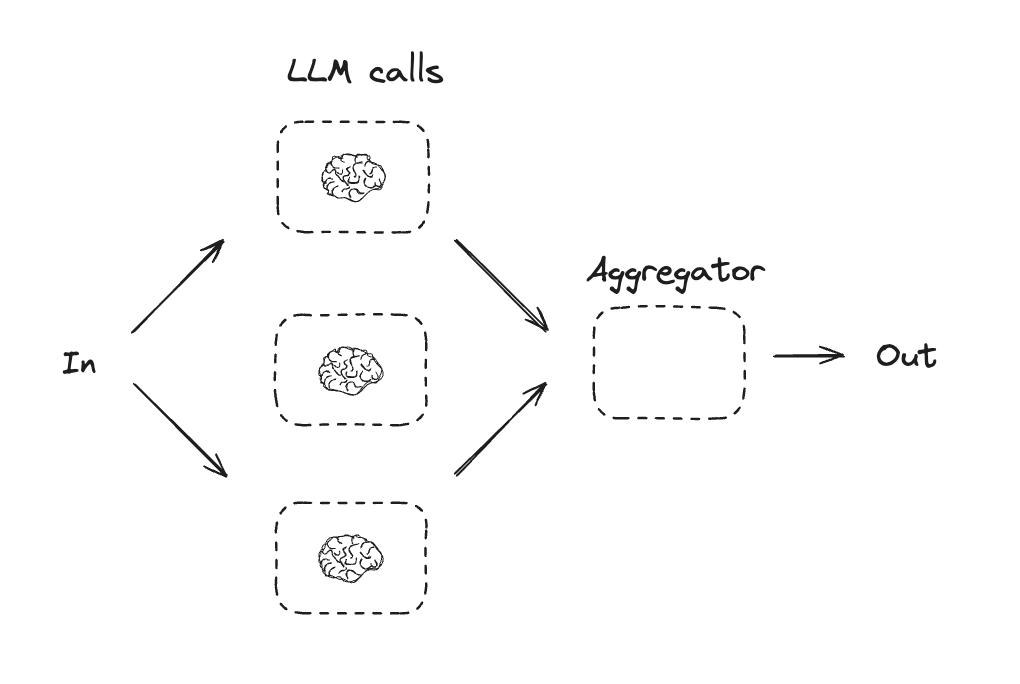
Parallelization에서는 LLM이 작업을 동시에 수행합니다. 이는 여러 독립적인 하위 작업을 동시에 실행하거나, 동일한 작업을 여러 번 실행하여 다른 출력을 확인하는 방식으로 수행됩니다. Parallelization은 일반적으로 다음과 같은 용도로 사용됩니다:
  • 하위 작업을 분할하고 병렬로 실행하여 속도 향상
  • 작업을 여러 번 실행하여 다른 출력을 확인하고 신뢰도 향상
몇 가지 예는 다음과 같습니다:
  • 문서에서 키워드를 처리하는 하나의 하위 작업과 형식 오류를 확인하는 두 번째 하위 작업을 실행
  • 인용 수, 사용된 출처 수, 출처의 품질과 같은 다양한 기준에 따라 문서의 정확성을 평가하는 작업을 여러 번 실행
parallelization.png
# Graph state
class State(TypedDict):
    topic: str
    joke: str
    story: str
    poem: str
    combined_output: str


# Nodes
def call_llm_1(state: State):
    """First LLM call to generate initial joke"""

    msg = llm.invoke(f"Write a joke about {state['topic']}")
    return {"joke": msg.content}


def call_llm_2(state: State):
    """Second LLM call to generate story"""

    msg = llm.invoke(f"Write a story about {state['topic']}")
    return {"story": msg.content}


def call_llm_3(state: State):
    """Third LLM call to generate poem"""

    msg = llm.invoke(f"Write a poem about {state['topic']}")
    return {"poem": msg.content}


def aggregator(state: State):
    """Combine the joke and story into a single output"""

    combined = f"Here's a story, joke, and poem about {state['topic']}!\n\n"
    combined += f"STORY:\n{state['story']}\n\n"
    combined += f"JOKE:\n{state['joke']}\n\n"
    combined += f"POEM:\n{state['poem']}"
    return {"combined_output": combined}


# Build workflow
parallel_builder = StateGraph(State)

# Add nodes
parallel_builder.add_node("call_llm_1", call_llm_1)
parallel_builder.add_node("call_llm_2", call_llm_2)
parallel_builder.add_node("call_llm_3", call_llm_3)
parallel_builder.add_node("aggregator", aggregator)

# Add edges to connect nodes
parallel_builder.add_edge(START, "call_llm_1")
parallel_builder.add_edge(START, "call_llm_2")
parallel_builder.add_edge(START, "call_llm_3")
parallel_builder.add_edge("call_llm_1", "aggregator")
parallel_builder.add_edge("call_llm_2", "aggregator")
parallel_builder.add_edge("call_llm_3", "aggregator")
parallel_builder.add_edge("aggregator", END)
parallel_workflow = parallel_builder.compile()

# Show workflow
display(Image(parallel_workflow.get_graph().draw_mermaid_png()))

# Invoke
state = parallel_workflow.invoke({"topic": "cats"})
print(state["combined_output"])

Routing

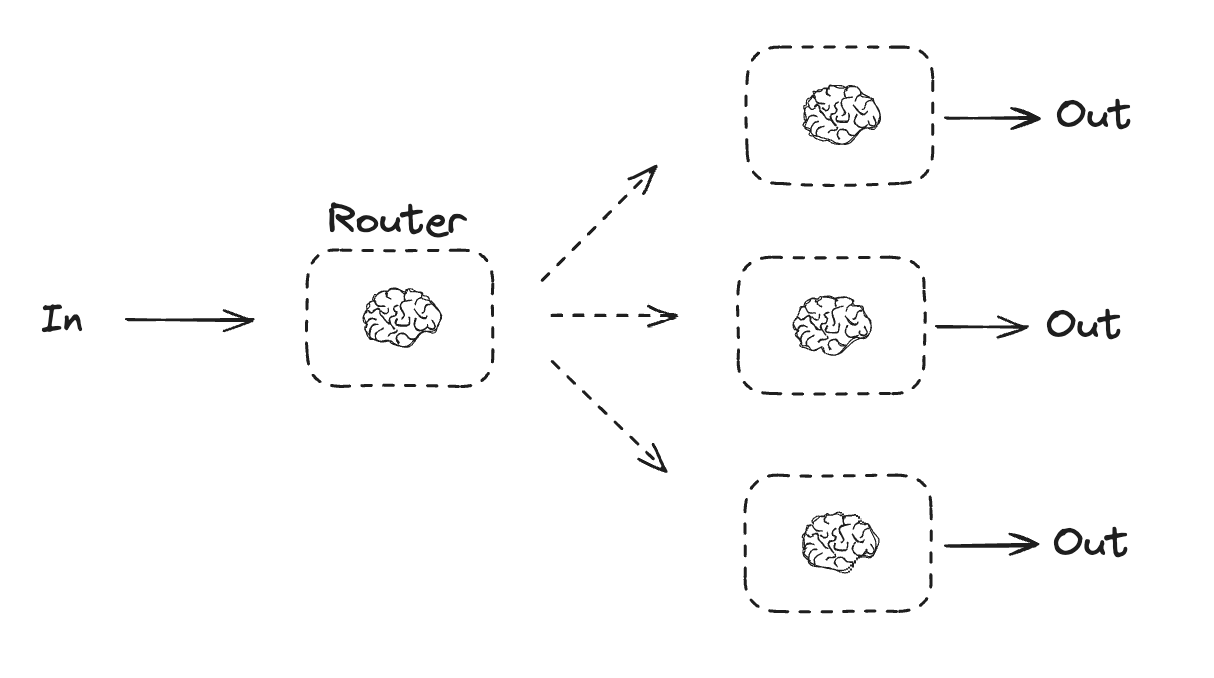
Routing workflow는 입력을 처리한 다음 컨텍스트별 작업으로 전달합니다. 이를 통해 복잡한 작업에 대한 특화된 흐름을 정의할 수 있습니다. 예를 들어, 제품 관련 질문에 답변하도록 구축된 workflow는 먼저 질문 유형을 처리한 다음 가격, 환불, 반품 등에 대한 특정 프로세스로 요청을 라우팅할 수 있습니다. routing.png
from typing_extensions import Literal
from langchain.messages import HumanMessage, SystemMessage


# Schema for structured output to use as routing logic
class Route(BaseModel):
    step: Literal["poem", "story", "joke"] = Field(
        None, description="The next step in the routing process"
    )


# Augment the LLM with schema for structured output
router = llm.with_structured_output(Route)


# State
class State(TypedDict):
    input: str
    decision: str
    output: str


# Nodes
def llm_call_1(state: State):
    """Write a story"""

    result = llm.invoke(state["input"])
    return {"output": result.content}


def llm_call_2(state: State):
    """Write a joke"""

    result = llm.invoke(state["input"])
    return {"output": result.content}


def llm_call_3(state: State):
    """Write a poem"""

    result = llm.invoke(state["input"])
    return {"output": result.content}


def llm_call_router(state: State):
    """Route the input to the appropriate node"""

    # Run the augmented LLM with structured output to serve as routing logic
    decision = router.invoke(
        [
            SystemMessage(
                content="Route the input to story, joke, or poem based on the user's request."
            ),
            HumanMessage(content=state["input"]),
        ]
    )

    return {"decision": decision.step}


# Conditional edge function to route to the appropriate node
def route_decision(state: State):
    # Return the node name you want to visit next
    if state["decision"] == "story":
        return "llm_call_1"
    elif state["decision"] == "joke":
        return "llm_call_2"
    elif state["decision"] == "poem":
        return "llm_call_3"


# Build workflow
router_builder = StateGraph(State)

# Add nodes
router_builder.add_node("llm_call_1", llm_call_1)
router_builder.add_node("llm_call_2", llm_call_2)
router_builder.add_node("llm_call_3", llm_call_3)
router_builder.add_node("llm_call_router", llm_call_router)

# Add edges to connect nodes
router_builder.add_edge(START, "llm_call_router")
router_builder.add_conditional_edges(
    "llm_call_router",
    route_decision,
    {  # Name returned by route_decision : Name of next node to visit
        "llm_call_1": "llm_call_1",
        "llm_call_2": "llm_call_2",
        "llm_call_3": "llm_call_3",
    },
)
router_builder.add_edge("llm_call_1", END)
router_builder.add_edge("llm_call_2", END)
router_builder.add_edge("llm_call_3", END)

# Compile workflow
router_workflow = router_builder.compile()

# Show the workflow
display(Image(router_workflow.get_graph().draw_mermaid_png()))

# Invoke
state = router_workflow.invoke({"input": "Write me a joke about cats"})
print(state["output"])

Orchestrator-worker

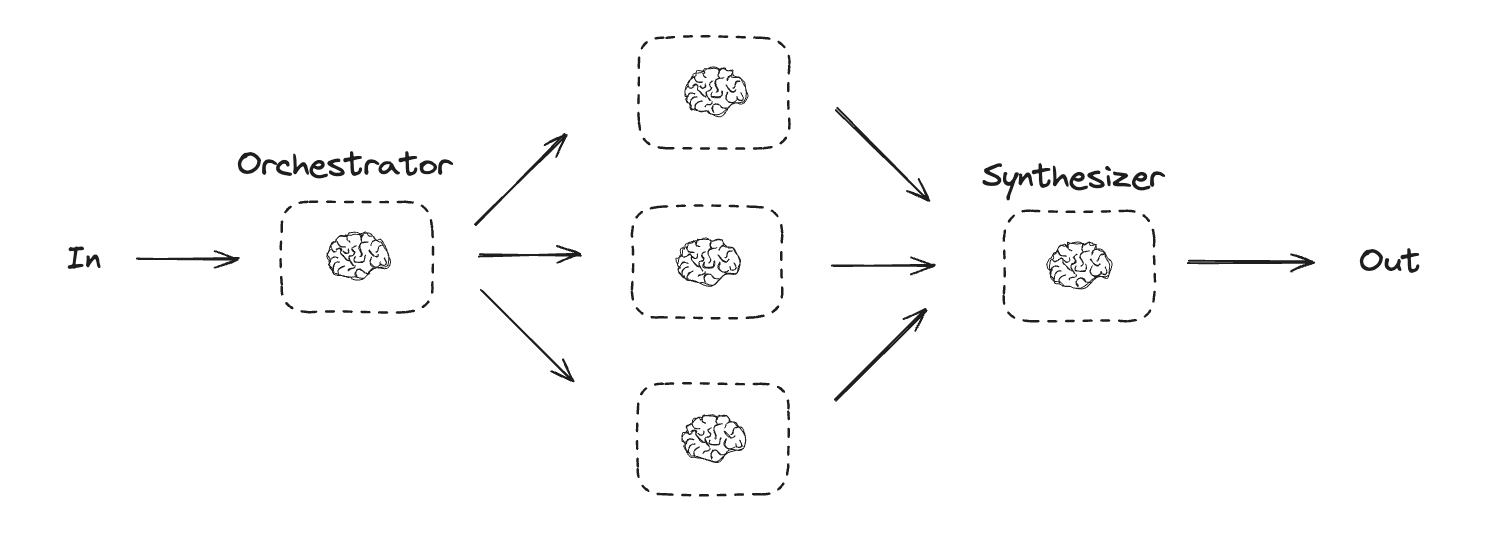
Orchestrator-worker 구성에서 orchestrator는:
  • 작업을 하위 작업으로 분해
  • 하위 작업을 worker에게 위임
  • worker 출력을 최종 결과로 합성
worker.png Orchestrator-worker workflow는 더 많은 유연성을 제공하며, parallelization처럼 하위 작업을 미리 정의할 수 없는 경우에 자주 사용됩니다. 이는 코드를 작성하거나 여러 파일에 걸쳐 콘텐츠를 업데이트해야 하는 workflow에서 일반적입니다. 예를 들어, 알 수 없는 수의 문서에서 여러 Python 라이브러리에 대한 설치 지침을 업데이트해야 하는 workflow는 이 패턴을 사용할 수 있습니다.
from typing import Annotated, List
import operator


# Schema for structured output to use in planning
class Section(BaseModel):
    name: str = Field(
        description="Name for this section of the report.",
    )
    description: str = Field(
        description="Brief overview of the main topics and concepts to be covered in this section.",
    )


class Sections(BaseModel):
    sections: List[Section] = Field(
        description="Sections of the report.",
    )


# Augment the LLM with schema for structured output
planner = llm.with_structured_output(Sections)

LangGraph에서 worker 생성하기

Orchestrator-worker workflow는 일반적이며 LangGraph는 이를 기본적으로 지원합니다. Send API를 사용하면 worker node를 동적으로 생성하고 특정 입력을 전송할 수 있습니다. 각 worker는 자체 state를 가지며, 모든 worker 출력은 orchestrator graph에서 액세스할 수 있는 공유 state key에 기록됩니다. 이를 통해 orchestrator는 모든 worker 출력에 액세스하고 이를 최종 출력으로 합성할 수 있습니다. 아래 예제는 section 목록을 반복하고 Send API를 사용하여 각 worker에게 section을 전송합니다.
from langgraph.types import Send


# Graph state
class State(TypedDict):
    topic: str  # Report topic
    sections: list[Section]  # List of report sections
    completed_sections: Annotated[
        list, operator.add
    ]  # All workers write to this key in parallel
    final_report: str  # Final report


# Worker state
class WorkerState(TypedDict):
    section: Section
    completed_sections: Annotated[list, operator.add]


# Nodes
def orchestrator(state: State):
    """Orchestrator that generates a plan for the report"""

    # Generate queries
    report_sections = planner.invoke(
        [
            SystemMessage(content="Generate a plan for the report."),
            HumanMessage(content=f"Here is the report topic: {state['topic']}"),
        ]
    )

    return {"sections": report_sections.sections}


def llm_call(state: WorkerState):
    """Worker writes a section of the report"""

    # Generate section
    section = llm.invoke(
        [
            SystemMessage(
                content="Write a report section following the provided name and description. Include no preamble for each section. Use markdown formatting."
            ),
            HumanMessage(
                content=f"Here is the section name: {state['section'].name} and description: {state['section'].description}"
            ),
        ]
    )

    # Write the updated section to completed sections
    return {"completed_sections": [section.content]}


def synthesizer(state: State):
    """Synthesize full report from sections"""

    # List of completed sections
    completed_sections = state["completed_sections"]

    # Format completed section to str to use as context for final sections
    completed_report_sections = "\n\n---\n\n".join(completed_sections)

    return {"final_report": completed_report_sections}


# Conditional edge function to create llm_call workers that each write a section of the report
def assign_workers(state: State):
    """Assign a worker to each section in the plan"""

    # Kick off section writing in parallel via Send() API
    return [Send("llm_call", {"section": s}) for s in state["sections"]]


# Build workflow
orchestrator_worker_builder = StateGraph(State)

# Add the nodes
orchestrator_worker_builder.add_node("orchestrator", orchestrator)
orchestrator_worker_builder.add_node("llm_call", llm_call)
orchestrator_worker_builder.add_node("synthesizer", synthesizer)

# Add edges to connect nodes
orchestrator_worker_builder.add_edge(START, "orchestrator")
orchestrator_worker_builder.add_conditional_edges(
    "orchestrator", assign_workers, ["llm_call"]
)
orchestrator_worker_builder.add_edge("llm_call", "synthesizer")
orchestrator_worker_builder.add_edge("synthesizer", END)

# Compile the workflow
orchestrator_worker = orchestrator_worker_builder.compile()

# Show the workflow
display(Image(orchestrator_worker.get_graph().draw_mermaid_png()))

# Invoke
state = orchestrator_worker.invoke({"topic": "Create a report on LLM scaling laws"})

from IPython.display import Markdown
Markdown(state["final_report"])

Evaluator-optimizer

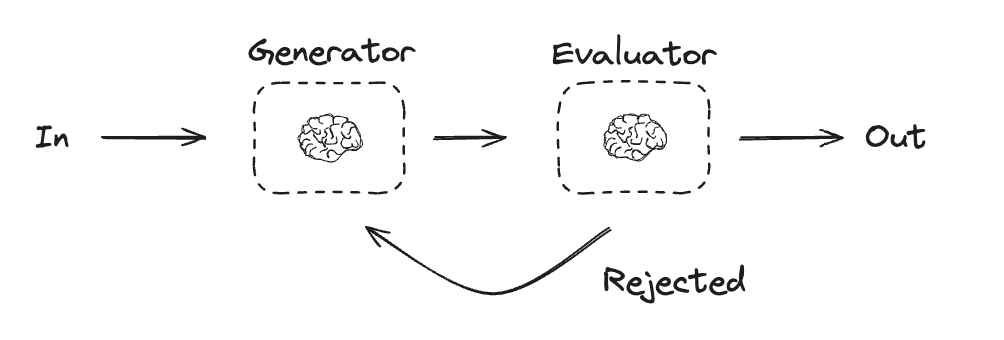
Evaluator-optimizer workflow에서는 하나의 LLM 호출이 응답을 생성하고 다른 호출이 해당 응답을 평가합니다. evaluator 또는 human-in-the-loop가 응답에 개선이 필요하다고 판단하면 피드백이 제공되고 응답이 재생성됩니다. 이 루프는 허용 가능한 응답이 생성될 때까지 계속됩니다. Evaluator-optimizer workflow는 작업에 대한 특정 성공 기준이 있지만 해당 기준을 충족하기 위해 반복이 필요한 경우에 일반적으로 사용됩니다. 예를 들어, 두 언어 간에 텍스트를 번역할 때 항상 완벽하게 일치하는 것은 아닙니다. 두 언어에서 동일한 의미를 가진 번역을 생성하려면 몇 번의 반복이 필요할 수 있습니다. evaluator_optimizer.png
# Graph state
class State(TypedDict):
    joke: str
    topic: str
    feedback: str
    funny_or_not: str


# Schema for structured output to use in evaluation
class Feedback(BaseModel):
    grade: Literal["funny", "not funny"] = Field(
        description="Decide if the joke is funny or not.",
    )
    feedback: str = Field(
        description="If the joke is not funny, provide feedback on how to improve it.",
    )


# Augment the LLM with schema for structured output
evaluator = llm.with_structured_output(Feedback)


# Nodes
def llm_call_generator(state: State):
    """LLM generates a joke"""

    if state.get("feedback"):
        msg = llm.invoke(
            f"Write a joke about {state['topic']} but take into account the feedback: {state['feedback']}"
        )
    else:
        msg = llm.invoke(f"Write a joke about {state['topic']}")
    return {"joke": msg.content}


def llm_call_evaluator(state: State):
    """LLM evaluates the joke"""

    grade = evaluator.invoke(f"Grade the joke {state['joke']}")
    return {"funny_or_not": grade.grade, "feedback": grade.feedback}


# Conditional edge function to route back to joke generator or end based upon feedback from the evaluator
def route_joke(state: State):
    """Route back to joke generator or end based upon feedback from the evaluator"""

    if state["funny_or_not"] == "funny":
        return "Accepted"
    elif state["funny_or_not"] == "not funny":
        return "Rejected + Feedback"


# Build workflow
optimizer_builder = StateGraph(State)

# Add the nodes
optimizer_builder.add_node("llm_call_generator", llm_call_generator)
optimizer_builder.add_node("llm_call_evaluator", llm_call_evaluator)

# Add edges to connect nodes
optimizer_builder.add_edge(START, "llm_call_generator")
optimizer_builder.add_edge("llm_call_generator", "llm_call_evaluator")
optimizer_builder.add_conditional_edges(
    "llm_call_evaluator",
    route_joke,
    {  # Name returned by route_joke : Name of next node to visit
        "Accepted": END,
        "Rejected + Feedback": "llm_call_generator",
    },
)

# Compile the workflow
optimizer_workflow = optimizer_builder.compile()

# Show the workflow
display(Image(optimizer_workflow.get_graph().draw_mermaid_png()))

# Invoke
state = optimizer_workflow.invoke({"topic": "Cats"})
print(state["joke"])

Agent

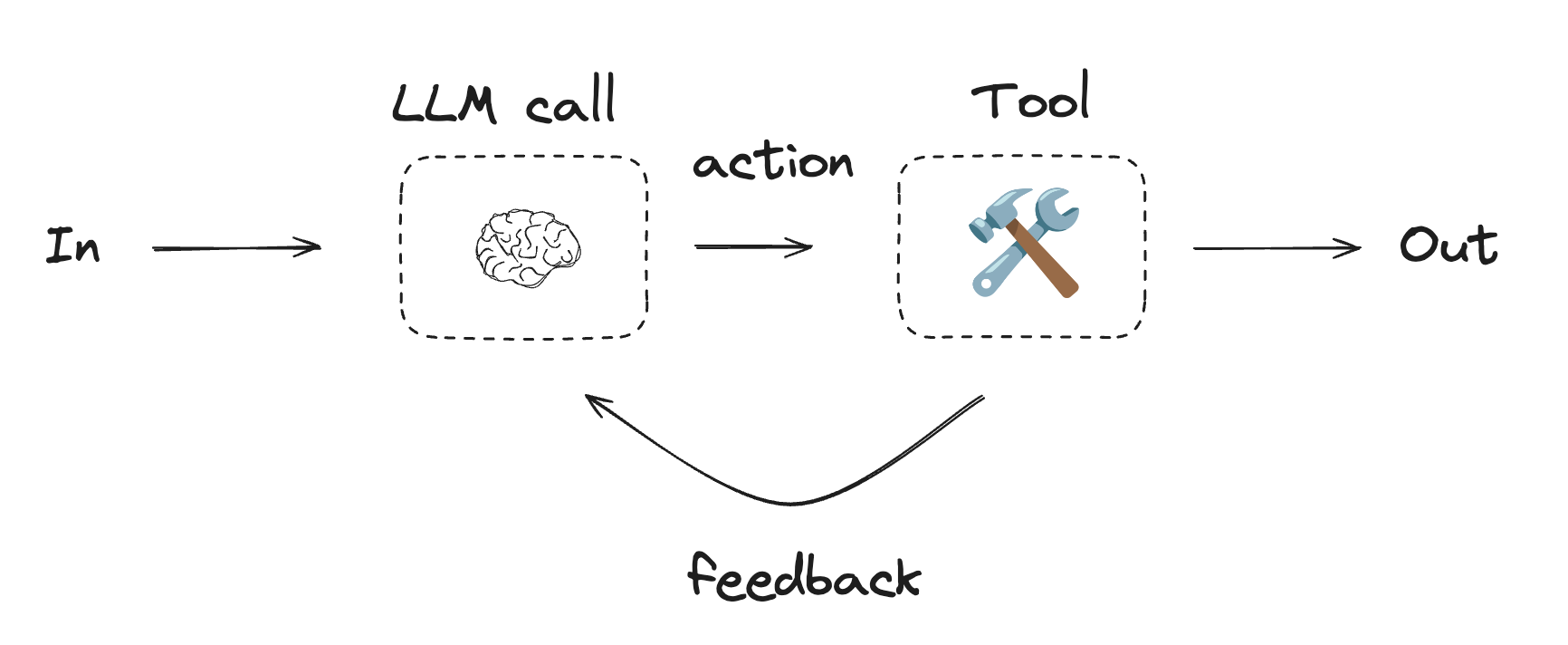
Agent는 일반적으로 tool을 사용하여 작업을 수행하는 LLM으로 구현됩니다. 연속적인 피드백 루프에서 작동하며, 문제와 솔루션을 예측할 수 없는 상황에서 사용됩니다. Agent는 workflow보다 더 많은 자율성을 가지며, 사용하는 도구와 문제 해결 방법에 대한 결정을 내릴 수 있습니다. 사용 가능한 도구 세트와 agent의 동작 방식에 대한 가이드라인을 여전히 정의할 수 있습니다. agent.png
Agent를 시작하려면 quickstart를 참조하거나 LangChain에서 작동 방식에 대해 자세히 읽어보세요.
Using tools
from langchain.tools import tool


# Define tools
@tool
def multiply(a: int, b: int) -> int:
    """Multiply `a` and `b`.

    Args:
        a: First int
        b: Second int
    """
    return a * b


@tool
def add(a: int, b: int) -> int:
    """Adds `a` and `b`.

    Args:
        a: First int
        b: Second int
    """
    return a + b


@tool
def divide(a: int, b: int) -> float:
    """Divide `a` and `b`.

    Args:
        a: First int
        b: Second int
    """
    return a / b


# Augment the LLM with tools
tools = [add, multiply, divide]
tools_by_name = {tool.name: tool for tool in tools}
llm_with_tools = llm.bind_tools(tools)
from langgraph.graph import MessagesState
from langchain.messages import SystemMessage, HumanMessage, ToolMessage


# Nodes
def llm_call(state: MessagesState):
    """LLM decides whether to call a tool or not"""

    return {
        "messages": [
            llm_with_tools.invoke(
                [
                    SystemMessage(
                        content="You are a helpful assistant tasked with performing arithmetic on a set of inputs."
                    )
                ]
                + state["messages"]
            )
        ]
    }


def tool_node(state: dict):
    """Performs the tool call"""

    result = []
    for tool_call in state["messages"][-1].tool_calls:
        tool = tools_by_name[tool_call["name"]]
        observation = tool.invoke(tool_call["args"])
        result.append(ToolMessage(content=observation, tool_call_id=tool_call["id"]))
    return {"messages": result}


# Conditional edge function to route to the tool node or end based upon whether the LLM made a tool call
def should_continue(state: MessagesState) -> Literal["tool_node", END]:
    """Decide if we should continue the loop or stop based upon whether the LLM made a tool call"""

    messages = state["messages"]
    last_message = messages[-1]

    # If the LLM makes a tool call, then perform an action
    if last_message.tool_calls:
        return "tool_node"

    # Otherwise, we stop (reply to the user)
    return END


# Build workflow
agent_builder = StateGraph(MessagesState)

# Add nodes
agent_builder.add_node("llm_call", llm_call)
agent_builder.add_node("tool_node", tool_node)

# Add edges to connect nodes
agent_builder.add_edge(START, "llm_call")
agent_builder.add_conditional_edges(
    "llm_call",
    should_continue,
    ["tool_node", END]
)
agent_builder.add_edge("tool_node", "llm_call")

# Compile the agent
agent = agent_builder.compile()

# Show the agent
display(Image(agent.get_graph(xray=True).draw_mermaid_png()))

# Invoke
messages = [HumanMessage(content="Add 3 and 4.")]
messages = agent.invoke({"messages": messages})
for m in messages["messages"]:
    m.pretty_print()

Connect these docs programmatically to Claude, VSCode, and more via MCP for real-time answers.
I