LangSmith는 prompt를 생성, 테스트 및 반복 작업할 수 있는 협업 인터페이스를 제공합니다. 런타임에 애플리케이션으로 LangSmith에서 동적으로 prompt를 가져올 수 있지만, 자체 데이터베이스나 버전 관리 시스템과 prompt를 동기화하는 것을 선호할 수 있습니다. 이러한 워크플로우를 지원하기 위해 LangSmith는 webhook을 통해 prompt 업데이트 알림을 받을 수 있도록 합니다. 왜 GitHub와 prompt를 동기화해야 하나요?
  • 버전 관리: 익숙한 시스템에서 애플리케이션 코드와 함께 prompt의 버전을 관리할 수 있습니다.
  • CI/CD 통합: 중요한 prompt가 변경될 때 자동화된 스테이징 또는 프로덕션 배포를 트리거할 수 있습니다.
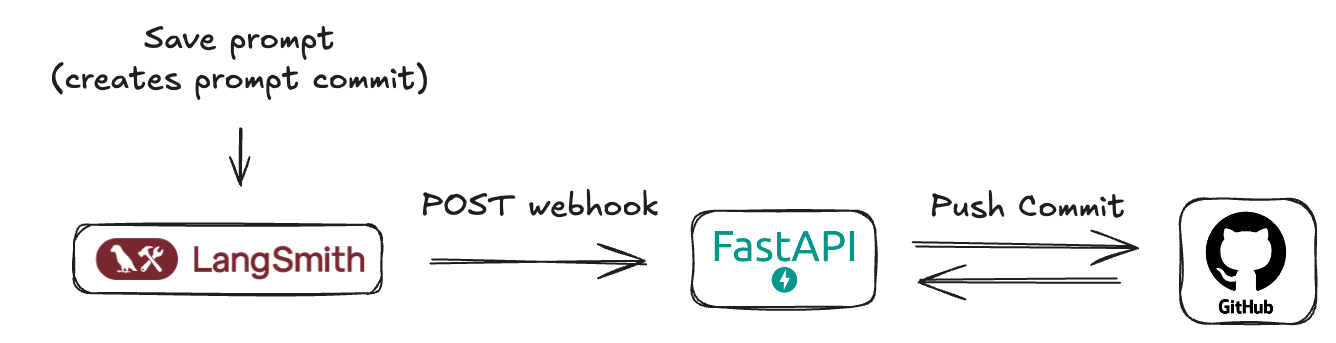
Prompt Webhook Diagram

사전 요구사항

시작하기 전에 다음 사항이 설정되어 있는지 확인하세요:
  1. GitHub 계정: 표준 GitHub 계정.
  2. GitHub Repository: LangSmith prompt manifest가 저장될 새 repository를 생성하거나 기존 repository를 선택합니다. 애플리케이션 코드와 동일한 repository이거나 prompt 전용 repository일 수 있습니다.
  3. GitHub Personal Access Token (PAT):
    • LangSmith webhook은 GitHub와 직접 상호작용하지 않습니다—사용자가 생성하는 중개 서버를 호출합니다.
    • 이 서버는 repository에 인증하고 commit을 수행하기 위해 GitHub PAT가 필요합니다.
    • repo scope를 포함해야 합니다 (public repository의 경우 public_repo로 충분합니다).
    • **GitHub > Settings > Developer settings > Personal access tokens > Tokens (classic)**으로 이동합니다.
    • **Generate new token (classic)**을 클릭합니다.
    • 이름을 지정하고 (예: “LangSmith Prompt Sync”), 만료 기간을 설정하고, 필요한 scope를 선택합니다.
    • Generate token을 클릭하고 즉시 복사하세요 — 다시 표시되지 않습니다.
    • token을 안전하게 저장하고 서버에 환경 변수로 제공합니다.

LangSmith “Prompt Commits”와 Webhooks 이해하기

LangSmith에서 prompt에 대한 변경 사항을 저장하면 본질적으로 새 버전 또는 “Prompt Commit”을 생성하는 것입니다. 이러한 commit이 webhook을 트리거할 수 있습니다. webhook은 새로운 prompt manifest를 포함하는 JSON payload를 전송합니다.
{
  "prompt_id": "f33dcb51-eb17-47a5-83ca-64ac8a027a29",
  "prompt_name": "My Prompt",
  "commit_hash": "commit_hash_1234567890",
  "created_at": "2021-01-01T00:00:00Z",
  "created_by": "Jane Doe",
  "manifest": {
    "lc": 1,
    "type": "constructor",
    "id": ["langchain", "schema", "runnable", "RunnableSequence"],
    "kwargs": {
      "first": {
        "lc": 1,
        "type": "constructor",
        "id": ["langchain", "prompts", "chat", "ChatPromptTemplate"],
        "kwargs": {
          "messages": [
            {
              "lc": 1,
              "type": "constructor",
              "id": [
                "langchain_core",
                "prompts",
                "chat",
                "SystemMessagePromptTemplate"
              ],
              "kwargs": {
                "prompt": {
                  "lc": 1,
                  "type": "constructor",
                  "id": [
                    "langchain_core",
                    "prompts",
                    "prompt",
                    "PromptTemplate"
                  ],
                  "kwargs": {
                    "input_variables": [],
                    "template_format": "mustache",
                    "template": "You are a chatbot."
                  }
                }
              }
            },
            {
              "lc": 1,
              "type": "constructor",
              "id": [
                "langchain_core",
                "prompts",
                "chat",
                "HumanMessagePromptTemplate"
              ],
              "kwargs": {
                "prompt": {
                  "lc": 1,
                  "type": "constructor",
                  "id": [
                    "langchain_core",
                    "prompts",
                    "prompt",
                    "PromptTemplate"
                  ],
                  "kwargs": {
                    "input_variables": ["question"],
                    "template_format": "mustache",
                    "template": "{{question}}"
                  }
                }
              }
            }
          ],
          "input_variables": ["question"]
        }
      },
      "last": {
        "lc": 1,
        "type": "constructor",
        "id": ["langchain", "schema", "runnable", "RunnableBinding"],
        "kwargs": {
          "bound": {
            "lc": 1,
            "type": "constructor",
            "id": ["langchain", "chat_models", "openai", "ChatOpenAI"],
            "kwargs": {
              "temperature": 1,
              "top_p": 1,
              "presence_penalty": 0,
              "frequency_penalty": 0,
              "model": "gpt-4.1-mini",
              "extra_headers": {},
              "openai_api_key": {
                "id": ["OPENAI_API_KEY"],
                "lc": 1,
                "type": "secret"
              }
            }
          },
          "kwargs": {}
        }
      }
    }
  }
}
LangSmith의 prompt commit webhook은 일반적으로 workspace 레벨에서 트리거된다는 점을 이해하는 것이 중요합니다. 즉, LangSmith workspace 내의 어떤 prompt가 수정되고 “prompt commit”이 저장되면 webhook이 실행되어 해당 prompt의 업데이트된 manifest를 전송합니다. payload는 prompt id로 식별할 수 있습니다. 수신 서버는 이를 염두에 두고 설계되어야 합니다.

Webhook 수신을 위한 FastAPI 서버 구현

prompt가 업데이트될 때 LangSmith의 webhook 알림을 효과적으로 처리하려면 중개 서버 애플리케이션이 필요합니다. 이 서버는 LangSmith가 보내는 HTTP POST 요청의 수신자 역할을 합니다. 이 가이드에서는 데모 목적으로 이 역할을 수행할 간단한 FastAPI 애플리케이션 생성에 대해 설명합니다. 이 공개적으로 접근 가능한 서버는 다음을 담당합니다:
  1. Webhook 요청 수신: 들어오는 HTTP POST 요청을 수신합니다.
  2. Payload 파싱: 요청 본문에서 JSON 형식의 prompt manifest를 추출하고 해석합니다.
  3. GitHub에 Commit: 지정된 GitHub repository에 업데이트된 prompt manifest를 포함하는 새 commit을 프로그래밍 방식으로 생성합니다. 이를 통해 prompt가 버전 관리되고 LangSmith에서 수행된 변경 사항과 동기화됩니다.
배포를 위해 Render.com (적절한 무료 tier 제공), Vercel, Fly.io 또는 기타 클라우드 제공업체 (AWS, GCP, Azure)와 같은 플랫폼을 사용하여 FastAPI 애플리케이션을 호스팅하고 공개 URL을 얻을 수 있습니다. 서버의 핵심 기능에는 webhook 수신을 위한 endpoint, manifest 파싱 로직, 그리고 commit을 관리하기 위한 GitHub API와의 통합 (인증을 위해 Personal Access Token 사용)이 포함됩니다.
main.py이 서버는 LangSmith로부터 들어오는 webhook을 수신하고 받은 prompt manifest를 GitHub repository에 commit합니다.
import base64
import json
import uuid
from typing import Any, Dict
import httpx
from fastapi import FastAPI, HTTPException, Body
from pydantic import BaseModel, Field
from pydantic_settings import BaseSettings, SettingsConfigDict

# --- Configuration ---
class AppConfig(BaseSettings):
    """
    Application configuration model.
    Loads settings from environment variables.
    """
    GITHUB_TOKEN: str
    GITHUB_REPO_OWNER: str
    GITHUB_REPO_NAME: str
    GITHUB_FILE_PATH: str = "prompt_manifest.json"
    GITHUB_BRANCH: str = "main"
    model_config = SettingsConfigDict(
        env_file=".env",
        env_file_encoding='utf-8',
        extra='ignore'
    )

settings = AppConfig()

# --- Pydantic Models ---
class WebhookPayload(BaseModel):
    """
    Defines the expected structure of the incoming webhook payload.
    """
    prompt_id: UUID = Field(
        ...,
        description="The unique identifier for the prompt."
    )
    prompt_name: str = Field(
        ...,
        description="The name/title of the prompt."
    )
    commit_hash: str = Field(
        ...,
        description="An identifier for the commit event that triggered the webhook."
    )
    created_at: str = Field(
        ...,
        description="Timestamp indicating when the event was created (ISO format preferred)."
    )
    created_by: str = Field(
        ...,
        description="The name of the user who created the event."
    )
    manifest: Dict[str, Any] = Field(
        ...,
        description="The main content or configuration data to be committed to GitHub."
    )

# --- GitHub Helper Function ---
async def commit_manifest_to_github(payload: WebhookPayload) -> Dict[str, Any]:
    """
    Helper function to commit the manifest directly to the configured branch.
    """
    github_api_base_url = "https://api.github.com"
    repo_file_url = (
        f"{github_api_base_url}/repos/{settings.GITHUB_REPO_OWNER}/"
        f"{settings.GITHUB_REPO_NAME}/contents/{settings.GITHUB_FILE_PATH}"
    )
    headers = {
        "Authorization": f"Bearer {settings.GITHUB_TOKEN}",
        "Accept": "application/vnd.github.v3+json",
        "X-GitHub-Api-Version": "2022-11-28",
    }
    manifest_json_string = json.dumps(payload.manifest, indent=2)
    content_base64 = base64.b64encode(manifest_json_string.encode('utf-8')).decode('utf-8')
    commit_message = f"feat: Update {settings.GITHUB_FILE_PATH} via webhook - commit {payload.commit_hash}"
    data_to_commit = {
        "message": commit_message,
        "content": content_base64,
        "branch": settings.GITHUB_BRANCH,
    }
    async with httpx.AsyncClient() as client:
        current_file_sha = None
        try:
            params_get = {"ref": settings.GITHUB_BRANCH}
            response_get = await client.get(repo_file_url, headers=headers, params=params_get)
            if response_get.status_code == 200:
                current_file_sha = response_get.json().get("sha")
            elif response_get.status_code != 404: # If not 404 (not found), it's an unexpected error
                response_get.raise_for_status()
        except httpx.HTTPStatusError as e:
            error_detail = f"GitHub API error (GET file SHA): {e.response.status_code} - {e.response.text}"
            print(f"[ERROR] {error_detail}")
            raise HTTPException(status_code=e.response.status_code, detail=error_detail)
        except httpx.RequestError as e:
            error_detail = f"Network error connecting to GitHub (GET file SHA): {str(e)}"
            print(f"[ERROR] {error_detail}")
            raise HTTPException(status_code=503, detail=error_detail)
        if current_file_sha:
            data_to_commit["sha"] = current_file_sha
        try:
            response_put = await client.put(repo_file_url, headers=headers, json=data_to_commit)
            response_put.raise_for_status()
            return response_put.json()
        except httpx.HTTPStatusError as e:
            error_detail = f"GitHub API error (PUT content): {e.response.status_code} - {e.response.text}"
            if e.response.status_code == 409: # Conflict
                error_detail = (
                    f"GitHub API conflict (PUT content): {e.response.text}. "
                    "This might be due to an outdated SHA or branch protection rules."
                )
            elif e.response.status_code == 422: # Unprocessable Entity
                error_detail = (
                    f"GitHub API Unprocessable Entity (PUT content): {e.response.text}. "
                    f"Ensure the branch '{settings.GITHUB_BRANCH}' exists and the payload is correctly formatted."
                )
            print(f"[ERROR] {error_detail}")
            raise HTTPException(status_code=e.response.status_code, detail=error_detail)
        except httpx.RequestError as e:
            error_detail = f"Network error connecting to GitHub (PUT content): {str(e)}"
            print(f"[ERROR] {error_detail}")
            raise HTTPException(status_code=503, detail=error_detail)

# --- FastAPI Application ---
app = FastAPI(
    title="Minimal Webhook to GitHub Commit Service",
    description="Receives a webhook and commits its 'manifest' part directly to a GitHub repository.",
    version="0.1.0",
)

@app.post("/webhook/commit", status_code=201, tags=["GitHub Webhooks"])
async def handle_webhook_direct_commit(payload: WebhookPayload = Body(...)):
    """
    Webhook endpoint to receive events and commit DIRECTLY to the configured branch.
    """
    try:
        github_response = await commit_manifest_to_github(payload)
        return {
            "message": "Webhook received and manifest committed directly to GitHub successfully.",
            "github_commit_details": github_response.get("commit", {}),
            "github_content_details": github_response.get("content", {})
        }
    except HTTPException:
        raise # Re-raise if it's an HTTPException from the helper
    except Exception as e:
        error_message = f"An unexpected error occurred: {str(e)}"
        print(f"[ERROR] {error_message}")
        raise HTTPException(status_code=500, detail="An internal server error occurred.")

@app.get("/health", status_code=200, tags=["Health"])
async def health_check():
    """
    A simple health check endpoint.
    """
    return {"status": "ok", "message": "Service is running."}

# To run this server (save as main.py):
# 1. Install dependencies: pip install fastapi uvicorn pydantic pydantic-settings httpx python-dotenv
# 2. Create a .env file with your GitHub token and repo details.
# 3. Run with Uvicorn: uvicorn main:app --reload
# 4. Deploy to a public platform like Render.com.
이 서버의 주요 측면:
  • 구성 (.env): GITHUB_TOKEN, GITHUB_REPO_OWNER, GITHUB_REPO_NAME이 포함된 .env 파일이 필요합니다. GITHUB_FILE_PATH (기본값: LangSmith_prompt_manifest.json)와 GITHUB_BRANCH (기본값: main)도 사용자 정의할 수 있습니다.
  • GitHub 상호작용: commit_manifest_to_github 함수는 현재 파일의 SHA를 가져오고 (업데이트하기 위해) 새 manifest 내용을 commit하는 로직을 처리합니다.
  • Webhook Endpoint (/webhook/commit): LangSmith webhook이 대상으로 하는 URL 경로입니다.
  • 오류 처리: GitHub API 상호작용에 대한 기본 오류 처리가 포함되어 있습니다.
이 서버를 선택한 플랫폼 (예: Render)에 배포하고 공개 URL (예: https://prompt-commit-webhook.onrender.com)을 기록해 두세요.

LangSmith에서 Webhook 구성

FastAPI 서버가 배포되고 공개 URL이 있으면 LangSmith에서 webhook을 구성할 수 있습니다:
  1. LangSmith workspace로 이동합니다.
  2. Prompts 섹션으로 이동합니다. 여기에서 prompt 목록을 볼 수 있습니다. LangSmith Prompts section
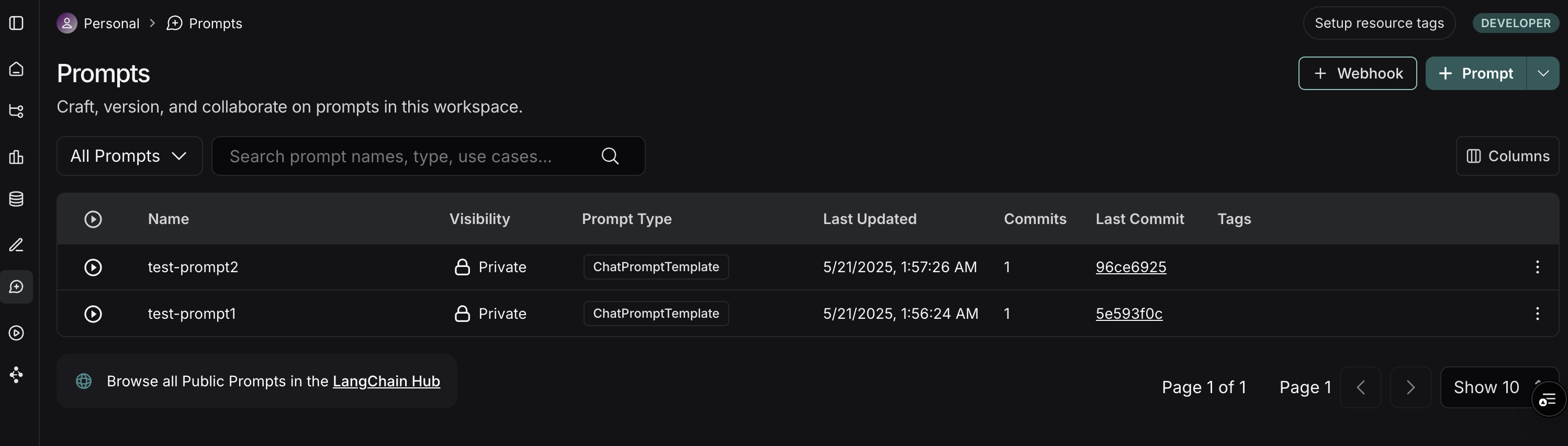
  3. Prompts 페이지의 오른쪽 상단에서 + Webhook 버튼을 클릭합니다.
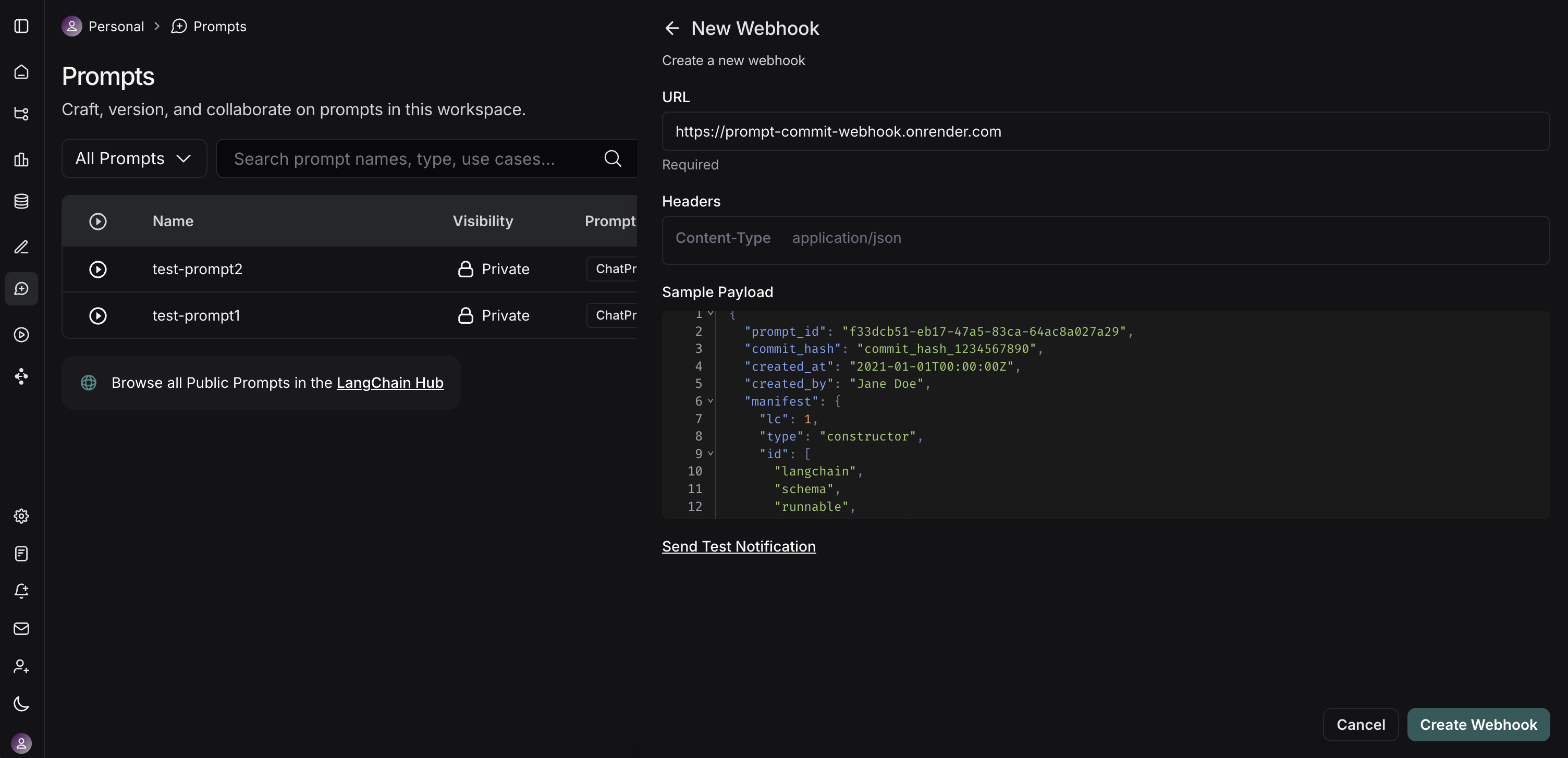
  4. webhook을 구성하는 양식이 표시됩니다: LangSmith Webhook configuration modal
    • Webhook URL: 배포된 FastAPI 서버 endpoint의 전체 공개 URL을 입력합니다. 예제 서버의 경우 https://prompt-commit-webhook.onrender.com/webhook/commit입니다.
    • Headers (선택사항):
      • LangSmith가 각 webhook 요청과 함께 전송할 사용자 정의 header를 추가할 수 있습니다.
  5. Webhook 테스트: LangSmith는 “Send Test Notification” 버튼을 제공합니다. 이를 사용하여 서버에 샘플 payload를 전송합니다. 서버 로그 (예: Render)를 확인하여 요청을 수신하고 성공적으로 처리하는지 확인합니다 (또는 문제를 디버그합니다).
  6. webhook 구성을 저장합니다.

실제 워크플로우

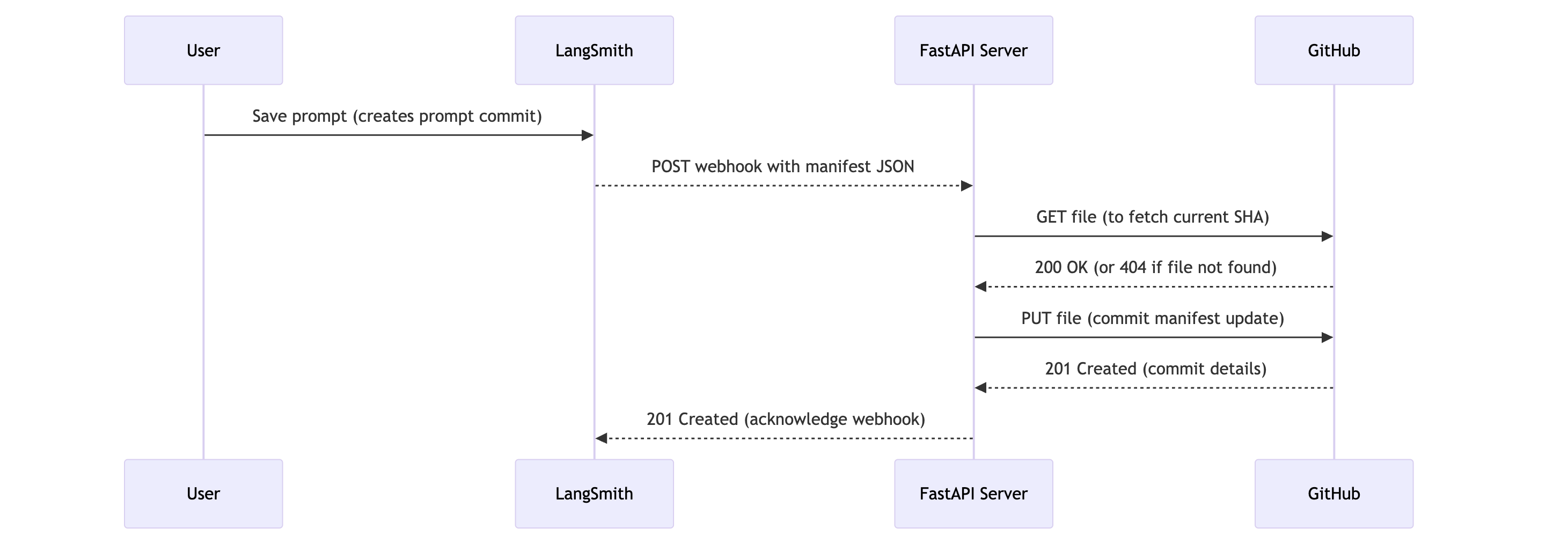
Workflow Diagram showing: User saves prompt in LangSmith, LangSmith sends webhook to FastAPI Server, which interacts with GitHub to update files 이제 모든 설정이 완료되었으므로 다음과 같은 일이 발생합니다:
  1. Prompt 수정: 사용자 (개발자 또는 비기술 팀원)가 LangSmith UI에서 prompt를 수정하고 저장하여 새로운 “prompt commit”을 생성합니다.
  2. Webhook 트리거: LangSmith는 이 새로운 prompt commit을 감지하고 구성된 webhook을 트리거합니다.
  3. HTTP 요청: LangSmith는 FastAPI 서버의 공개 URL (예: https://prompt-commit-webhook.onrender.com/webhook/commit)로 HTTP POST 요청을 전송합니다. 이 요청의 본문에는 전체 workspace에 대한 JSON prompt manifest가 포함됩니다.
  4. 서버가 Payload 수신: FastAPI 서버의 endpoint가 요청을 수신합니다.
  5. GitHub Commit: 서버는 요청 본문에서 JSON manifest를 파싱합니다. 그런 다음 구성된 GitHub Personal Access Token, repository owner, repository name, file path, branch를 사용하여:
    • 지정된 branch의 repository에 manifest 파일이 이미 존재하는지 확인하여 SHA를 가져옵니다 (기존 파일을 업데이트하는 데 필요합니다).
    • 최신 prompt manifest로 새 commit을 생성하여 파일을 생성하거나 이미 존재하는 경우 업데이트합니다. commit 메시지는 LangSmith에서 업데이트되었음을 나타냅니다.
  6. 확인: GitHub repository에 새 commit이 나타나는 것을 볼 수 있습니다. Manifest commited to Github
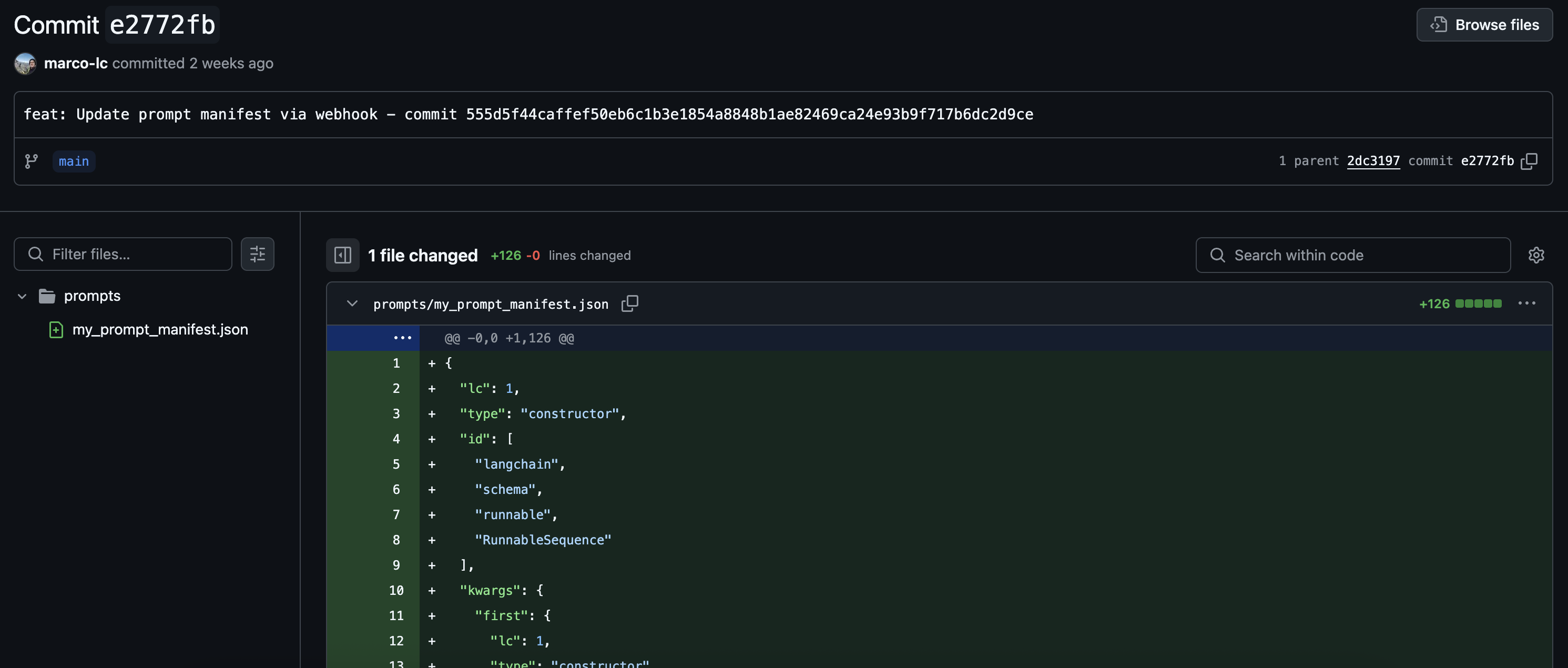
이제 LangSmith prompt를 GitHub와 성공적으로 동기화했습니다!

단순 Commit을 넘어서

예제 FastAPI 서버는 전체 prompt manifest의 직접 commit을 수행합니다. 그러나 이것은 시작점일 뿐입니다. 서버의 기능을 확장하여 더 정교한 작업을 수행할 수 있습니다:
  • 세분화된 Commit: manifest를 파싱하고 repository에서 더 세분화된 구조를 선호하는 경우 개별 prompt 파일에 대한 변경 사항을 commit합니다.
  • CI/CD 트리거: commit 대신 (또는 추가로) 서버가 CI/CD 파이프라인 (예: Jenkins, GitHub Actions, GitLab CI)을 트리거하여 스테이징 환경을 배포하거나, 테스트를 실행하거나, 새 애플리케이션 버전을 빌드하도록 합니다.
  • 데이터베이스/캐시 업데이트: 애플리케이션이 데이터베이스나 캐시에서 prompt를 로드하는 경우 이러한 저장소를 직접 업데이트합니다.
  • 알림: prompt 변경 사항에 대해 Slack, 이메일 또는 기타 통신 채널로 알림을 전송합니다.
  • 선택적 처리: LangSmith payload 내의 메타데이터 (사용 가능한 경우, 예: 어떤 특정 prompt가 변경되었는지 또는 누가 변경했는지)를 기반으로 다른 로직을 적용할 수 있습니다.

Connect these docs programmatically to Claude, VSCode, and more via MCP for real-time answers.
I