
이 튜토리얼에서는 LangGraph를 사용하여 SQL 데이터베이스에 대한 질문에 답변할 수 있는 커스텀 에이전트를 만들어 보겠습니다. LangChain은 LangGraph 프리미티브를 사용하여 구현된 내장 agent 구현을 제공합니다. 더 깊은 커스터마이징이 필요한 경우, 에이전트를 LangGraph에서 직접 구현할 수 있습니다. 이 가이드는 SQL 에이전트의 예제 구현을 보여줍니다. 더 높은 수준의 LangChain 추상화를 사용하여 SQL 에이전트를 만드는 튜토리얼은 여기에서 찾을 수 있습니다.
SQL 데이터베이스의 Q&A 시스템을 구축하려면 모델이 생성한 SQL 쿼리를 실행해야 합니다. 이를 수행하는 데는 본질적인 위험이 있습니다. 데이터베이스 연결 권한이 항상 에이전트의 필요에 따라 가능한 한 좁게 범위가 지정되어 있는지 확인하세요. 이는 모델 기반 시스템 구축의 위험을 완화하지만 제거하지는 못합니다.
사전 구축된 에이전트를 사용하면 빠르게 시작할 수 있지만, 시스템 프롬프트에 의존하여 동작을 제한했습니다. 예를 들어, 에이전트에게 항상 “list tables” 도구로 시작하고, 쿼리를 실행하기 전에 항상 query-checker 도구를 실행하도록 지시했습니다. LangGraph에서 에이전트를 커스터마이징하여 더 높은 수준의 제어를 적용할 수 있습니다. 여기서는 특정 tool-call을 위한 전용 노드가 있는 간단한 ReAct-에이전트 설정을 구현합니다. 사전 구축된 에이전트와 동일한 [state]를 사용합니다.

개념

다음 개념을 다룰 것입니다:

설정

설치

pip install langchain  langgraph  langchain-community

LangSmith

체인이나 에이전트 내부에서 무슨 일이 일어나는지 검사하려면 LangSmith를 설정하세요. 그런 다음 다음 환경 변수를 설정하세요:
export LANGSMITH_TRACING="true"
export LANGSMITH_API_KEY="..."

1. LLM 선택

tool-calling을 지원하는 모델을 선택하세요:
  • OpenAI
  • Anthropic
  • Azure
  • Google Gemini
  • AWS Bedrock
👉 OpenAI chat model 통합 문서를 읽어보세요
pip install -U "langchain[openai]"
import os
from langchain.chat_models import init_chat_model

os.environ["OPENAI_API_KEY"] = "sk-..."

model = init_chat_model("openai:gpt-4.1")
아래 예제에 표시된 출력은 OpenAI를 사용했습니다.

2. 데이터베이스 구성

이 튜토리얼을 위해 SQLite database를 생성할 것입니다. SQLite는 설정하고 사용하기 쉬운 경량 데이터베이스입니다. 디지털 미디어 스토어를 나타내는 샘플 데이터베이스인 chinook 데이터베이스를 로드할 것입니다. 편의를 위해 공개 GCS 버킷에 데이터베이스(Chinook.db)를 호스팅했습니다.
import requests, pathlib

url = "https://storage.googleapis.com/benchmarks-artifacts/chinook/Chinook.db"
local_path = pathlib.Path("Chinook.db")

if local_path.exists():
    print(f"{local_path} already exists, skipping download.")
else:
    response = requests.get(url)
    if response.status_code == 200:
        local_path.write_bytes(response.content)
        print(f"File downloaded and saved as {local_path}")
    else:
        print(f"Failed to download the file. Status code: {response.status_code}")
데이터베이스와 상호 작용하기 위해 langchain_community 패키지에서 사용 가능한 편리한 SQL 데이터베이스 래퍼를 사용할 것입니다. 이 래퍼는 SQL 쿼리를 실행하고 결과를 가져오는 간단한 인터페이스를 제공합니다:
from langchain_community.utilities import SQLDatabase

db = SQLDatabase.from_uri("sqlite:///Chinook.db")

print(f"Dialect: {db.dialect}")
print(f"Available tables: {db.get_usable_table_names()}")
print(f'Sample output: {db.run("SELECT * FROM Artist LIMIT 5;")}')
Dialect: sqlite
Available tables: ['Album', 'Artist', 'Customer', 'Employee', 'Genre', 'Invoice', 'InvoiceLine', 'MediaType', 'Playlist', 'PlaylistTrack', 'Track']
Sample output: [(1, 'AC/DC'), (2, 'Accept'), (3, 'Aerosmith'), (4, 'Alanis Morissette'), (5, 'Alice In Chains')]

3. 데이터베이스 상호 작용을 위한 도구 추가

데이터베이스와 상호 작용하기 위해 langchain_community 패키지에서 사용 가능한 SQLDatabase 래퍼를 사용하세요. 이 래퍼는 SQL 쿼리를 실행하고 결과를 가져오는 간단한 인터페이스를 제공합니다:
from langchain_community.agent_toolkits import SQLDatabaseToolkit

toolkit = SQLDatabaseToolkit(db=db, llm=llm)

tools = toolkit.get_tools()

for tool in tools:
    print(f"{tool.name}: {tool.description}\n")
sql_db_query: Input to this tool is a detailed and correct SQL query, output is a result from the database. If the query is not correct, an error message will be returned. If an error is returned, rewrite the query, check the query, and try again. If you encounter an issue with Unknown column 'xxxx' in 'field list', use sql_db_schema to query the correct table fields.

sql_db_schema: Input to this tool is a comma-separated list of tables, output is the schema and sample rows for those tables. Be sure that the tables actually exist by calling sql_db_list_tables first! Example Input: table1, table2, table3

sql_db_list_tables: Input is an empty string, output is a comma-separated list of tables in the database.

sql_db_query_checker: Use this tool to double check if your query is correct before executing it. Always use this tool before executing a query with sql_db_query!

4. 애플리케이션 단계 정의

다음 단계를 위한 전용 노드를 구성합니다:
  • DB 테이블 나열
  • “get schema” 도구 호출
  • 쿼리 생성
  • 쿼리 확인
이러한 단계를 전용 노드에 배치하면 (1) 필요할 때 tool-call을 강제하고, (2) 각 단계와 관련된 프롬프트를 커스터마이징할 수 있습니다.
from typing import Literal

from langchain.agents import ToolNode
from langchain.messages import AIMessage
from langchain_core.runnables import RunnableConfig
from langgraph.graph import END, START, MessagesState, StateGraph


get_schema_tool = next(tool for tool in tools if tool.name == "sql_db_schema")
get_schema_node = ToolNode([get_schema_tool], name="get_schema")

run_query_tool = next(tool for tool in tools if tool.name == "sql_db_query")
run_query_node = ToolNode([run_query_tool], name="run_query")


# Example: create a predetermined tool call
def list_tables(state: MessagesState):
    tool_call = {
        "name": "sql_db_list_tables",
        "args": {},
        "id": "abc123",
        "type": "tool_call",
    }
    tool_call_message = AIMessage(content="", tool_calls=[tool_call])

    list_tables_tool = next(tool for tool in tools if tool.name == "sql_db_list_tables")
    tool_message = list_tables_tool.invoke(tool_call)
    response = AIMessage(f"Available tables: {tool_message.content}")

    return {"messages": [tool_call_message, tool_message, response]}


# Example: force a model to create a tool call
def call_get_schema(state: MessagesState):
    # Note that LangChain enforces that all models accept `tool_choice="any"`
    # as well as `tool_choice=<string name of tool>`.
    llm_with_tools = llm.bind_tools([get_schema_tool], tool_choice="any")
    response = llm_with_tools.invoke(state["messages"])

    return {"messages": [response]}


generate_query_system_prompt = """
You are an agent designed to interact with a SQL database.
Given an input question, create a syntactically correct {dialect} query to run,
then look at the results of the query and return the answer. Unless the user
specifies a specific number of examples they wish to obtain, always limit your
query to at most {top_k} results.

You can order the results by a relevant column to return the most interesting
examples in the database. Never query for all the columns from a specific table,
only ask for the relevant columns given the question.

DO NOT make any DML statements (INSERT, UPDATE, DELETE, DROP etc.) to the database.
""".format(
    dialect=db.dialect,
    top_k=5,
)


def generate_query(state: MessagesState):
    system_message = {
        "role": "system",
        "content": generate_query_system_prompt,
    }
    # We do not force a tool call here, to allow the model to
    # respond naturally when it obtains the solution.
    llm_with_tools = llm.bind_tools([run_query_tool])
    response = llm_with_tools.invoke([system_message] + state["messages"])

    return {"messages": [response]}


check_query_system_prompt = """
You are a SQL expert with a strong attention to detail.
Double check the {dialect} query for common mistakes, including:
- Using NOT IN with NULL values
- Using UNION when UNION ALL should have been used
- Using BETWEEN for exclusive ranges
- Data type mismatch in predicates
- Properly quoting identifiers
- Using the correct number of arguments for functions
- Casting to the correct data type
- Using the proper columns for joins

If there are any of the above mistakes, rewrite the query. If there are no mistakes,
just reproduce the original query.

You will call the appropriate tool to execute the query after running this check.
""".format(dialect=db.dialect)


def check_query(state: MessagesState):
    system_message = {
        "role": "system",
        "content": check_query_system_prompt,
    }

    # Generate an artificial user message to check
    tool_call = state["messages"][-1].tool_calls[0]
    user_message = {"role": "user", "content": tool_call["args"]["query"]}
    llm_with_tools = llm.bind_tools([run_query_tool], tool_choice="any")
    response = llm_with_tools.invoke([system_message, user_message])
    response.id = state["messages"][-1].id

    return {"messages": [response]}

5. 에이전트 구현

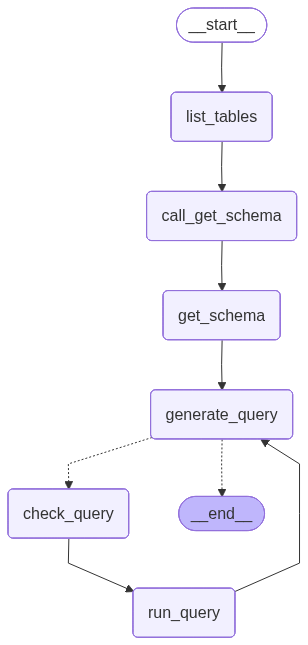
이제 Graph API를 사용하여 이러한 단계를 워크플로우로 조립할 수 있습니다. 쿼리 생성 단계에서 conditional edge를 정의하여 쿼리가 생성되면 query checker로 라우팅하거나, LLM이 쿼리에 대한 응답을 전달한 것과 같이 tool call이 없으면 종료합니다.
def should_continue(state: MessagesState) -> Literal[END, "check_query"]:
    messages = state["messages"]
    last_message = messages[-1]
    if not last_message.tool_calls:
        return END
    else:
        return "check_query"


builder = StateGraph(MessagesState)
builder.add_node(list_tables)
builder.add_node(call_get_schema)
builder.add_node(get_schema_node, "get_schema")
builder.add_node(generate_query)
builder.add_node(check_query)
builder.add_node(run_query_node, "run_query")

builder.add_edge(START, "list_tables")
builder.add_edge("list_tables", "call_get_schema")
builder.add_edge("call_get_schema", "get_schema")
builder.add_edge("get_schema", "generate_query")
builder.add_conditional_edges(
    "generate_query",
    should_continue,
)
builder.add_edge("check_query", "run_query")
builder.add_edge("run_query", "generate_query")

agent = builder.compile()
아래에서 애플리케이션을 시각화합니다:
from IPython.display import Image, display
from langchain_core.runnables.graph import CurveStyle, MermaidDrawMethod, NodeStyles

display(Image(agent.get_graph().draw_mermaid_png()))
SQL agent graph 이제 그래프를 호출할 수 있습니다:
question = "Which genre on average has the longest tracks?"

for step in agent.stream(
    {"messages": [{"role": "user", "content": question}]},
    stream_mode="values",
):
    step["messages"][-1].pretty_print()
================================ Human Message =================================

Which genre on average has the longest tracks?
================================== Ai Message ==================================

Available tables: Album, Artist, Customer, Employee, Genre, Invoice, InvoiceLine, MediaType, Playlist, PlaylistTrack, Track
================================== Ai Message ==================================
Tool Calls:
  sql_db_schema (call_yzje0tj7JK3TEzDx4QnRR3lL)
 Call ID: call_yzje0tj7JK3TEzDx4QnRR3lL
  Args:
    table_names: Genre, Track
================================= Tool Message =================================
Name: sql_db_schema


CREATE TABLE "Genre" (
	"GenreId" INTEGER NOT NULL,
	"Name" NVARCHAR(120),
	PRIMARY KEY ("GenreId")
)

/*
3 rows from Genre table:
GenreId	Name
1	Rock
2	Jazz
3	Metal
*/


CREATE TABLE "Track" (
	"TrackId" INTEGER NOT NULL,
	"Name" NVARCHAR(200) NOT NULL,
	"AlbumId" INTEGER,
	"MediaTypeId" INTEGER NOT NULL,
	"GenreId" INTEGER,
	"Composer" NVARCHAR(220),
	"Milliseconds" INTEGER NOT NULL,
	"Bytes" INTEGER,
	"UnitPrice" NUMERIC(10, 2) NOT NULL,
	PRIMARY KEY ("TrackId"),
	FOREIGN KEY("MediaTypeId") REFERENCES "MediaType" ("MediaTypeId"),
	FOREIGN KEY("GenreId") REFERENCES "Genre" ("GenreId"),
	FOREIGN KEY("AlbumId") REFERENCES "Album" ("AlbumId")
)

/*
3 rows from Track table:
TrackId	Name	AlbumId	MediaTypeId	GenreId	Composer	Milliseconds	Bytes	UnitPrice
1	For Those About To Rock (We Salute You)	1	1	1	Angus Young, Malcolm Young, Brian Johnson	343719	11170334	0.99
2	Balls to the Wall	2	2	1	U. Dirkschneider, W. Hoffmann, H. Frank, P. Baltes, S. Kaufmann, G. Hoffmann	342562	5510424	0.99
3	Fast As a Shark	3	2	1	F. Baltes, S. Kaufman, U. Dirkscneider & W. Hoffman	230619	3990994	0.99
*/
================================== Ai Message ==================================
Tool Calls:
  sql_db_query (call_cb9ApLfZLSq7CWg6jd0im90b)
 Call ID: call_cb9ApLfZLSq7CWg6jd0im90b
  Args:
    query: SELECT Genre.Name, AVG(Track.Milliseconds) AS AvgMilliseconds FROM Track JOIN Genre ON Track.GenreId = Genre.GenreId GROUP BY Genre.GenreId ORDER BY AvgMilliseconds DESC LIMIT 5;
================================== Ai Message ==================================
Tool Calls:
  sql_db_query (call_DMVALfnQ4kJsuF3Yl6jxbeAU)
 Call ID: call_DMVALfnQ4kJsuF3Yl6jxbeAU
  Args:
    query: SELECT Genre.Name, AVG(Track.Milliseconds) AS AvgMilliseconds FROM Track JOIN Genre ON Track.GenreId = Genre.GenreId GROUP BY Genre.GenreId ORDER BY AvgMilliseconds DESC LIMIT 5;
================================= Tool Message =================================
Name: sql_db_query

[('Sci Fi & Fantasy', 2911783.0384615385), ('Science Fiction', 2625549.076923077), ('Drama', 2575283.78125), ('TV Shows', 2145041.0215053763), ('Comedy', 1585263.705882353)]
================================== Ai Message ==================================

The genre with the longest tracks on average is "Sci Fi & Fantasy," with an average track length of approximately 2,911,783 milliseconds. Other genres with relatively long tracks include "Science Fiction," "Drama," "TV Shows," and "Comedy."
위 실행에 대한 LangSmith trace를 참조하세요.

6. Human-in-the-loop 검토 구현

에이전트의 SQL 쿼리가 실행되기 전에 의도하지 않은 작업이나 비효율성이 있는지 확인하는 것이 현명할 수 있습니다. 여기서는 LangGraph의 human-in-the-loop 기능을 활용하여 SQL 쿼리를 실행하기 전에 실행을 일시 중지하고 사람의 검토를 기다립니다. LangGraph의 persistence layer를 사용하면 실행을 무기한으로(또는 적어도 persistence layer가 살아있는 동안) 일시 중지할 수 있습니다. 사람의 입력을 받는 노드에서 sql_db_query 도구를 래핑해 보겠습니다. interrupt 함수를 사용하여 이를 구현할 수 있습니다. 아래에서는 tool call을 승인하거나, 인수를 편집하거나, 사용자 피드백을 제공하기 위한 입력을 허용합니다.
from langchain_core.runnables import RunnableConfig
from langchain.tools import tool
from langgraph.types import interrupt

@tool(
    run_query_tool.name,
    description=run_query_tool.description,
    args_schema=run_query_tool.args_schema
)
def run_query_tool_with_interrupt(config: RunnableConfig, **tool_input):
    request = {
        "action": run_query_tool.name,
        "args": tool_input,
        "description": "Please review the tool call"
    }
    response = interrupt([request]) 
    # approve the tool call
    if response["type"] == "accept":
        tool_response = run_query_tool.invoke(tool_input, config)
    # update tool call args
    elif response["type"] == "edit":
        tool_input = response["args"]["args"]
        tool_response = run_query_tool.invoke(tool_input, config)
    # respond to the LLM with user feedback
    elif response["type"] == "response":
        user_feedback = response["args"]
        tool_response = user_feedback
    else:
        raise ValueError(f"Unsupported interrupt response type: {response['type']}")

    return tool_response
위 구현은 더 광범위한 human-in-the-loop 가이드의 tool interrupt example을 따릅니다. 자세한 내용과 대안은 해당 가이드를 참조하세요.
이제 그래프를 다시 조립해 보겠습니다. 프로그래밍 방식 확인을 사람의 검토로 대체할 것입니다. 이제 checkpointer를 포함한다는 점에 유의하세요. 이는 실행을 일시 중지하고 재개하는 데 필요합니다.
from langgraph.checkpoint.memory import InMemorySaver

def should_continue(state: MessagesState) -> Literal[END, "run_query"]:
    messages = state["messages"]
    last_message = messages[-1]
    if not last_message.tool_calls:
        return END
    else:
        return "run_query"

builder = StateGraph(MessagesState)
builder.add_node(list_tables)
builder.add_node(call_get_schema)
builder.add_node(get_schema_node, "get_schema")
builder.add_node(generate_query)
builder.add_node(run_query_node, "run_query")

builder.add_edge(START, "list_tables")
builder.add_edge("list_tables", "call_get_schema")
builder.add_edge("call_get_schema", "get_schema")
builder.add_edge("get_schema", "generate_query")
builder.add_conditional_edges(
    "generate_query",
    should_continue,
)
builder.add_edge("run_query", "generate_query")

checkpointer = InMemorySaver() 
agent = builder.compile(checkpointer=checkpointer) 
이전과 같이 그래프를 호출할 수 있습니다. 이번에는 실행이 중단됩니다:
import json

config = {"configurable": {"thread_id": "1"}}

question = "Which genre on average has the longest tracks?"

for step in agent.stream(
    {"messages": [{"role": "user", "content": question}]},
    config,
    stream_mode="values",
):
    if "messages" in step:
        step["messages"][-1].pretty_print()
    elif "__interrupt__" in step:
        action = step["__interrupt__"][0]
        print("INTERRUPTED:")
        for request in action.value:
            print(json.dumps(request, indent=2))
    else:
        pass
...

INTERRUPTED:
{
  "action": "sql_db_query",
  "args": {
    "query": "SELECT Genre.Name, AVG(Track.Milliseconds) AS AvgLength FROM Track JOIN Genre ON Track.GenreId = Genre.GenreId GROUP BY Genre.Name ORDER BY AvgLength DESC LIMIT 5;"
  },
  "description": "Please review the tool call"
}
Command를 사용하여 tool call을 수락하거나 편집할 수 있습니다:
from langgraph.types import Command


for step in agent.stream(
    Command(resume={"type": "accept"}),
    # Command(resume={"type": "edit", "args": {"query": "..."}}),
    config,
    stream_mode="values",
):
    if "messages" in step:
        step["messages"][-1].pretty_print()
    elif "__interrupt__" in step:
        action = step["__interrupt__"][0]
        print("INTERRUPTED:")
        for request in action.value:
            print(json.dumps(request, indent=2))
    else:
        pass
================================== Ai Message ==================================
Tool Calls:
  sql_db_query (call_t4yXkD6shwdTPuelXEmY3sAY)
 Call ID: call_t4yXkD6shwdTPuelXEmY3sAY
  Args:
    query: SELECT Genre.Name, AVG(Track.Milliseconds) AS AvgLength FROM Track JOIN Genre ON Track.GenreId = Genre.GenreId GROUP BY Genre.Name ORDER BY AvgLength DESC LIMIT 5;
================================= Tool Message =================================
Name: sql_db_query

[('Sci Fi & Fantasy', 2911783.0384615385), ('Science Fiction', 2625549.076923077), ('Drama', 2575283.78125), ('TV Shows', 2145041.0215053763), ('Comedy', 1585263.705882353)]
================================== Ai Message ==================================

The genre with the longest average track length is "Sci Fi & Fantasy" with an average length of about 2,911,783 milliseconds. Other genres with long average track lengths include "Science Fiction," "Drama," "TV Shows," and "Comedy."
자세한 내용은 human-in-the-loop guide를 참조하세요.

다음 단계

LangSmith를 사용하여 이와 같은 SQL 에이전트를 포함한 LangGraph 애플리케이션을 평가하는 방법은 Evaluate a graph 가이드를 확인하세요.
Connect these docs programmatically to Claude, VSCode, and more via MCP for real-time answers.
I