
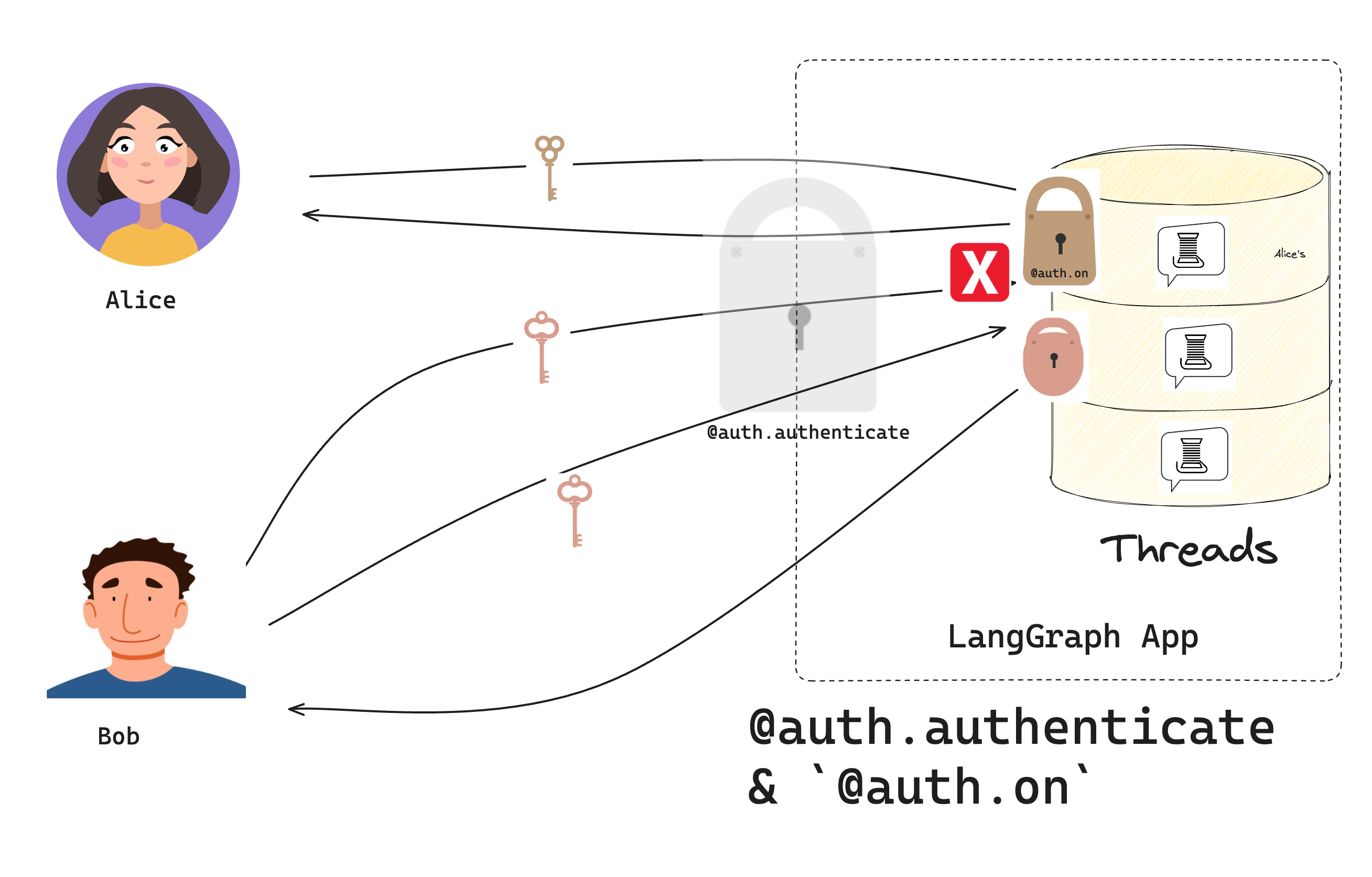
이 튜토리얼에서는 지난 튜토리얼에서 만든 챗봇을 확장하여 각 사용자에게 자신만의 비공개 대화를 제공합니다. 리소스 수준 접근 제어를 추가하여 사용자가 자신의 thread만 볼 수 있도록 합니다. Authorization 흐름: 인증 후, authorization handler가 각 리소스에 owner=user id 태그를 지정하고 사용자가 자신의 thread만 볼 수 있도록 필터를 반환합니다.

사전 요구 사항

이 튜토리얼을 시작하기 전에 첫 번째 튜토리얼의 봇이 오류 없이 실행되고 있는지 확인하세요.

1. 리소스 authorization 추가

지난 튜토리얼에서 Auth 객체를 사용하여 authentication 함수를 등록했으며, LangSmith는 이를 사용하여 들어오는 요청의 bearer token을 검증합니다. 이제 authorization handler를 등록하는 데 사용할 것입니다. Authorization handler는 authentication이 성공한 후에 실행되는 함수입니다. 이러한 handler는 리소스에 메타데이터(예: 소유자)를 추가하고 각 사용자가 볼 수 있는 내용을 필터링할 수 있습니다. src/security/auth.py를 업데이트하고 모든 요청에서 실행될 authorization handler를 추가하세요:
src/security/auth.py
from langgraph_sdk import Auth

# Keep our test users from the previous tutorial
VALID_TOKENS = {
    "user1-token": {"id": "user1", "name": "Alice"},
    "user2-token": {"id": "user2", "name": "Bob"},
}

auth = Auth()


@auth.authenticate
async def get_current_user(authorization: str | None) -> Auth.types.MinimalUserDict:
    """Our authentication handler from the previous tutorial."""
    assert authorization
    scheme, token = authorization.split()
    assert scheme.lower() == "bearer"

    if token not in VALID_TOKENS:
        raise Auth.exceptions.HTTPException(status_code=401, detail="Invalid token")

    user_data = VALID_TOKENS[token]
    return {
        "identity": user_data["id"],
    }


@auth.on
async def add_owner(
    ctx: Auth.types.AuthContext,  # Contains info about the current user
    value: dict,  # The resource being created/accessed
):
    """Make resources private to their creator."""
    # Examples:
    # ctx: AuthContext(
    #     permissions=[],
    #     user=ProxyUser(
    #         identity='user1',
    #         is_authenticated=True,
    #         display_name='user1'
    #     ),
    #     resource='threads',
    #     action='create_run'
    # )
    # value:
    # {
    #     'thread_id': UUID('1e1b2733-303f-4dcd-9620-02d370287d72'),
    #     'assistant_id': UUID('fe096781-5601-53d2-b2f6-0d3403f7e9ca'),
    #     'run_id': UUID('1efbe268-1627-66d4-aa8d-b956b0f02a41'),
    #     'status': 'pending',
    #     'metadata': {},
    #     'prevent_insert_if_inflight': True,
    #     'multitask_strategy': 'reject',
    #     'if_not_exists': 'reject',
    #     'after_seconds': 0,
    #     'kwargs': {
    #         'input': {'messages': [{'role': 'user', 'content': 'Hello!'}]},
    #         'command': None,
    #         'config': {
    #             'configurable': {
    #                 'langgraph_auth_user': ... Your user object...
    #                 'langgraph_auth_user_id': 'user1'
    #             }
    #         },
    #         'stream_mode': ['values'],
    #         'interrupt_before': None,
    #         'interrupt_after': None,
    #         'webhook': None,
    #         'feedback_keys': None,
    #         'temporary': False,
    #         'subgraphs': False
    #     }
    # }

    # Does 2 things:
    # 1. Add the user's ID to the resource's metadata. Each LangGraph resource has a `metadata` dict that persists with the resource.
    # this metadata is useful for filtering in read and update operations
    # 2. Return a filter that lets users only see their own resources
    filters = {"owner": ctx.user.identity}
    metadata = value.setdefault("metadata", {})
    metadata.update(filters)

    # Only let users see their own resources
    return filters
handler는 두 개의 매개변수를 받습니다:
  1. ctx (AuthContext): 현재 user, 사용자의 permissions, resource(“threads”, “crons”, “assistants”), 그리고 수행 중인 action(“create”, “read”, “update”, “delete”, “search”, “create_run”)에 대한 정보를 포함합니다
  2. value (dict): 생성되거나 접근되는 데이터입니다. 이 dict의 내용은 접근되는 resource와 action에 따라 다릅니다. 더 세밀한 접근 제어를 얻는 방법에 대한 정보는 아래의 범위가 지정된 authorization handler 추가를 참조하세요.
간단한 handler가 두 가지 작업을 수행한다는 점에 주목하세요:
  1. 사용자의 ID를 리소스의 메타데이터에 추가합니다.
  2. 사용자가 자신이 소유한 리소스만 볼 수 있도록 메타데이터 필터를 반환합니다.

2. 비공개 대화 테스트

authorization을 테스트하세요. 올바르게 설정했다면 모든 ✅ 메시지가 표시됩니다. 개발 서버가 실행 중인지 확인하세요(langgraph dev 실행):
from langgraph_sdk import get_client

# Create clients for both users
alice = get_client(
    url="http://localhost:2024",
    headers={"Authorization": "Bearer user1-token"}
)

bob = get_client(
    url="http://localhost:2024",
    headers={"Authorization": "Bearer user2-token"}
)

# Alice creates an assistant
alice_assistant = await alice.assistants.create()
print(f"✅ Alice created assistant: {alice_assistant['assistant_id']}")

# Alice creates a thread and chats
alice_thread = await alice.threads.create()
print(f"✅ Alice created thread: {alice_thread['thread_id']}")

await alice.runs.create(
    thread_id=alice_thread["thread_id"],
    assistant_id="agent",
    input={"messages": [{"role": "user", "content": "Hi, this is Alice's private chat"}]}
)

# Bob tries to access Alice's thread
try:
    await bob.threads.get(alice_thread["thread_id"])
    print("❌ Bob shouldn't see Alice's thread!")
except Exception as e:
    print("✅ Bob correctly denied access:", e)

# Bob creates his own thread
bob_thread = await bob.threads.create()
await bob.runs.create(
    thread_id=bob_thread["thread_id"],
    assistant_id="agent",
    input={"messages": [{"role": "user", "content": "Hi, this is Bob's private chat"}]}
)
print(f"✅ Bob created his own thread: {bob_thread['thread_id']}")

# List threads - each user only sees their own
alice_threads = await alice.threads.search()
bob_threads = await bob.threads.search()
print(f"✅ Alice sees {len(alice_threads)} thread")
print(f"✅ Bob sees {len(bob_threads)} thread")
출력:
 Alice created assistant: fc50fb08-78da-45a9-93cc-1d3928a3fc37
 Alice created thread: 533179b7-05bc-4d48-b47a-a83cbdb5781d
 Bob correctly denied access: Client error '404 Not Found' for url 'http://localhost:2024/threads/533179b7-05bc-4d48-b47a-a83cbdb5781d'
For more information check: https://developer.mozilla.org/en-US/docs/Web/HTTP/Status/404
 Bob created his own thread: 437c36ed-dd45-4a1e-b484-28ba6eca8819
 Alice sees 1 thread
 Bob sees 1 thread
이것은 다음을 의미합니다:
  1. 각 사용자는 자신의 thread를 생성하고 채팅할 수 있습니다
  2. 사용자는 서로의 thread를 볼 수 없습니다
  3. thread 목록은 자신의 것만 표시합니다

3. 범위가 지정된 authorization handler 추가

광범위한 @auth.on handler는 모든 authorization 이벤트와 일치합니다. 이것은 간결하지만 value dict의 내용이 잘 범위가 지정되지 않고 모든 리소스에 동일한 사용자 수준 접근 제어가 적용된다는 것을 의미합니다. 더 세밀하게 제어하려면 리소스에 대한 특정 action을 제어할 수도 있습니다. src/security/auth.py를 업데이트하여 특정 리소스 유형에 대한 handler를 추가하세요:
# Keep our previous handlers...

from langgraph_sdk import Auth

@auth.on.threads.create
async def on_thread_create(
    ctx: Auth.types.AuthContext,
    value: Auth.types.on.threads.create.value,
):
    """Add owner when creating threads.

    This handler runs when creating new threads and does two things:
    1. Sets metadata on the thread being created to track ownership
    2. Returns a filter that ensures only the creator can access it
    """
    # Example value:
    #  {'thread_id': UUID('99b045bc-b90b-41a8-b882-dabc541cf740'), 'metadata': {}, 'if_exists': 'raise'}

    # Add owner metadata to the thread being created
    # This metadata is stored with the thread and persists
    metadata = value.setdefault("metadata", {})
    metadata["owner"] = ctx.user.identity


    # Return filter to restrict access to just the creator
    return {"owner": ctx.user.identity}

@auth.on.threads.read
async def on_thread_read(
    ctx: Auth.types.AuthContext,
    value: Auth.types.on.threads.read.value,
):
    """Only let users read their own threads.

    This handler runs on read operations. We don't need to set
    metadata since the thread already exists - we just need to
    return a filter to ensure users can only see their own threads.
    """
    return {"owner": ctx.user.identity}

@auth.on.assistants
async def on_assistants(
    ctx: Auth.types.AuthContext,
    value: Auth.types.on.assistants.value,
):
    # For illustration purposes, we will deny all requests
    # that touch the assistants resource
    # Example value:
    # {
    #     'assistant_id': UUID('63ba56c3-b074-4212-96e2-cc333bbc4eb4'),
    #     'graph_id': 'agent',
    #     'config': {},
    #     'metadata': {},
    #     'name': 'Untitled'
    # }
    raise Auth.exceptions.HTTPException(
        status_code=403,
        detail="User lacks the required permissions.",
    )

# Assumes you organize information in store like (user_id, resource_type, resource_id)
@auth.on.store()
async def authorize_store(ctx: Auth.types.AuthContext, value: dict):
    # The "namespace" field for each store item is a tuple you can think of as the directory of an item.
    namespace: tuple = value["namespace"]
    assert namespace[0] == ctx.user.identity, "Not authorized"
하나의 전역 handler 대신 이제 다음에 대한 특정 handler가 있습니다:
  1. thread 생성
  2. thread 읽기
  3. assistant 접근
처음 세 개는 각 리소스에 대한 특정 action과 일치하며(리소스 action 참조), 마지막 하나(@auth.on.assistants)는 assistants 리소스에 대한 모든 action과 일치합니다. 각 요청에 대해 LangGraph는 접근 중인 리소스와 action과 일치하는 가장 구체적인 handler를 실행합니다. 이는 광범위하게 범위가 지정된 “@auth.on” handler가 아닌 위의 네 가지 handler가 실행된다는 것을 의미합니다. 테스트 파일에 다음 테스트 코드를 추가해 보세요:
# ... Same as before
# Try creating an assistant. This should fail
try:
    await alice.assistants.create("agent")
    print("❌ Alice shouldn't be able to create assistants!")
except Exception as e:
    print("✅ Alice correctly denied access:", e)

# Try searching for assistants. This also should fail
try:
    await alice.assistants.search()
    print("❌ Alice shouldn't be able to search assistants!")
except Exception as e:
    print("✅ Alice correctly denied access to searching assistants:", e)

# Alice can still create threads
alice_thread = await alice.threads.create()
print(f"✅ Alice created thread: {alice_thread['thread_id']}")
출력:
 Alice created thread: dcea5cd8-eb70-4a01-a4b6-643b14e8f754
 Bob correctly denied access: Client error '404 Not Found' for url 'http://localhost:2024/threads/dcea5cd8-eb70-4a01-a4b6-643b14e8f754'
For more information check: https://developer.mozilla.org/en-US/docs/Web/HTTP/Status/404
 Bob created his own thread: 400f8d41-e946-429f-8f93-4fe395bc3eed
 Alice sees 1 thread
 Bob sees 1 thread
 Alice correctly denied access:
For more information check: https://developer.mozilla.org/en-US/docs/Web/HTTP/Status/500
 Alice correctly denied access to searching assistants:
축하합니다! 각 사용자가 자신만의 비공개 대화를 가진 챗봇을 구축했습니다. 이 시스템은 간단한 token 기반 인증을 사용하지만, 이러한 authorization 패턴은 실제 인증 시스템을 구현할 때도 작동합니다. 다음 튜토리얼에서는 OAuth2를 사용하여 테스트 사용자를 실제 사용자 계정으로 교체할 것입니다.

다음 단계

이제 리소스에 대한 접근을 제어할 수 있으므로 다음을 수행할 수 있습니다:
  1. 인증 제공자 연결로 이동하여 실제 사용자 계정을 추가합니다.
  2. authorization 패턴에 대해 자세히 알아봅니다.
  3. 이 튜토리얼에서 사용된 인터페이스와 메서드에 대한 자세한 내용은 API 참조를 확인하세요.

Connect these docs programmatically to Claude, VSCode, and more via MCP for real-time answers.
I