
MCP Toolbox를 사용하여 데이터베이스를 LangChain agent와 통합하세요.

Overview

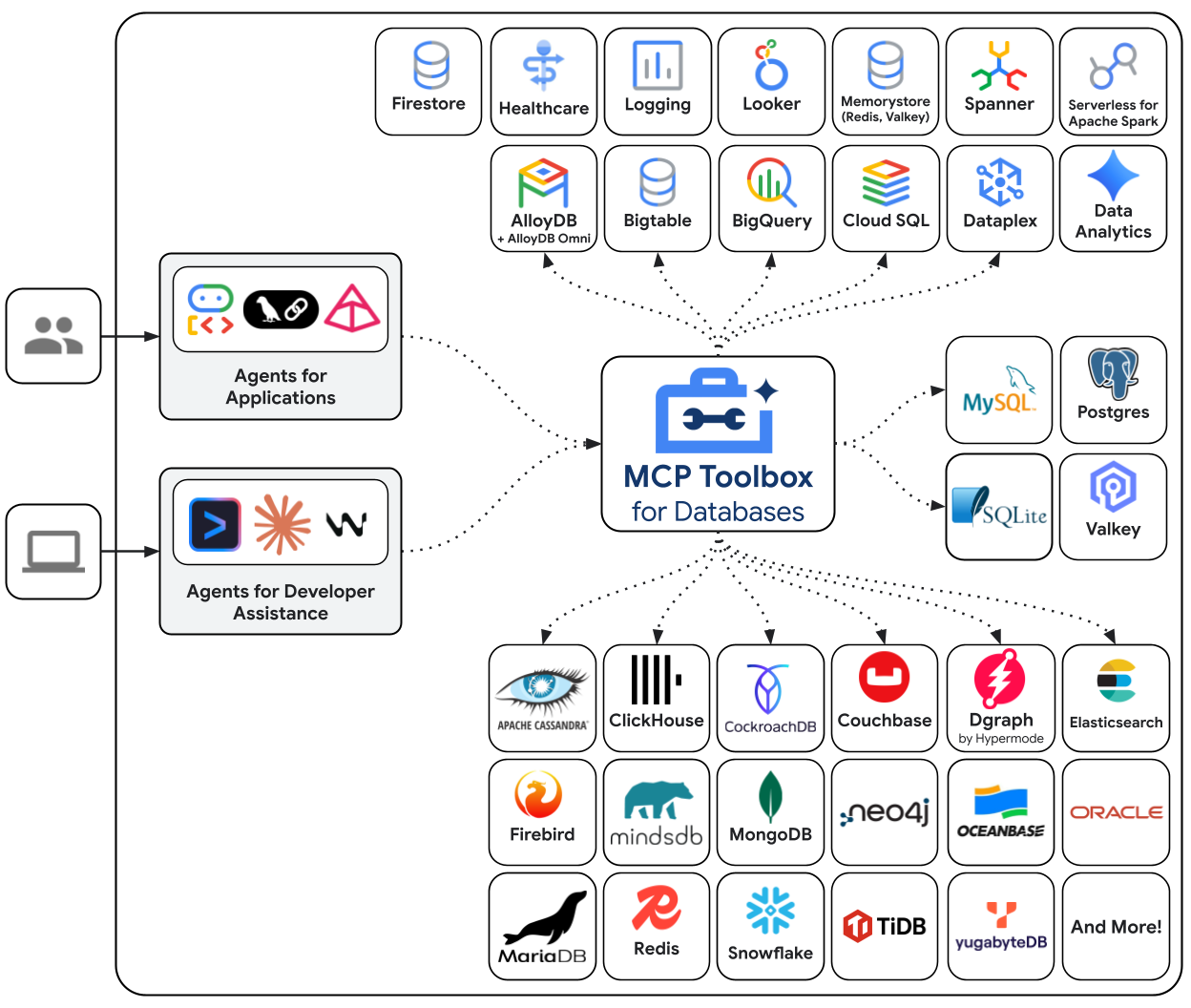
MCP Toolbox for Databases는 데이터베이스를 위한 오픈 소스 MCP server입니다. 엔터프라이즈급 및 프로덕션 품질을 염두에 두고 설계되었습니다. connection pooling, authentication 등의 복잡한 작업을 처리하여 더 쉽고, 빠르고, 안전하게 tool을 개발할 수 있습니다. Toolbox Tools는 LangChain application과 원활하게 통합될 수 있습니다. MCP Toolbox 시작하기 또는 구성에 대한 자세한 내용은 문서를 참조하세요. architecture
Setup

이 가이드는 이미 다음 작업을 완료했다고 가정합니다:
  1. Python 3.9+pip 설치
  2. PostgreSQL 16+ 및 psql command-line client 설치

1. Setup your Database

먼저 PostgreSQL database를 설정하겠습니다. 새 database, MCP Toolbox 전용 user, 그리고 샘플 데이터가 포함된 hotels table을 생성합니다. psql 명령을 사용하여 PostgreSQL에 연결합니다. PostgreSQL 설정에 따라 명령을 조정해야 할 수 있습니다(예: host를 지정하거나 다른 superuser를 사용해야 하는 경우).
psql -U postgres
이제 다음 SQL 명령을 실행하여 user, database를 생성하고 필요한 권한을 부여합니다:
CREATE USER toolbox_user WITH PASSWORD 'my-password';
CREATE DATABASE toolbox_db;
GRANT ALL PRIVILEGES ON DATABASE toolbox_db TO toolbox_user;
ALTER DATABASE toolbox_db OWNER TO toolbox_user;
새로 생성한 user로 database에 연결합니다:
\c toolbox_db toolbox_user
마지막으로 hotels table을 생성하고 데이터를 삽입합니다:
CREATE TABLE hotels(
  id            INTEGER NOT NULL PRIMARY KEY,
  name          VARCHAR NOT NULL,
  location      VARCHAR NOT NULL,
  price_tier    VARCHAR NOT NULL,
  booked        BIT     NOT NULL
);

INSERT INTO hotels(id, name, location, price_tier, booked)
VALUES
  (1, 'Hilton Basel', 'Basel', 'Luxury', B'0'),
  (2, 'Marriott Zurich', 'Zurich', 'Upscale', B'0'),
  (3, 'Hyatt Regency Basel', 'Basel', 'Upper Upscale', B'0');
\q를 입력하여 psql을 종료할 수 있습니다.

2. Install MCP Toolbox

다음으로 MCP Toolbox를 설치하고, tools.yaml 구성 파일에 tool을 정의한 다음, MCP Toolbox server를 실행합니다. macOS 사용자의 경우 Homebrew로 설치하는 것이 가장 쉽습니다:
brew install mcp-toolbox
다른 플랫폼의 경우 운영 체제 및 아키텍처에 맞는 최신 MCP Toolbox binary를 다운로드하세요. tools.yaml 파일을 생성합니다. 이 파일은 MCP Toolbox가 연결할 수 있는 data source와 agent에 노출할 수 있는 tool을 정의합니다. 프로덕션 환경에서는 항상 secret에 environment variable을 사용하세요.
sources:
  my-pg-source:
    kind: postgres
    host: 127.0.0.1
    port: 5432
    database: toolbox_db
    user: toolbox_user
    password: my-password

tools:
  search-hotels-by-location:
    kind: postgres-sql
    source: my-pg-source
    description: Search for hotels based on location.
    parameters:
      - name: location
        type: string
        description: The location of the hotel.
    statement: SELECT id, name, location, price_tier FROM hotels WHERE location ILIKE '%' || $1 || '%';
  book-hotel:
    kind: postgres-sql
    source: my-pg-source
    description: >-
        Book a hotel by its ID. If the hotel is successfully booked, returns a confirmation message.
    parameters:
      - name: hotel_id
        type: integer
        description: The ID of the hotel to book.
    statement: UPDATE hotels SET booked = B'1' WHERE id = $1;

toolsets:
  hotel_toolset:
    - search-hotels-by-location
    - book-hotel
이제 별도의 terminal 창에서 MCP Toolbox server를 시작합니다. Homebrew를 통해 설치한 경우 toolbox를 실행하면 됩니다. binary를 수동으로 다운로드한 경우 저장한 디렉토리에서 ./toolbox를 실행해야 합니다:
toolbox --tools-file "tools.yaml"
MCP Toolbox는 기본적으로 http://127.0.0.1:5000에서 시작되며 tools.yaml 파일을 변경하면 hot-reload됩니다.

Instantiation

!pip install toolbox-langchain
from toolbox_langchain import ToolboxClient

with ToolboxClient("http://127.0.0.1:5000") as client:
    search_tool = await client.aload_tool("search-hotels-by-location")

Invocation

from toolbox_langchain import ToolboxClient

with ToolboxClient("http://127.0.0.1:5000") as client:
    search_tool = await client.aload_tool("search-hotels-by-location")
    results = search_tool.invoke({"location": "Basel"})
    print(results)
[{"id":1,"location":"Basel","name":"Hilton Basel","price_tier":"Luxury"},{"id":3,"location":"Basel","name":"Hyatt Regency Basel","price_tier":"Upper Upscale"}]

Use within an agent

이제 재미있는 부분입니다! 필요한 LangChain package를 설치하고 MCP Toolbox에서 정의한 tool을 사용할 수 있는 agent를 생성합니다.
pip install -qU toolbox-langchain langgraph langchain-google-vertexai
package가 설치되면 agent를 정의할 수 있습니다. model로는 ChatVertexAI를 사용하고 tool을 로드하기 위해 ToolboxClient를 사용합니다. langchain.agentscreate_agent는 어떤 tool을 호출할지 추론할 수 있는 강력한 agent를 생성합니다. 참고: 아래 코드를 실행하기 전에 별도의 terminal에서 MCP Toolbox server가 실행 중인지 확인하세요.
from langchain.agents import create_agent
from langchain_google_vertexai import ChatVertexAI
from langgraph.checkpoint.memory import MemorySaver
from toolbox_langchain import ToolboxClient


prompt = """
You're a helpful hotel assistant. You handle hotel searching and booking.
When the user searches for a hotel, list the full details for each hotel found: id, name, location, and price tier.
Always use the hotel ID for booking operations.
For any bookings, provide a clear confirmation message.
Don't ask for clarification or confirmation from the user; perform the requested action directly.
"""


async def run_queries(agent_executor):
    config = {"configurable": {"thread_id": "hotel-thread-1"}}

    # --- Query 1: Search for hotels ---
    query1 = "I need to find a hotel in Basel."
    print(f'\n--- USER: "{query1}" ---')
    inputs1 = {"messages": [("user", prompt + query1)]}
    async for event in agent_executor.astream_events(
        inputs1, config=config, version="v2"
    ):
        if event["event"] == "on_chat_model_end" and event["data"]["output"].content:
            print(f"--- AGENT: ---\n{event['data']['output'].content}")

    # --- Query 2: Book a hotel ---
    query2 = "Great, please book the Hyatt Regency Basel for me."
    print(f'\n--- USER: "{query2}" ---')
    inputs2 = {"messages": [("user", query2)]}
    async for event in agent_executor.astream_events(
        inputs2, config=config, version="v2"
    ):
        if event["event"] == "on_chat_model_end" and event["data"]["output"].content:
            print(f"--- AGENT: ---\n{event['data']['output'].content}")

Run the agent

async def main():
    await run_hotel_agent()


async def run_hotel_agent():
    model = ChatVertexAI(model_name="gemini-2.5-flash")

    # Load the tools from the running MCP Toolbox server
    async with ToolboxClient("http://127.0.0.1:5000") as client:
        tools = await client.aload_toolset("hotel_toolset")

        agent = create_agent(model, tools, checkpointer=MemorySaver())

        await run_queries(agent)


await main()
MCP Toolbox를 사용하여 LangChain agent를 로컬 database에 성공적으로 연결했습니다! 🥳

API reference

이 통합의 주요 class는 ToolboxClient입니다. 자세한 내용은 다음 리소스를 참조하세요: MCP Toolbox는 데이터베이스용 Gen AI tool 개발을 원활하게 만드는 다양한 기능을 제공합니다:
  • Authenticated Parameters: tool input을 OIDC token의 값에 자동으로 바인딩하여 데이터 유출 가능성 없이 민감한 query를 쉽게 실행할 수 있습니다
  • Authorized Invocations: 사용자의 Auth token을 기반으로 tool 사용 액세스를 제한합니다
  • OpenTelemetry: OpenTelemetry를 통해 MCP Toolbox에서 metric 및 tracing을 가져옵니다

Community and Support

커뮤니티에 참여하시기를 권장합니다:
  • ⭐️ GitHub repository로 이동하여 시작하고 업데이트를 확인하세요.
  • 📚 더 고급 기능 및 구성에 대해서는 공식 문서를 살펴보세요.
  • 💬 Discord server에 참여하여 커뮤니티와 소통하고 질문하세요.

Connect these docs programmatically to Claude, VSCode, and more via MCP for real-time answers.
I