
LangChain을 사용하여 앱이나 에이전트를 구축할 때, 단일 사용자 요청을 처리하기 위해 여러 API 호출을 하게 됩니다. 그러나 이러한 요청들은 분석하려고 할 때 연결되어 있지 않습니다. Portkey를 사용하면 단일 사용자 요청에서 발생하는 모든 embedding, completion 및 기타 요청이 공통 ID로 로깅되고 추적되어 사용자 상호작용에 대한 완전한 가시성을 확보할 수 있습니다. 이 노트북은 LangChain 앱에서 Portkey를 사용하여 LangChain LLM 호출을 로깅, 추적 및 모니터링하는 방법에 대한 단계별 가이드입니다. 먼저 Portkey, OpenAI 및 Agent 도구를 import 해봅시다
import os

from langchain.agents import AgentExecutor, create_openai_tools_agent
from langchain_openai import ChatOpenAI
from portkey_ai import PORTKEY_GATEWAY_URL, createHeaders
아래에 OpenAI API key를 붙여넣으세요. (여기에서 찾을 수 있습니다)
os.environ["OPENAI_API_KEY"] = "..."

Portkey API Key 받기

  1. 여기에서 Portkey에 가입하세요
  2. 대시보드에서 왼쪽 하단의 프로필 아이콘을 클릭한 다음 “Copy API Key”를 클릭하세요
  3. 아래에 붙여넣으세요
PORTKEY_API_KEY = "..."  # Paste your Portkey API Key here

Trace ID 설정

  1. 아래에 요청에 대한 trace id를 설정하세요
  2. Trace ID는 단일 요청에서 발생하는 모든 API 호출에 공통으로 사용될 수 있습니다
TRACE_ID = "uuid-trace-id"  # Set trace id here

Portkey Headers 생성

portkey_headers = createHeaders(
    api_key=PORTKEY_API_KEY, provider="openai", trace_id=TRACE_ID
)
사용할 prompt와 tool을 정의합니다
from langchain_classic import hub
from langchain.tools import tool

prompt = hub.pull("hwchase17/openai-tools-agent")


@tool
def multiply(first_int: int, second_int: int) -> int:
    """Multiply two integers together."""
    return first_int * second_int


@tool
def exponentiate(base: int, exponent: int) -> int:
    "Exponentiate the base to the exponent power."
    return base**exponent


tools = [multiply, exponentiate]
평소처럼 agent를 실행하세요. 유일한 변경 사항은 이제 요청에 위의 header를 포함한다는 것입니다.
model = ChatOpenAI(
    base_url=PORTKEY_GATEWAY_URL, default_headers=portkey_headers, temperature=0
)

# Construct the OpenAI Tools agent
agent = create_openai_tools_agent(model, tools, prompt)

# Create an agent executor by passing in the agent and tools
agent_executor = AgentExecutor(agent=agent, tools=tools, verbose=True)

agent_executor.invoke(
    {
        "input": "Take 3 to the fifth power and multiply that by thirty six, then square the result"
    }
)
> Entering new AgentExecutor chain...

Invoking: `exponentiate` with `{'base': 3, 'exponent': 5}`


243
Invoking: `multiply` with `{'first_int': 243, 'second_int': 36}`


8748
Invoking: `exponentiate` with `{'base': 8748, 'exponent': 2}`


76527504The result of taking 3 to the fifth power, multiplying it by 36, and then squaring the result is 76,527,504.

> Finished chain.
{'input': 'Take 3 to the fifth power and multiply that by thirty six, then square the result',
 'output': 'The result of taking 3 to the fifth power, multiplying it by 36, and then squaring the result is 76,527,504.'}

Portkey에서 로깅 및 추적이 작동하는 방식

로깅
  • Portkey를 통해 요청을 보내면 기본적으로 모든 요청이 로깅됩니다
  • 각 요청 로그에는 timestamp, model name, total cost, request time, request json, response json 및 추가 Portkey 기능이 포함됩니다
추적
  • Trace id는 각 요청과 함께 전달되며 Portkey 대시보드의 로그에서 확인할 수 있습니다
  • 원하는 경우 각 요청에 대해 고유한 trace id를 설정할 수도 있습니다
  • trace id에 사용자 피드백을 추가할 수도 있습니다. 자세한 내용은 여기를 참조하세요
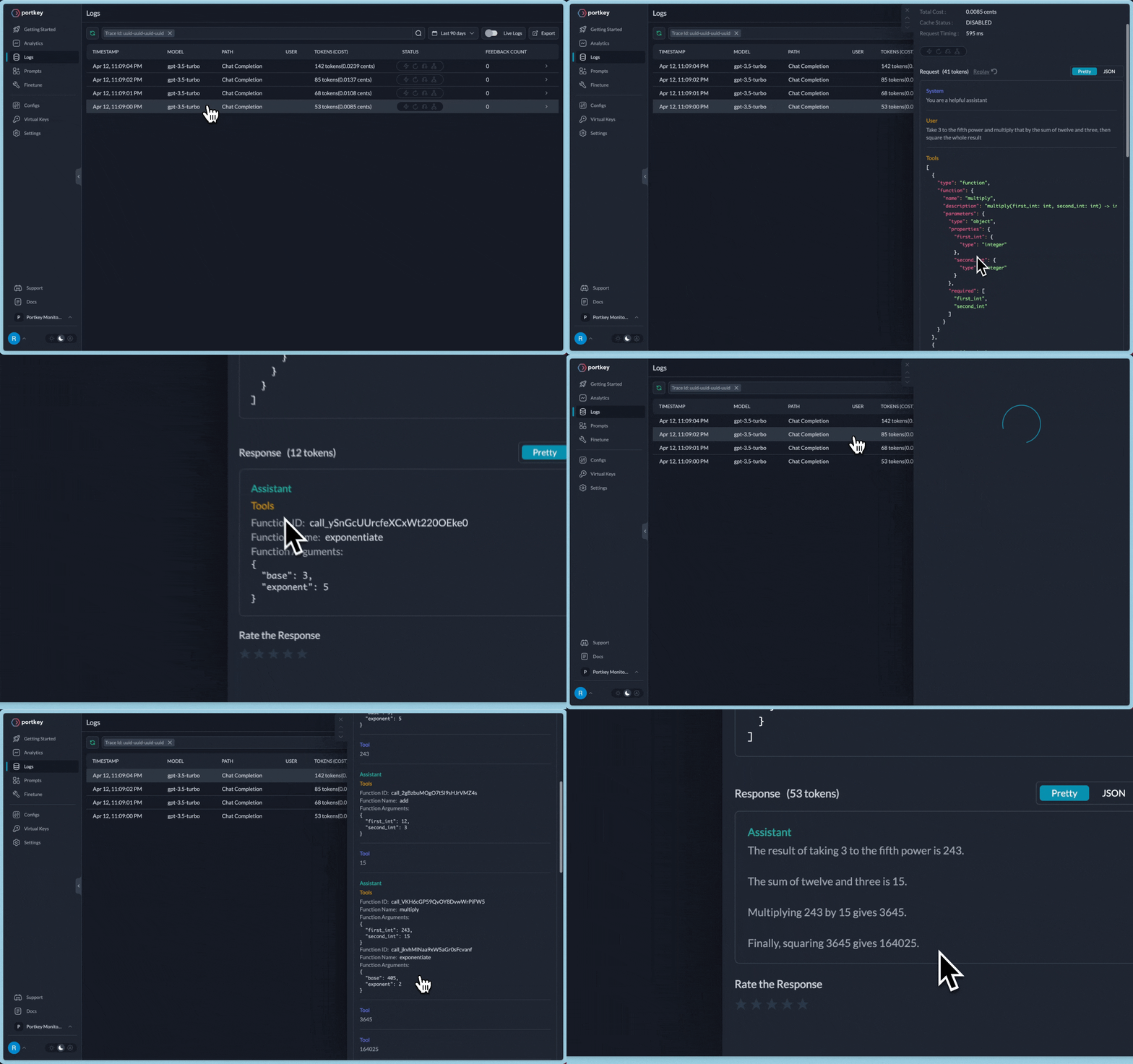
위 요청의 경우 다음과 같이 전체 로그 추적을 볼 수 있습니다 Portkey에서 LangChain 추적 보기

고급 LLMOps 기능 - 캐싱, 태깅, 재시도

로깅 및 추적 외에도 Portkey는 기존 워크플로우에 프로덕션 기능을 추가하는 더 많은 기능을 제공합니다: 캐싱 이전에 처리된 고객 쿼리에 대해 OpenAI로 다시 보내는 대신 캐시에서 응답합니다. 정확한 문자열 또는 의미적으로 유사한 문자열을 매칭합니다. 캐시는 비용을 절감하고 지연 시간을 20배까지 줄일 수 있습니다. 문서 재시도 실패한 API 요청을 **최대 5번**까지 자동으로 재처리합니다. 네트워크 과부하를 방지하기 위해 재시도 시도 간격을 두는 exponential backoff 전략을 사용합니다. 문서 태깅 사전 정의된 태그를 사용하여 각 사용자 상호작용을 세부적으로 추적하고 감사합니다. 문서
Connect these docs programmatically to Claude, VSCode, and more via MCP for real-time answers.
I