
Langfuse란 무엇인가요? Langfuse는 팀이 API 호출을 추적하고, 성능을 모니터링하며, AI 애플리케이션의 문제를 디버깅할 수 있도록 돕는 오픈 소스 LLM 엔지니어링 플랫폼입니다.

LangChain Tracing

Langfuse Tracing은 LangChain Callbacks(Python, JS)를 사용하여 LangChain과 통합됩니다. 이를 통해 Langfuse SDK는 LangChain 애플리케이션의 모든 실행에 대해 자동으로 중첩된 trace를 생성합니다. 이를 통해 LangChain 애플리케이션을 로깅하고, 분석하고, 디버깅할 수 있습니다. (1) constructor 인자 또는 (2) 환경 변수를 통해 통합을 구성할 수 있습니다. cloud.langfuse.com에 가입하거나 Langfuse를 자체 호스팅하여 Langfuse 자격 증명을 받으세요.

Constructor 인자

pip install langfuse
from langfuse import Langfuse, get_client
from langfuse.langchain import CallbackHandler
from langchain_openai import ChatOpenAI  # Example LLM
from langchain_core.prompts import ChatPromptTemplate

# Initialize Langfuse client with constructor arguments
Langfuse(
    public_key="your-public-key",
    secret_key="your-secret-key",
    host="https://cloud.langfuse.com"  # Optional: defaults to https://cloud.langfuse.com
)

# Get the configured client instance
langfuse = get_client()

# Initialize the Langfuse handler
langfuse_handler = CallbackHandler()

# Create your LangChain components
llm = ChatOpenAI(model_name="gpt-4o")
prompt = ChatPromptTemplate.from_template("Tell me a joke about {topic}")
chain = prompt | llm

# Run your chain with Langfuse tracing
response = chain.invoke({"topic": "cats"}, config={"callbacks": [langfuse_handler]})
print(response.content)

# Flush events to Langfuse in short-lived applications
langfuse.flush()

환경 변수

LANGFUSE_SECRET_KEY="sk-lf-..."
LANGFUSE_PUBLIC_KEY="pk-lf-..."
# 🇪🇺 EU region
LANGFUSE_HOST="https://cloud.langfuse.com"
# 🇺🇸 US region
# LANGFUSE_HOST="https://us.cloud.langfuse.com"
# Initialize Langfuse handler
from langfuse.langchain import CallbackHandler
langfuse_handler = CallbackHandler()

# Your LangChain code

# Add Langfuse handler as callback (classic and LCEL)
chain.invoke({"input": "<user_input>"}, config={"callbacks": [langfuse_handler]})
이 통합을 다른 Langfuse 기능과 함께 사용하는 방법을 보려면 이 end-to-end 예제를 확인하세요.

LangGraph Tracing

이 부분에서는 LangfuseLangChain 통합을 사용하여 LangGraph 애플리케이션을 디버깅하고, 분석하고, 반복하는 데 어떻게 도움이 되는지 보여줍니다.

Langfuse 초기화

참고: 최소한 Python 3.11을 실행해야 합니다(GitHub Issue). Langfuse UI의 프로젝트 설정에서 API keys를 사용하여 Langfuse 클라이언트를 초기화하고 환경에 추가하세요.
pip install langfuse
pip install langchain langgraph langchain_openai langchain_community
import os

# get keys for your project from https://cloud.langfuse.com
os.environ["LANGFUSE_PUBLIC_KEY"] = "pk-lf-***"
os.environ["LANGFUSE_SECRET_KEY"] = "sk-lf-***"
os.environ["LANGFUSE_HOST"] = "https://cloud.langfuse.com" # for EU data region
# os.environ["LANGFUSE_HOST"] = "https://us.cloud.langfuse.com" # for US data region

# your openai key
os.environ["OPENAI_API_KEY"] = "***"

LangGraph를 사용한 간단한 채팅 앱

이 섹션에서 수행할 작업:
  • 일반적인 질문에 답변할 수 있는 지원 챗봇을 LangGraph로 구축
  • Langfuse를 사용하여 챗봇의 입력 및 출력 추적
기본 챗봇으로 시작하여 다음 섹션에서 더 고급 multi agent 설정을 구축하면서 주요 LangGraph 개념을 소개하겠습니다.

Agent 생성

StateGraph를 생성하는 것으로 시작합니다. StateGraph 객체는 챗봇의 구조를 상태 머신으로 정의합니다. LLM과 챗봇이 호출할 수 있는 함수를 나타내는 node를 추가하고, 봇이 이러한 함수 간에 전환하는 방법을 지정하는 edge를 추가합니다.
from typing import Annotated

from langchain_openai import ChatOpenAI
from langchain.messages import HumanMessage
from typing_extensions import TypedDict

from langgraph.graph import StateGraph
from langgraph.graph.message import add_messages

class State(TypedDict):
    # Messages have the type "list". The `add_messages` function in the annotation defines how this state key should be updated
    # (in this case, it appends messages to the list, rather than overwriting them)
    messages: Annotated[list, add_messages]

graph_builder = StateGraph(State)

llm = ChatOpenAI(model = "gpt-4o", temperature = 0.2)

# The chatbot node function takes the current State as input and returns an updated messages list. This is the basic pattern for all LangGraph node functions.
def chatbot(state: State):
    return {"messages": [llm.invoke(state["messages"])]}

# Add a "chatbot" node. Nodes represent units of work. They are typically regular python functions.
graph_builder.add_node("chatbot", chatbot)

# Add an entry point. This tells our graph where to start its work each time we run it.
graph_builder.set_entry_point("chatbot")

# Set a finish point. This instructs the graph "any time this node is run, you can exit."
graph_builder.set_finish_point("chatbot")

# To be able to run our graph, call "compile()" on the graph builder. This creates a "CompiledGraph" we can use invoke on our state.
graph = graph_builder.compile()

호출에 Langfuse를 callback으로 추가

이제 애플리케이션의 단계를 추적하기 위해 LangChain용 Langfuse callback handler를 추가합니다: config={"callbacks": [langfuse_handler]}
from langfuse.langchain import CallbackHandler

# Initialize Langfuse CallbackHandler for LangChain (tracing)
langfuse_handler = CallbackHandler()

for s in graph.stream({"messages": [HumanMessage(content = "What is Langfuse?")]},
                      config={"callbacks": [langfuse_handler]}):
    print(s)
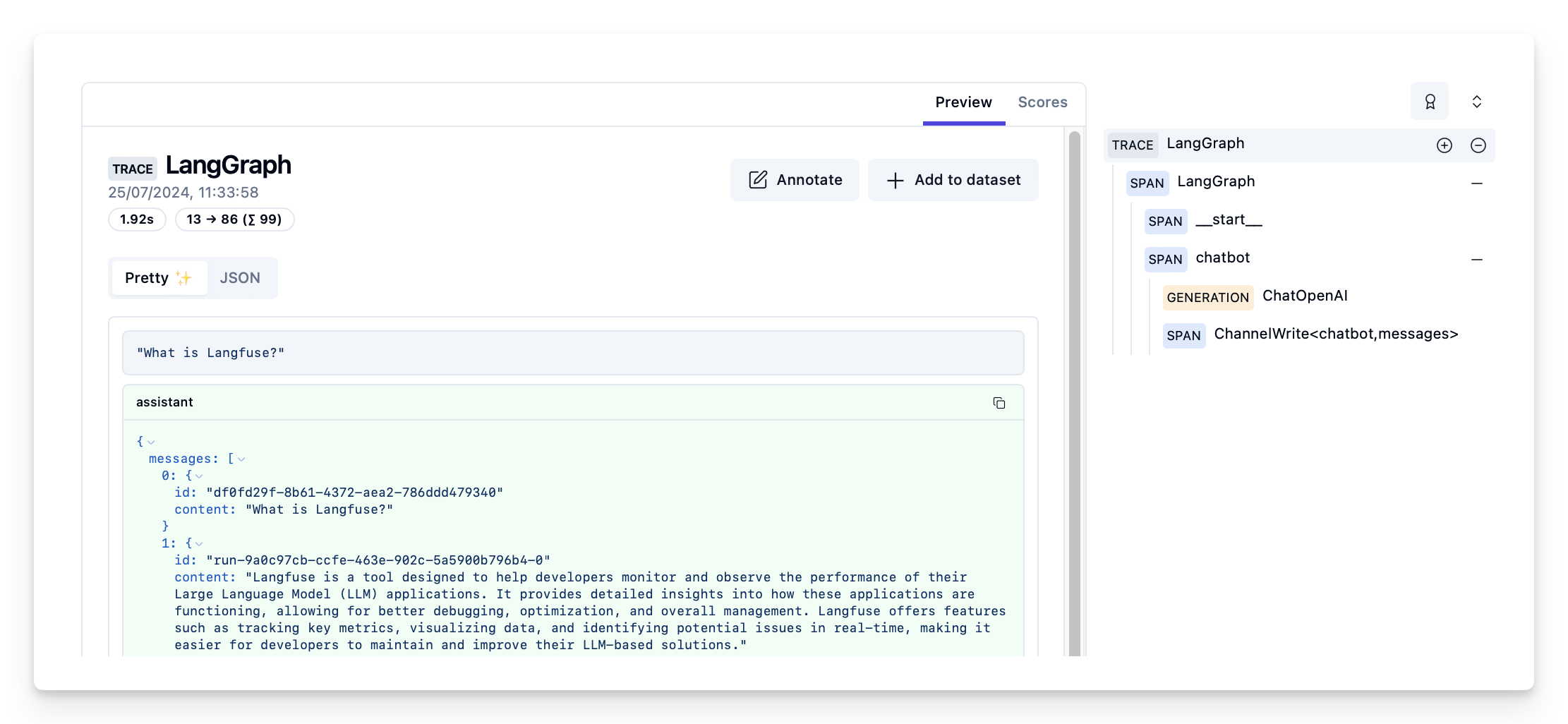
{'chatbot': {'messages': [AIMessage(content='Langfuse is a tool designed to help developers monitor and observe the performance of their Large Language Model (LLM) applications. It provides detailed insights into how these applications are functioning, allowing for better debugging, optimization, and overall management. Langfuse offers features such as tracking key metrics, visualizing data, and identifying potential issues in real-time, making it easier for developers to maintain and improve their LLM-based solutions.', response_metadata={'token_usage': {'completion_tokens': 86, 'prompt_tokens': 13, 'total_tokens': 99}, 'model_name': 'gpt-4o-2024-05-13', 'system_fingerprint': 'fp_400f27fa1f', 'finish_reason': 'stop', 'logprobs': None}, id='run-9a0c97cb-ccfe-463e-902c-5a5900b796b4-0', usage_metadata={'input_tokens': 13, 'output_tokens': 86, 'total_tokens': 99})]}}

Langfuse에서 trace 보기

Langfuse의 예제 trace: https://cloud.langfuse.com/project/cloramnkj0002jz088vzn1ja4/traces/d109e148-d188-4d6e-823f-aac0864afbab Langfuse의 채팅 앱 Trace 뷰
Connect these docs programmatically to Claude, VSCode, and more via MCP for real-time answers.
I