
Argilla는 LLM을 위한 오픈소스 데이터 큐레이션 플랫폼입니다. Argilla를 사용하면 누구나 인간과 기계의 피드백을 모두 활용하여 더 빠른 데이터 큐레이션을 통해 강력한 언어 모델을 구축할 수 있습니다. 데이터 라벨링부터 모델 모니터링까지 MLOps 사이클의 각 단계를 지원합니다.
Colab에서 열기 이 가이드에서는 ArgillaCallbackHandler를 사용하여 LLM의 입력과 응답을 추적하고 Argilla에서 데이터셋을 생성하는 방법을 보여드립니다. 향후 fine-tuning을 위한 데이터셋을 생성하기 위해 LLM의 입력과 출력을 추적하는 것은 유용합니다. 이는 특히 질문 답변, 요약 또는 번역과 같은 특정 작업을 위한 데이터를 생성하기 위해 LLM을 사용할 때 특히 유용합니다.

Installation and Setup

pip install -qU  langchain langchain-openai argilla

Getting API Credentials

Argilla API credentials를 얻으려면 다음 단계를 따르세요:
  1. Argilla UI로 이동합니다.
  2. 프로필 사진을 클릭하고 “My settings”로 이동합니다.
  3. 그런 다음 API Key를 복사합니다.
Argilla에서 API URL은 Argilla UI의 URL과 동일합니다. OpenAI API credentials를 얻으려면 platform.openai.com/account/api-keys를 방문하세요.
import os

os.environ["ARGILLA_API_URL"] = "..."
os.environ["ARGILLA_API_KEY"] = "..."

os.environ["OPENAI_API_KEY"] = "..."

Setup Argilla

ArgillaCallbackHandler를 사용하려면 LLM 실험을 추적하기 위해 Argilla에 새로운 FeedbackDataset을 생성해야 합니다. 이를 위해 다음 코드를 사용하세요:
import argilla as rg
from packaging.version import parse as parse_version

if parse_version(rg.__version__) < parse_version("1.8.0"):
    raise RuntimeError(
        "`FeedbackDataset` is only available in Argilla v1.8.0 or higher, please "
        "upgrade `argilla` as `pip install argilla --upgrade`."
    )
dataset = rg.FeedbackDataset(
    fields=[
        rg.TextField(name="prompt"),
        rg.TextField(name="response"),
    ],
    questions=[
        rg.RatingQuestion(
            name="response-rating",
            description="How would you rate the quality of the response?",
            values=[1, 2, 3, 4, 5],
            required=True,
        ),
        rg.TextQuestion(
            name="response-feedback",
            description="What feedback do you have for the response?",
            required=False,
        ),
    ],
    guidelines="You're asked to rate the quality of the response and provide feedback.",
)

rg.init(
    api_url=os.environ["ARGILLA_API_URL"],
    api_key=os.environ["ARGILLA_API_KEY"],
)

dataset.push_to_argilla("langchain-dataset")
📌 참고: 현재 FeedbackDataset.fields로는 prompt-response 쌍만 지원되므로, ArgillaCallbackHandler는 prompt(즉, LLM 입력)와 response(즉, LLM 출력)만 추적합니다.

Tracking

ArgillaCallbackHandler를 사용하려면 다음 코드를 사용하거나 다음 섹션에 제시된 예제 중 하나를 재현하면 됩니다.
from langchain_community.callbacks.argilla_callback import ArgillaCallbackHandler

argilla_callback = ArgillaCallbackHandler(
    dataset_name="langchain-dataset",
    api_url=os.environ["ARGILLA_API_URL"],
    api_key=os.environ["ARGILLA_API_KEY"],
)

Scenario 1: Tracking an LLM

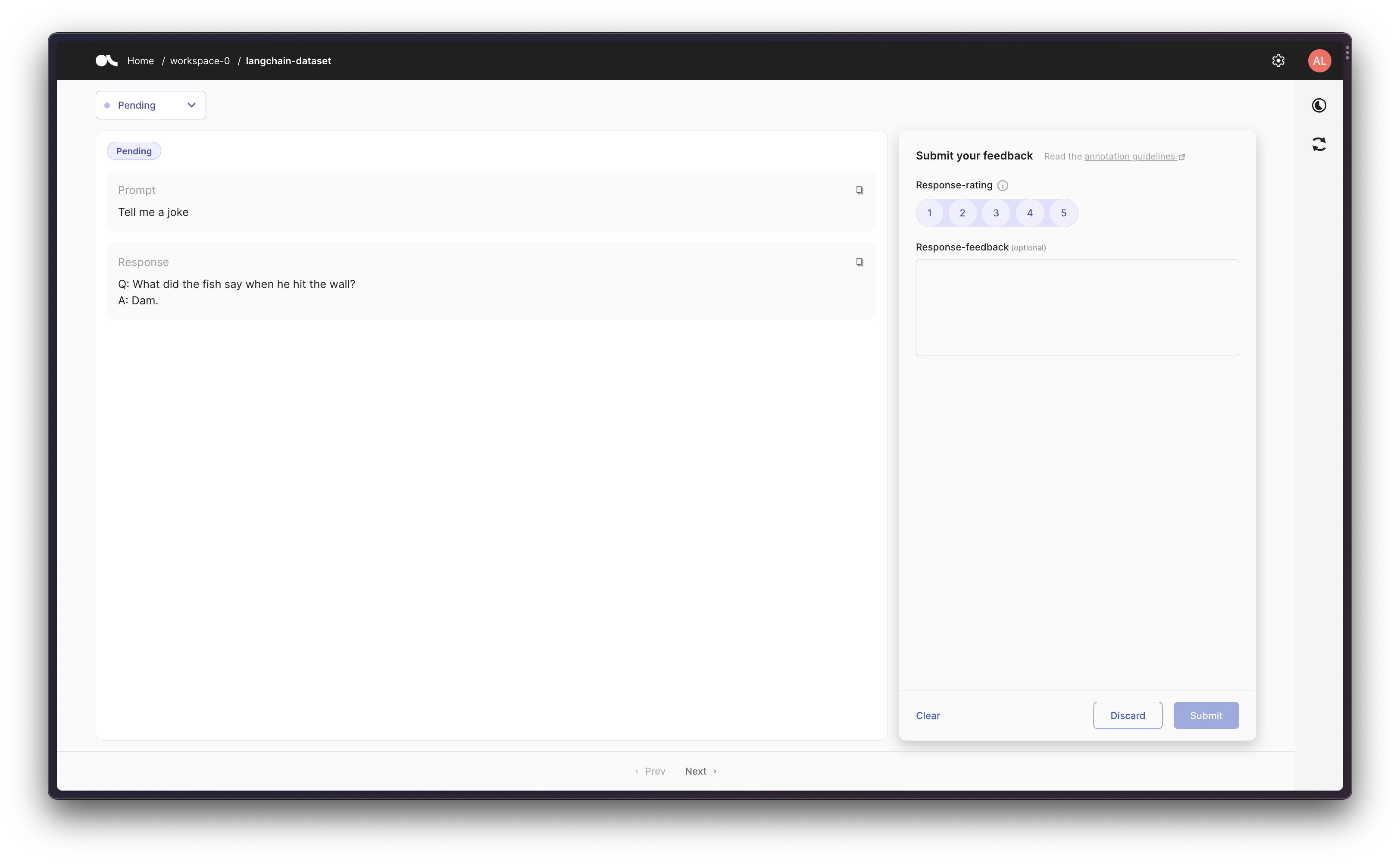
먼저, 단일 LLM을 몇 번 실행하고 결과 prompt-response 쌍을 Argilla에 캡처해 보겠습니다.
from langchain_core.callbacks.stdout import StdOutCallbackHandler
from langchain_openai import OpenAI

argilla_callback = ArgillaCallbackHandler(
    dataset_name="langchain-dataset",
    api_url=os.environ["ARGILLA_API_URL"],
    api_key=os.environ["ARGILLA_API_KEY"],
)
callbacks = [StdOutCallbackHandler(), argilla_callback]

llm = OpenAI(temperature=0.9, callbacks=callbacks)
llm.generate(["Tell me a joke", "Tell me a poem"] * 3)
LLMResult(generations=[[Generation(text='\n\nQ: What did the fish say when he hit the wall? \nA: Dam.', generation_info={'finish_reason': 'stop', 'logprobs': None})], [Generation(text='\n\nThe Moon \n\nThe moon is high in the midnight sky,\nSparkling like a star above.\nThe night so peaceful, so serene,\nFilling up the air with love.\n\nEver changing and renewing,\nA never-ending light of grace.\nThe moon remains a constant view,\nA reminder of life’s gentle pace.\n\nThrough time and space it guides us on,\nA never-fading beacon of hope.\nThe moon shines down on us all,\nAs it continues to rise and elope.', generation_info={'finish_reason': 'stop', 'logprobs': None})], [Generation(text='\n\nQ. What did one magnet say to the other magnet?\nA. "I find you very attractive!"', generation_info={'finish_reason': 'stop', 'logprobs': None})], [Generation(text="\n\nThe world is charged with the grandeur of God.\nIt will flame out, like shining from shook foil;\nIt gathers to a greatness, like the ooze of oil\nCrushed. Why do men then now not reck his rod?\n\nGenerations have trod, have trod, have trod;\nAnd all is seared with trade; bleared, smeared with toil;\nAnd wears man's smudge and shares man's smell: the soil\nIs bare now, nor can foot feel, being shod.\n\nAnd for all this, nature is never spent;\nThere lives the dearest freshness deep down things;\nAnd though the last lights off the black West went\nOh, morning, at the brown brink eastward, springs —\n\nBecause the Holy Ghost over the bent\nWorld broods with warm breast and with ah! bright wings.\n\n~Gerard Manley Hopkins", generation_info={'finish_reason': 'stop', 'logprobs': None})], [Generation(text='\n\nQ: What did one ocean say to the other ocean?\nA: Nothing, they just waved.', generation_info={'finish_reason': 'stop', 'logprobs': None})], [Generation(text="\n\nA poem for you\n\nOn a field of green\n\nThe sky so blue\n\nA gentle breeze, the sun above\n\nA beautiful world, for us to love\n\nLife is a journey, full of surprise\n\nFull of joy and full of surprise\n\nBe brave and take small steps\n\nThe future will be revealed with depth\n\nIn the morning, when dawn arrives\n\nA fresh start, no reason to hide\n\nSomewhere down the road, there's a heart that beats\n\nBelieve in yourself, you'll always succeed.", generation_info={'finish_reason': 'stop', 'logprobs': None})]], llm_output={'token_usage': {'completion_tokens': 504, 'total_tokens': 528, 'prompt_tokens': 24}, 'model_name': 'text-davinci-003'})
Argilla UI with LangChain LLM input-response

Scenario 2: Tracking an LLM in a chain

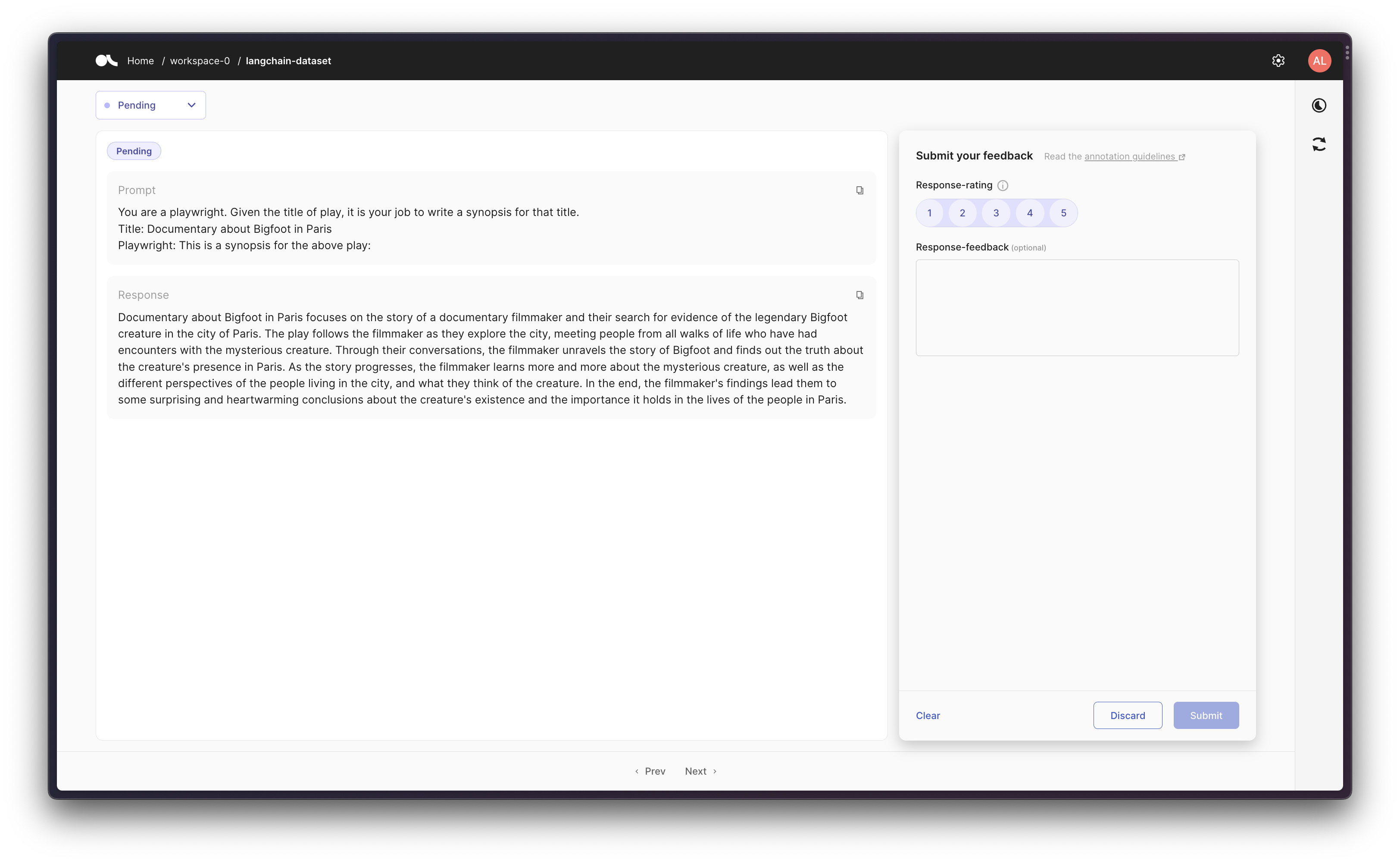
그런 다음 prompt template을 사용하여 chain을 생성하고, 초기 prompt와 최종 response를 Argilla에서 추적할 수 있습니다.
from langchain.chains import LLMChain
from langchain_core.callbacks.stdout import StdOutCallbackHandler
from langchain_core.prompts import PromptTemplate
from langchain_openai import OpenAI

argilla_callback = ArgillaCallbackHandler(
    dataset_name="langchain-dataset",
    api_url=os.environ["ARGILLA_API_URL"],
    api_key=os.environ["ARGILLA_API_KEY"],
)
callbacks = [StdOutCallbackHandler(), argilla_callback]
llm = OpenAI(temperature=0.9, callbacks=callbacks)

template = """You are a playwright. Given the title of play, it is your job to write a synopsis for that title.
Title: {title}
Playwright: This is a synopsis for the above play:"""
prompt_template = PromptTemplate(input_variables=["title"], template=template)
synopsis_chain = LLMChain(llm=llm, prompt=prompt_template, callbacks=callbacks)

test_prompts = [{"title": "Documentary about Bigfoot in Paris"}]
synopsis_chain.apply(test_prompts)
> Entering new LLMChain chain...
Prompt after formatting:
You are a playwright. Given the title of play, it is your job to write a synopsis for that title.
Title: Documentary about Bigfoot in Paris
Playwright: This is a synopsis for the above play:

> Finished chain.
[{'text': "\n\nDocumentary about Bigfoot in Paris focuses on the story of a documentary filmmaker and their search for evidence of the legendary Bigfoot creature in the city of Paris. The play follows the filmmaker as they explore the city, meeting people from all walks of life who have had encounters with the mysterious creature. Through their conversations, the filmmaker unravels the story of Bigfoot and finds out the truth about the creature's presence in Paris. As the story progresses, the filmmaker learns more and more about the mysterious creature, as well as the different perspectives of the people living in the city, and what they think of the creature. In the end, the filmmaker's findings lead them to some surprising and heartwarming conclusions about the creature's existence and the importance it holds in the lives of the people in Paris."}]
Argilla UI with LangChain Chain input-response

Scenario 3: Using an Agent with Tools

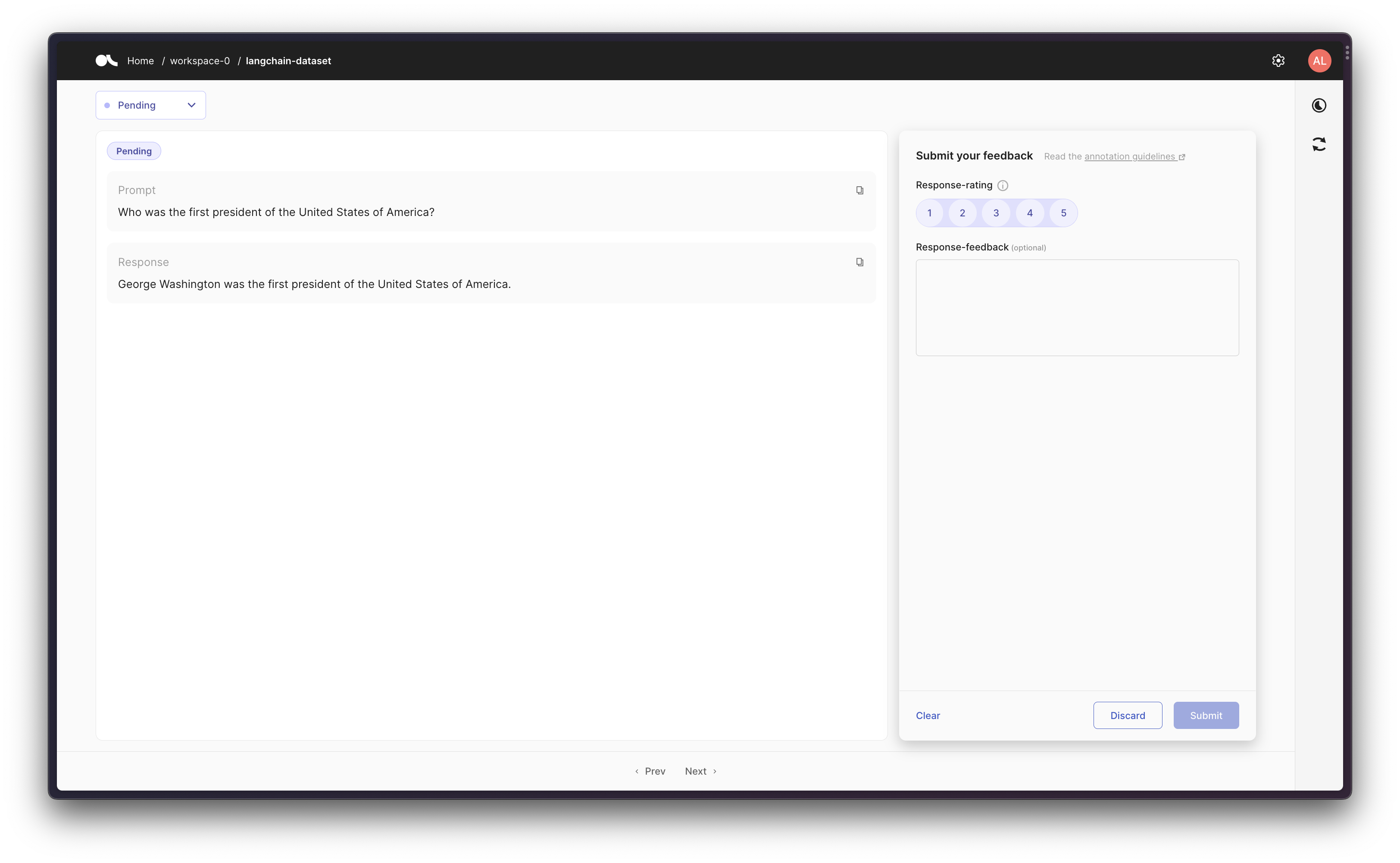
마지막으로, 더 고급 워크플로우로서 일부 tool을 사용하는 agent를 생성할 수 있습니다. ArgillaCallbackHandler는 입력과 출력을 추적하지만 중간 단계/생각은 추적하지 않으므로, 주어진 prompt에 대해 원래 prompt와 해당 prompt에 대한 최종 response를 로깅합니다.
이 시나리오에서는 Google Search API(Serp API)를 사용하므로 pip install google-search-resultsgoogle-search-results를 설치하고, Serp API Key를 os.environ["SERPAPI_API_KEY"] = "..."로 설정해야 합니다(serpapi.com/dashboard에서 찾을 수 있습니다). 그렇지 않으면 아래 예제가 작동하지 않습니다.
from langchain.agents import AgentType, initialize_agent, load_tools
from langchain_core.callbacks.stdout import StdOutCallbackHandler
from langchain_openai import OpenAI

argilla_callback = ArgillaCallbackHandler(
    dataset_name="langchain-dataset",
    api_url=os.environ["ARGILLA_API_URL"],
    api_key=os.environ["ARGILLA_API_KEY"],
)
callbacks = [StdOutCallbackHandler(), argilla_callback]
llm = OpenAI(temperature=0.9, callbacks=callbacks)

tools = load_tools(["serpapi"], llm=llm, callbacks=callbacks)
agent = initialize_agent(
    tools,
    llm,
    agent=AgentType.ZERO_SHOT_REACT_DESCRIPTION,
    callbacks=callbacks,
)
agent.run("Who was the first president of the United States of America?")
> Entering new AgentExecutor chain...
 I need to answer a historical question
Action: Search
Action Input: "who was the first president of the United States of America"
Observation: George Washington
Thought: George Washington was the first president
Final Answer: George Washington was the first president of the United States of America.

> Finished chain.
'George Washington was the first president of the United States of America.'
Argilla UI with LangChain Agent input-response
Connect these docs programmatically to Claude, VSCode, and more via MCP for real-time answers.
I